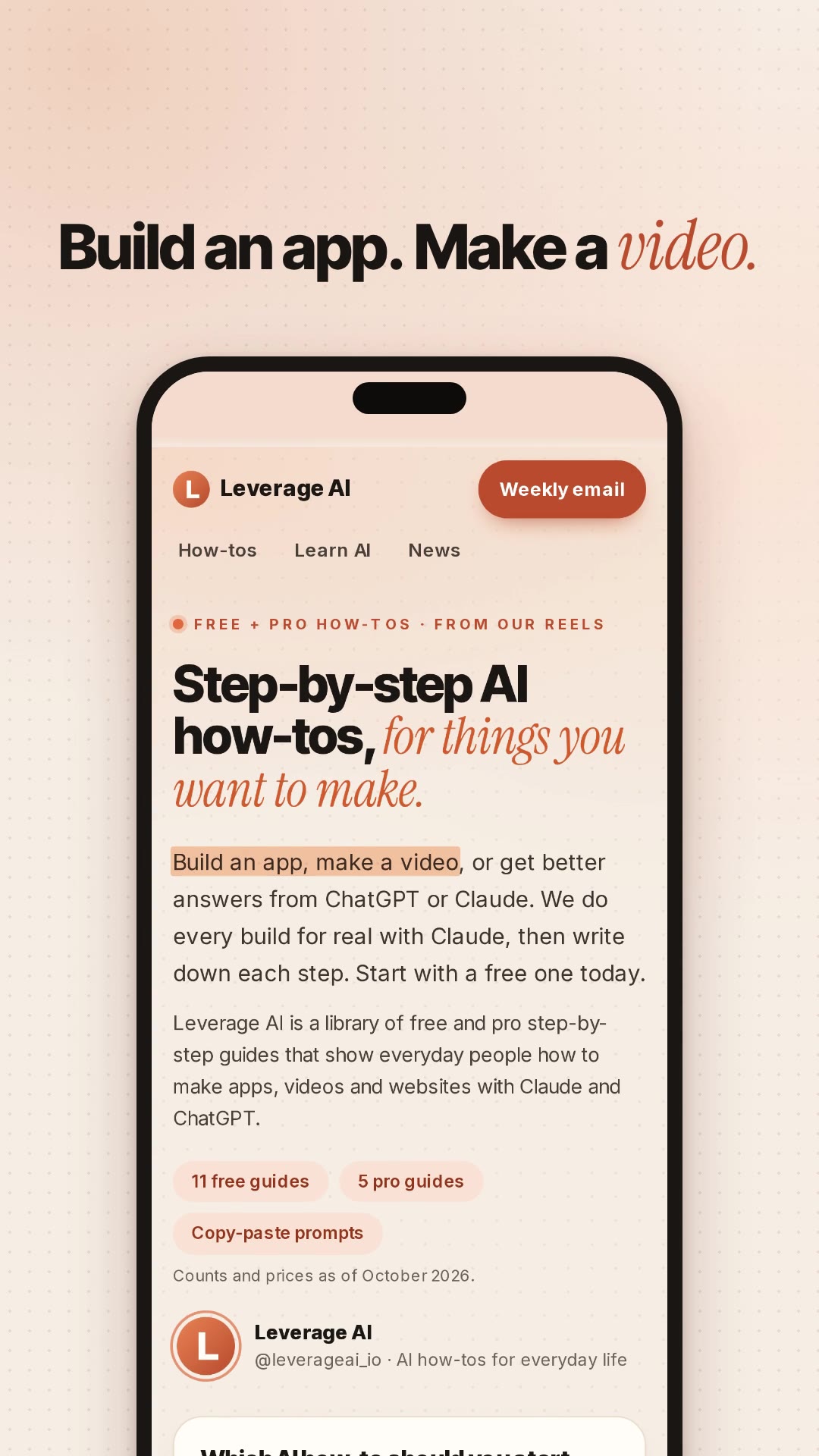
Turn your product page into a 16-second ad video with Claude Code
You give Claude Code the address of your product page. You get back four short ad videos built from that page: real screenshots, motion, big captions and a music bed, in 9:16 and 1:1, each with two different openings to test against each other. No video model is involved. The ad is a small web page that HyperFrames records frame by frame.
Here is ours, made from our own site, leverageai.io. Claude worked for about 17 minutes in total: 14 for the first version and 3 for one round of fixes. Each render took 16 to 23 seconds. It cost nothing beyond the Claude plan we already pay for.
The four finished ads, 16 seconds each, with music:
9:16, version A: opens with "Never built anything?"
9:16, version B: opens on the page's own headline
1:1, version A
1:1, version B
From 2.5 seconds on, both versions are the same: three selling points from the page, each one a screenshot with the matching line highlighted, then an end card with the logo, the address and "Start with a free one today."
What you need
Claude Code on any paid Claude plan. We used Claude Opus 5.5.
Python 3 with Playwright and numpy, for the screenshots and the music. We already had Playwright 1.62.0 and numpy 2.4.4 installed. If you don't, the usual install is pip install playwright numpy, then python -m playwright install chromium.
The steps
1
Step 1: Install the HyperFrames skills
HyperFrames is the free renderer that turns the ad's HTML into an MP4. Its init command also installs its own Claude skills, which our skill builds on. Run it once in any folder:
This took 4 seconds for us. It makes a small try-it project (delete it if you like) and copies the HyperFrames skills into your skills folder. We pinned version 0.8.224 so you get what we used.
HyperFrames sends usage data by default. To turn that off, add export HYPERFRAMES_NO_TELEMETRY=1 to your shell profile.
2
Step 2: Add the /product-ad skill
Make a folder called product-ad in ~/.claude/skills/ and save this as SKILL.md inside it. It is the whole skill: it tells Claude how to read the page, which claims it may use, how to time the ad and what to check before handing it over.
markdown
---
name: product-ad
description: Turn a product page URL into a 15-20 second product ad video, built in code with HyperFrames (HTML + GSAP). Real screenshots, motion, captions and an original music bed, two hooks, 9:16 and 1:1. Use when the user types /product-ad <url> or asks for an ad, promo or social video from a product page.
---

# /product-ad <url>

Make a short product ad from a real product page. No video model, no stock footage, no paid APIs. Everything on screen comes from the page itself.

## The one rule

Every word in the ad must be backed by the page. Only use claims the page makes, in words close to the page's own. No made-up numbers, user counts, ratings, testimonials, "best", "#1", "guaranteed", or results the page does not promise. If the page states a price or a count, show it with the date you read it ("as of Oct 2026"). If you are not sure a claim is on the page, leave it out.

## Steps

1. **Read the page.** Fetch the URL and save the visible text to `brief/page.txt`. Write `brief/claims.md`: a table of every selling point the page makes, each with the exact quote. Pick the 3 strongest for an ad and say why in one line each.

2. **Screenshots.** Use Playwright (Chromium) to capture the real page into `assets/`:
   - desktop viewport 1440x900 at device scale 2: the top of the page plus each section that shows one of the 3 points,
   - mobile viewport 390x844 at device scale 3: the top of the page.
   Dismiss cookie banners before capturing. Open the images and check them: no half-loaded fonts, no popups.

3. **Script two versions.** Same 3 points, two different hooks (the first 2 seconds), for example one that names the viewer's problem and one that shows the product straight away. Write `brief/script.md` with a timed table per version:
   - 0-2.5 s hook (one line, big),
   - three beats of about 3.5 s, one per selling point, each a real screenshot with one short caption (max 7 words),
   - 3 s end card: logo or name, the URL, one call to action from the page.
   Total 15-20 s. Every caption must map to a row in `claims.md`.

4. **Build in HyperFrames.** Make one project per size:
   ```bash
   npx -y hyperframes@0.8.224 init ad-9x16 --resolution portrait --non-interactive
   npx -y hyperframes@0.8.224 init ad-1x1 --resolution square --non-interactive
   ```
   Put version A and version B in each (two compositions or two projects, whichever renders cleanly). Put the screenshots in a phone frame (9:16) or a browser frame (1:1) and move the camera: slow push-ins, a scroll through the page, and a highlight on the line that matches the caption. Captions large and high contrast. In 9:16 keep text and key UI in the middle of the frame: Reels and Stories cover the top and bottom with buttons and the caption.

5. **Music bed.** Write a small script that synthesizes an original music bed (a few chords and a soft beat) to `assets/music.wav`, the exact length of the ad, with a fade in and a fade out. No downloaded music, no samples. Keep it in the background (around -20 LUFS) and put it on the timeline.

6. **Check, look, render.** In each project folder (`cd ad-9x16`, then `cd ../ad-1x1`), run `npx -y hyperframes@0.8.224 check`, fix what it reports, take snapshots at each beat and look at them yourself. Fix anything unreadable, cropped or empty. Then render both versions at 30 fps: `npx -y hyperframes@0.8.224 render --fps 30 --variables '{"version":"A"}' -o renders/<name>-A.mp4`, and the same with `"B"`.

7. **Report.** List the four files with their length, the hook of each version, and the claims table showing which page quote backs each caption.

## Ad rules to check before you hand it over

- Each caption traces to a quote in `claims.md`.
- No fake UI, fake reviews or invented customers. Screenshots are of the page itself.
- Prices and counts carry an "as of" date.
3
Step 3: Run it on your page
Make an empty folder for the ad, open Claude Code in it, and give it the skill and your page's address. This is the prompt we used:
bash
mkdir my-ad && cd my-ad
claude
text
Read ~/.claude/skills/product-ad/SKILL.md and the HyperFrames skill, and follow them.
/product-ad https://leverageai.io
Naming the files makes Claude read both skills even in a session that was already open. In a session started after you saved the skill, Claude Code also lists it as a slash command, so /product-ad https://leverageai.io on its own should start the same steps.
Apart from approving commands if Claude Code asks, you don't need to type anything else. On our page it listed 17 claims with their quotes in brief/claims.md and picked three. It took six screenshots with Playwright, wrote the two openings into brief/script.md and built two HyperFrames projects with five scenes each, using the site's own fonts and colours. It also wrote a numpy script for a 16-second music bed at 120 BPM, so every cut lands on a beat. Then it ran npx -y hyperframes@0.8.224 check, looked at snapshots of every beat, fixed what it saw and rendered all four files.
The two versions are one project with a switch. Claude renders each version by passing it at render time, from inside the project folder:
At the end, Claude replied with the file list and this table, which you should read before you use the ad anywhere:
On screen
Sentence on the page
Never built anything? (version A)
"If you have never built anything, start with Build your first app with Claude Code"
Step-by-step AI how-tos, for things you want to make. (version B)
The page's headline: "Step-by-step AI how-tos, for things you want to make"
Build an app. Make a video.
"Build an app, make a video, or get better answers from ChatGPT or Claude."
Every build done for real, with Claude.
"We do every build for real with Claude, then write down each step."
11 free guides. Copy-paste prompts. Counts as of October 2026
"11 free guides", "Copy-paste prompts", "Counts and prices as of October 2026." (The page showed 11 when we made the ad; the count has grown since, so check your own numbers on the day you render.)
Start with a free one today.
"Start with a free one today."
4
Step 4: Watch all four and send one note
Open the two MP4s in ad-9x16/renders/ and the two in ad-1x1/renders/ and watch them on your phone, where the ad will run. Ours were good on the first try with two problems. In 9:16 the phone's notch sat on top of page text in two shots, and the "11 free guides" buttons were too small to read on a phone. We typed:
text
In the 9:16 versions the phone's notch sits on top of the page text in a few shots (you can see 'want to m...' cut by it). Keep the page text clear of the notch. And the '11 free guides' beat is hard to read on the phone, zoom in on those buttons so they fill the screen.
Claude added a status-bar strip at the top of the phone screen so the page starts below the notch, zoomed the camera onto the buttons (their text went from about 28 px to 47 px tall), re-checked and re-rendered all four files in about 3 minutes. It made the same zoom in the 1:1 versions without being asked.
The first 6.5 seconds of both 9:16 versions side by side: loop-1-two-hooks.mp4.
5
Step 5: Test the two openings
Everything after 2.5 seconds is the same in both versions, so the opening is the main difference between them. To compare them fairly, use the A/B test option in Meta Ads Manager rather than two ads side by side, and give it enough budget and days to reach a result. We haven't run these ads yet, so we have no results to share.
Ad rules
Before you run the ad, read brief/claims.md next to Meta's Advertising Standards, especially the unrealistic outcomes rules on promised results. A sentence on your own page can still break them.
If something looks off
Both versions look the same
Check frame 0 of each file. If A and B open identically, tell Claude "version B renders the same as A, check how the scenes read the version switch". In our run, the scenes couldn't see the switch set on the main page; Claude fixed it by reading the value passed at render time.
Text is too small or cut off in 1:1
HyperFrames' check flags text under 28 px. Ask Claude to zoom the page out until the whole header fits and to make the address bar text at least 28 px. That fixed our cropped header.
A number reads wrong
In the site's italic serif font, "11" looked like "ll". Ask Claude to set numbers in the plain font and put the accent on a word instead.
The phone's notch covers text, or buttons are too small to read
Send the note from Step 4.
The music is too quiet or too loud
Our bed measured -20.7 LUFS, which is quieter than most feed audio. Claude can measure loudness but can't hear the track, so listen yourself and ask for "music 4 dB louder" or quieter.
The page has a cookie banner or popup in the screenshots
The skill tells Claude to close banners before capturing. If one still shows up, name it: "close the cookie banner before the screenshots and capture again".
Want a voice-over?
We left the voice out: captions carry the message, and most people watch feed ads muted. If you want one, write the line, make it in ElevenLabs and save the MP3 into the project. The free plan is fine for tests, but a commercial licence needs a paid plan. Then tell Claude "put voice.mp3 on the timeline from 0.3 s and lower the music under it".
Credits and licences
HyperFrames by HeyGen, Apache-2.0. It renders on your computer; we never ran its publish or cloud commands.
GSAP 3.15.0 for the animation, loaded by HyperFrames. Free to use under GSAP's own "Standard No Charge" licence, which is not an open-source licence.
numpy, BSD-3-Clause, for the music bed. The script builds the music from sine waves and noise, with no samples and no downloaded music.
Fonts: Inter Tight and Instrument Serif, the site's own fonts, both SIL Open Font License 1.1.
Screenshots, logo and text: leverageai.io, our own site.
How we tested
We ran the skill once on leverageai.io on 31 October 2026, then sent one round of notes.
What
Result
Claude's time, first version
14 min
Claude's time, one round of notes
3 min
Render time per file
16-23 s
Files
4 MP4s, 16.0 s, 30 fps, H.264 with AAC music
Sizes
1080x1920 and 1080x1080
HyperFrames check
0 errors, 0 warnings on the final version
Problems Claude found and fixed itself
4
Problems we sent back
2
Versions: Claude Code with Claude Opus 5.5, HyperFrames 0.8.224, Playwright 1.62.0 (Python), GSAP 3.15.0, Node.js 22.23.4, FFmpeg 6.1.1. Claude also wrote one Python script that generates both projects, so changing a caption later means changing one line and rendering again.
Questions people ask
Do I need to know how to code?+
No. After a few minutes of setup (Node.js, FFmpeg, Playwright and the skill file), you start it with a two-line prompt that names the skill and your page's address. Claude writes all the code, takes the screenshots and renders the videos; Claude Code may ask your permission before it runs commands. Then you watch the ad and describe any changes in plain words.
Will the ad make claims my product page doesn't make?+
The skill tells Claude to list every claim on the page with its exact quote and to use only those. In our run every caption traced back to a sentence on the page, and the guide counts carried the date we read them. Read the claims file before you run the ad.
Can I add a voice-over?+
Yes. Our ad has no voice: it uses captions and music, because many people watch feed ads muted. If you want a voice-over, make it in ElevenLabs (the free plan is fine for tests, but you need a paid plan for a commercial licence) and ask Claude to put the audio file on the timeline.
Why not use an AI video model?+
Video models invent things: they can show screens your product doesn't have and blur text. This ad uses screenshots of your actual page, so the product on screen is the one customers will find, and the text stays sharp. It also costs nothing beyond your Claude plan.
What sizes do I get?+
You get 1080x1920 (9:16) for Reels, Stories and TikTok, and 1080x1080 (1:1) for the feed, each in two versions with different openings. That makes four MP4 files at 30 fps with a music track.
Read it on your computer
Keep this guide for later.
We'll send you this page's link and the other free guides.