Free guide
Audit your vibe-coded app with Claude Code
Updated
We built a small booking app with 11 security holes on purpose, then asked Claude Code to find and fix them with 5 short prompts. Claude ran the app, broke into it as a stranger and as a customer, explained each problem in plain English and fixed what could be fixed in code. All 21 of our own checks failed before and passed after, though Claude still lists a few smaller open points. Claude worked for about 34 minutes. We used a paid Claude plan and paid nothing extra; everything else is free and open source.
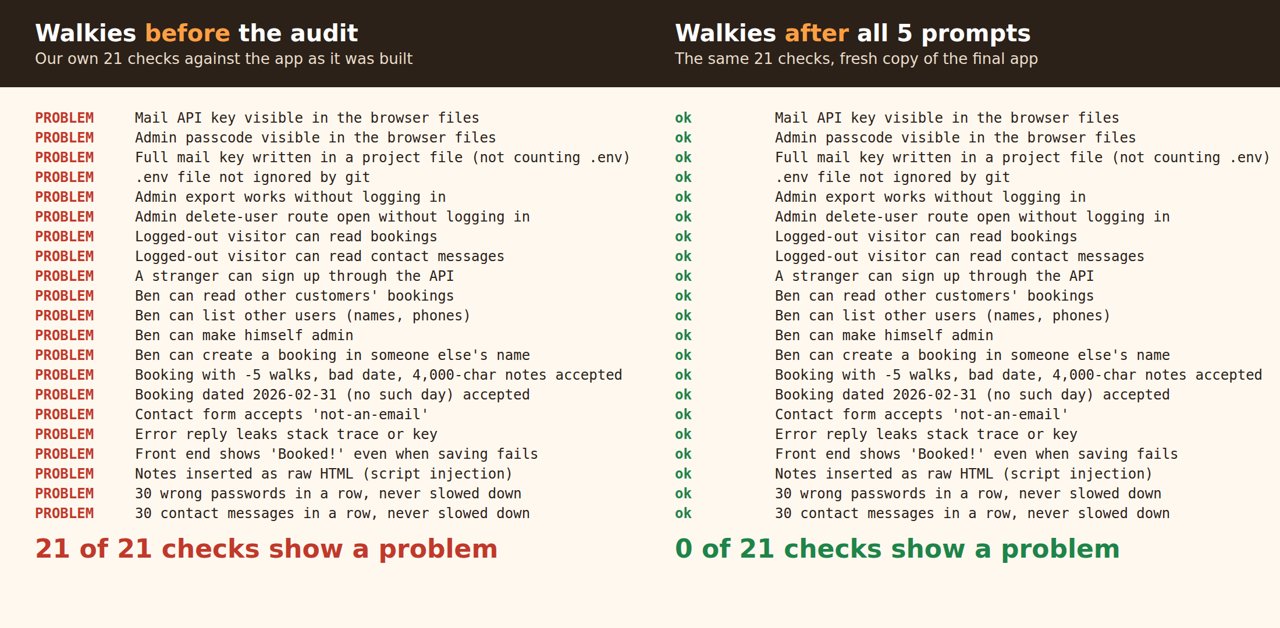
Claude was not perfect. Its first report missed one planted problem, caught two others only in part, and overstated two of its own tests. Its first fix round left 3 holes, and its report said the leaked key was gone from all code when it was still in Claude's own test script. A second session, started fresh, caught all of that. Running a second check is the most useful habit in this guide.
The test app
Walkies is a made-up dog-walk booking site: customers log in, book walks with their address and notes ("Key is under the blue flower pot"), and the owner has an admin page. It runs on PocketBase 0.40.6, a free database-plus-login server in one file, with a plain HTML page in front. All data is fake (example.test emails, 555 phone numbers) and the "mail API key" in it is not a real key.
We planted the problems that keep showing up in AI-built apps, from the Wiz Moltbook report to a Reddit audit of 1,764 vibe-coded apps:
- A mail API key written into the code and into a file every visitor's browser downloads.
- The admin passcode in that same browser file, checked only in the browser.
- An admin "export all bookings" link that works without logging in.
- An admin "delete user" link that works without logging in.
- Database rules that let anyone, logged in or not, read and edit every booking.
- Contact-form messages readable by anyone.
- Any customer can list all users and change anyone's role to "admin".
- No rate limits on login or the contact form.
- No checks on what people type: -5 walks, "not a date", bookings in someone else's name.
- Error replies that include the stack trace and the key, and a "Booked!" message that shows even when saving failed.
- Booking notes put into the page as HTML, so typed code runs.
Claude was not told any of this list. It only got the prompts below.
What you need
- Claude Code on a paid Claude plan. We used Claude Code 2.1.312 with Claude Opus 5.5.
- Your app's code in a folder on your computer, and a way to run it there. If your app lives only in a hosted builder, get its code out first; many builders can export to GitHub, though our run started from local files.
- git, so you can undo anything Claude changes.
- Only test data. Keep your live database with real customers out of this.
For our demo we also used PocketBase 0.40.6 and its JavaScript SDK 0.28.1 (both MIT). In steps 4 to 6 Claude used Python Playwright 1.62 with Chromium, which was already installed on our server.
Step 1: Save a checkpoint
In your app's folder, start a git snapshot so you can always go back. Before saving anything, keep files with keys out of it. The echo line adds .env to .gitignore, and git status lists the files git can see:
git init
echo ".env" >> .gitignore
git status
Read that list. If a file holding passwords or keys shows up, add its name to .gitignore the same way and run git status again. Then save:
git add -A
git commit -m "Before the security audit"
A key written inside a normal code file still ends up in this snapshot, so keep the snapshot on your computer: don't push it to GitHub or anywhere else until step 7 is done. If your project was already in git with .env committed, as in our demo, ignoring it now won't remove it from git. Claude untracked it in step 3 and listed the history clean-up as a job for you.
Then start Claude Code in the same folder:
claude
Step 2: Ask for an audit, no fixes yet
I'm not a developer. I built this dog-walk booking app with AI and I want to let real customers use it next week. Before I do, check it for security problems: leaked keys or passwords, pages or data that work without logging in, database rules that are too open, no rate limits, no checks on what people type in, and error messages that leak things. Run the app on this computer and actually try to break it with the test accounts, don't just read the code. Don't fix anything yet. Put what you find in AUDIT.md in plain English, worst first, and tell me which ones I have to deal with myself.
Change "dog-walk booking app" to what your app does. "Actually try to break it" makes Claude start the app and send real requests, as a stranger and as a test customer. "Don't fix anything yet" gives you a list to read before any code changes.
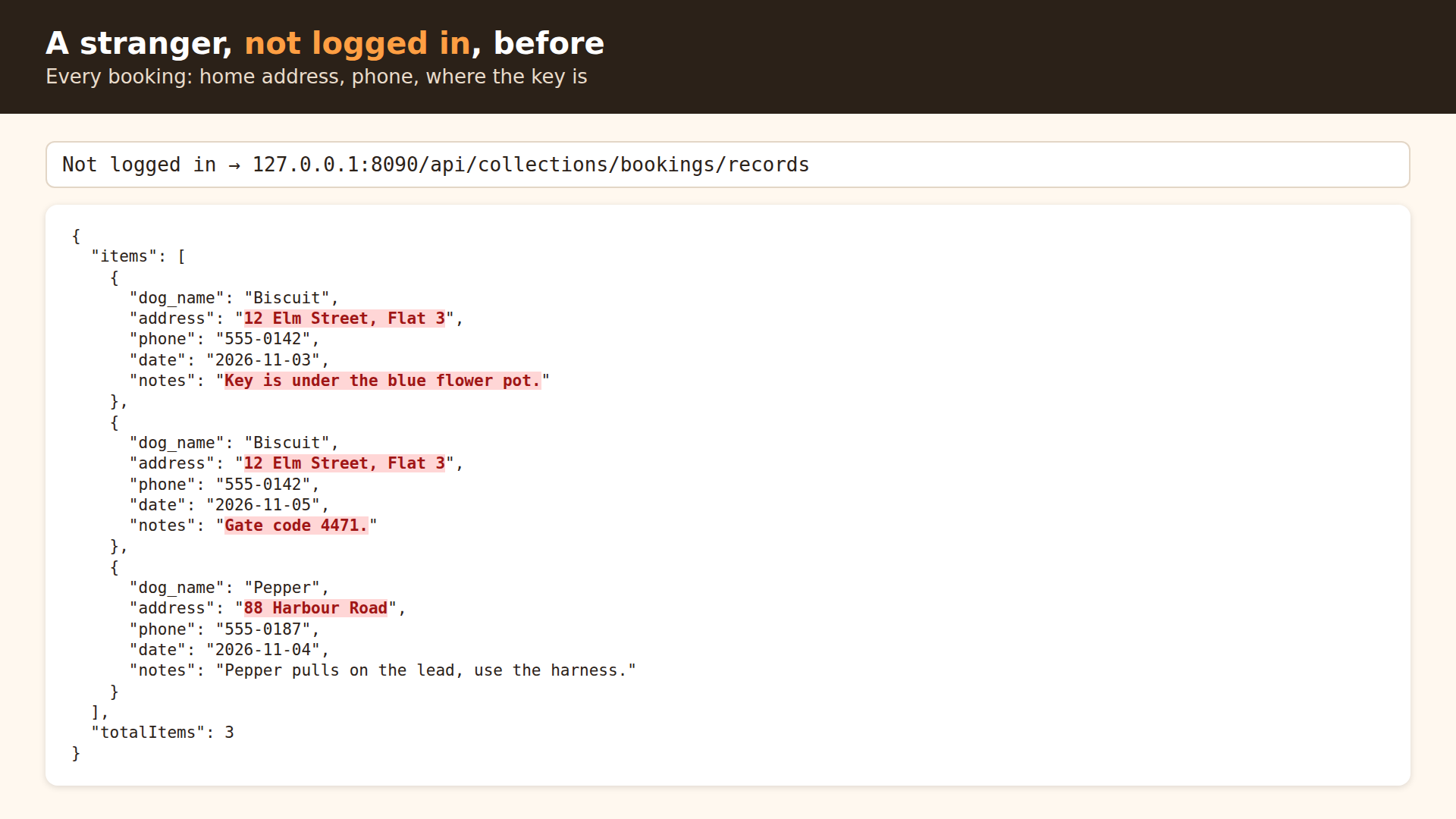
In about 4 minutes Claude started PocketBase, sent requests with curl, and wrote a 200-line AUDIT.md with 9 findings, worst first. Without logging in it pulled every booking, including "Key is under the blue flower pot" and "Gate code 4471".
Against our list of 11 it fully found 8: the key, the passcode, both open admin links, the open booking rules, the user takeover, the rate limits and the HTML notes. Two it found only in part. For input checks it covered the contact form but not the booking form, and for error handling it caught the leaking error reply but not the fake "Booked!" message. It missed one: the public contact messages. It also flagged something that was not on our list: every test account uses password123.
It also said three jobs were the owner's, not the code's: cancel the mail key with the provider, change the walkies2026 password, and clean the secrets out of git history.
Step 3: Fix and re-test
OK, fix everything in AUDIT.md that can be fixed in code. Ana and Ben must still be able to log in, book walks and see their own bookings, and I still need a way to see all bookings as the owner. After the fixes, try to break it again the same way you did before and show me a before/after table. Update AUDIT.md with what's fixed and what's still on me.
Naming Ana, Ben and the owner matters: without it, the easiest fix for "anyone can read bookings" is "nobody can read bookings".
It added a new database-rules file so customers see only their own bookings and only the owner sees everything. It moved the key out of the code into a server setting and replaced the passcode box with a real owner login. It also turned on PocketBase's rate limiter, limited walks to 1 to 20 and notes to 1,000 characters, and made notes show as plain text. It wrote a test script with 30 attacks and 8 normal-use checks and ran it against the old and new code: all 30 attacks were blocked.
It also corrected its own first report without being asked. Two claims were wrong: Ana had deleted her own booking, not someone else's, and deleting Ben left his address behind in the database rather than removing it. It said the code-injection finding came from reading code, not from a browser. And it found the public contact messages it had missed. One more catch: its first owner-only check crashed for everyone, and its own test script counted that crash as "blocked". Claude noticed, fixed the check and made the script stricter.
Step 4: Click through it in a browser
Claude's step 3 summary said it had not tried the pages in a real browser, so we asked:
You said you didn't click through it in a browser. Please do that now: log in as Ana, book a walk, check it shows up, try a booking with a silly number of walks, then log in as the owner on the admin page and check you can see all bookings. Take screenshots and tell me if anything is broken.
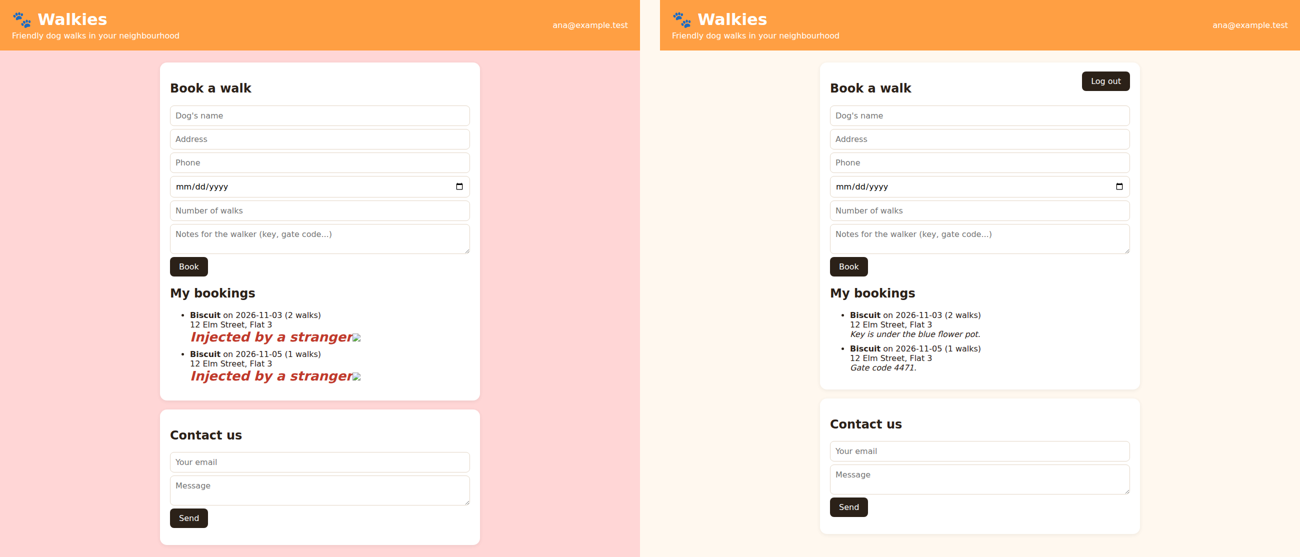
Claude wrote a Playwright script and took 12 screenshots. 15 of 16 checks passed. Ana could book; bookings for -5, 999 and 2.5 walks were refused; the owner saw all 4 bookings; and Ana was turned away from the admin page. The one fail: customers had no log-out button.
Step 5: Second check in a new session
Close Claude Code, start it again in the same folder, and paste:
I had Claude fix the security problems in this app (see AUDIT.md). Check it again with fresh eyes, as if you'd never seen it: run it and try to break it as a stranger and as the test customers. Tell me anything that's still wrong, and anything the first check got wrong. Don't fix anything. Add what you find at the end of AUDIT.md under 'Second check'.
This session tried harder tricks: signing up first, filter searches, faked IP addresses, file uploads, password-reset spam. It found things the first session got wrong:
- Anyone could still create an account straight through the server, then book walks at any address. It booked 20 walks at Ana's address this way.
- The full mail key was still written in Claude's own test script,
security-tests/attack.py, while the first report said it was gone from all code. - Dates were only checked for their shape:
2026-02-31and past dates went through. - Smaller points: sign-up told strangers which emails were customers, logging out did not end the login on the server, and one visitor could still make 20 bookings plus 20 sign-ups a minute, because each kind of request had its own limit.
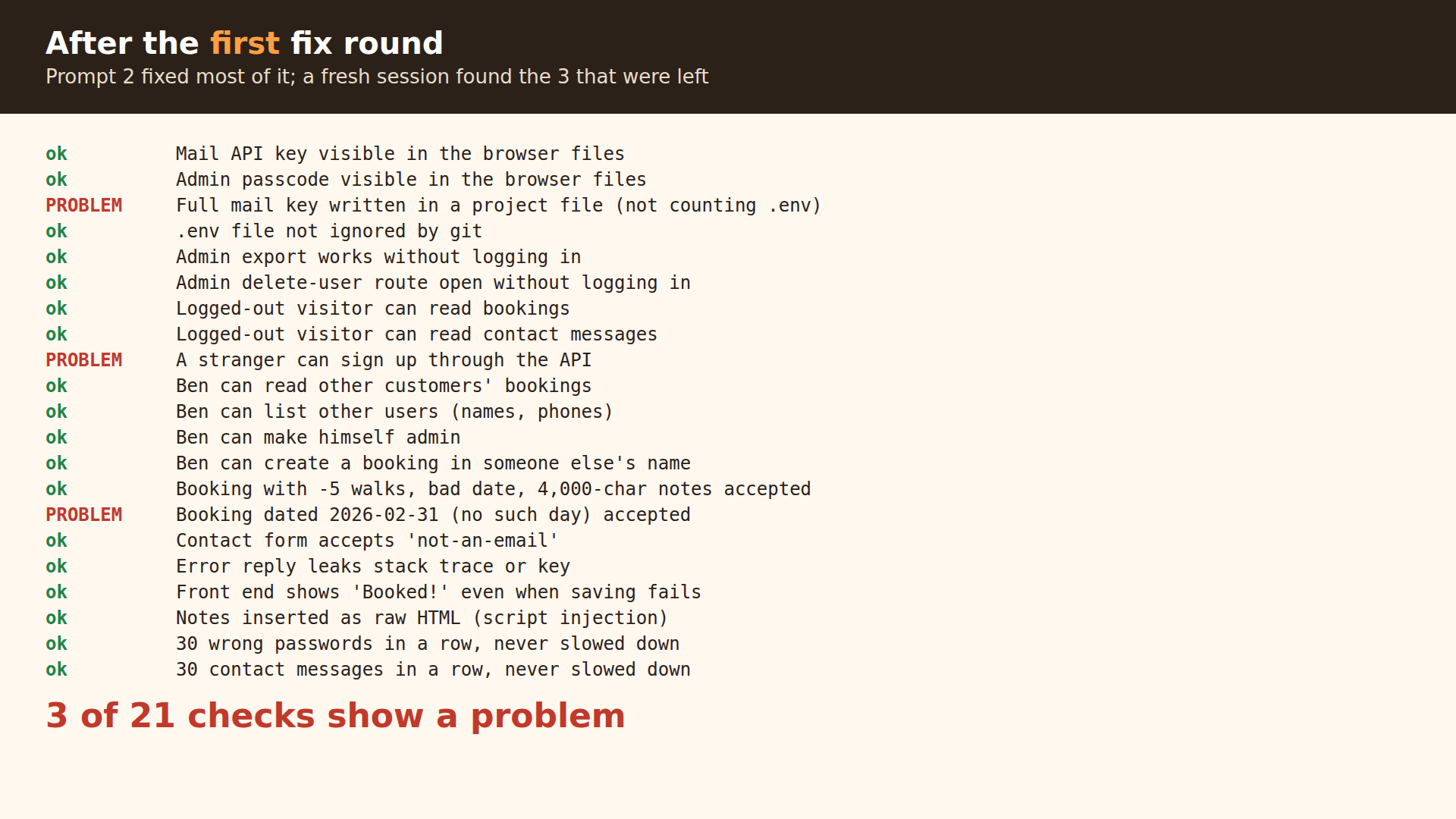
Our own checks agreed: after step 3 the app still failed 3 of our 21, the same 3 this session found.
Step 6: Fix what the second check found
In the same new session:
Thanks. Customers don't need to sign up themselves, I'll add them, so turn sign-up off. Take the key out of the test script, reject impossible and past dates, and add a log-out button. Then run all the old attack tests again plus your new ones and tell me what's left. Update AUDIT.md.
This was the longest run, about 16 minutes. Claude turned sign-up off, changed the test script to look for anything shaped like a mail key instead of containing the full key, added a date check for new and moved bookings, and added the log-out button. Its re-test: 49 attacks blocked, 12 normal-use checks passed, 18 of 18 browser checks passed. Its first browser run showed the new date check had broken the "please fill in these fields" message; it fixed that and re-ran everything.
Still open after this round: a copied login stays valid on the server for about 5 days, far-future dates up to 2099 are accepted, and password-reset email needs a mail service.
Step 7: Do your part
Code changes can't undo a leak, and some fixes need your accounts. Claude's final list of jobs for the owner:
- Cancel the old mail key with the mail provider and get a new one. Our demo key is fake, so there was nothing to cancel; with a working key, this is the most urgent job on the list.
- Stop using the leaked password everywhere.
- Clean the old secrets out of git history before sharing or uploading the code.
- Remove the test accounts or change their passwords; give the owner account a long, unique password.
- Set a strong password for the PocketBase dashboard.
- Use HTTPS once it is online.
- Put the new key in
.envor your host's secret settings, in place of the old one. Keep that file out of git, uploads and anything the browser downloads. - Commit the changes. Claude did not commit anything.
The result
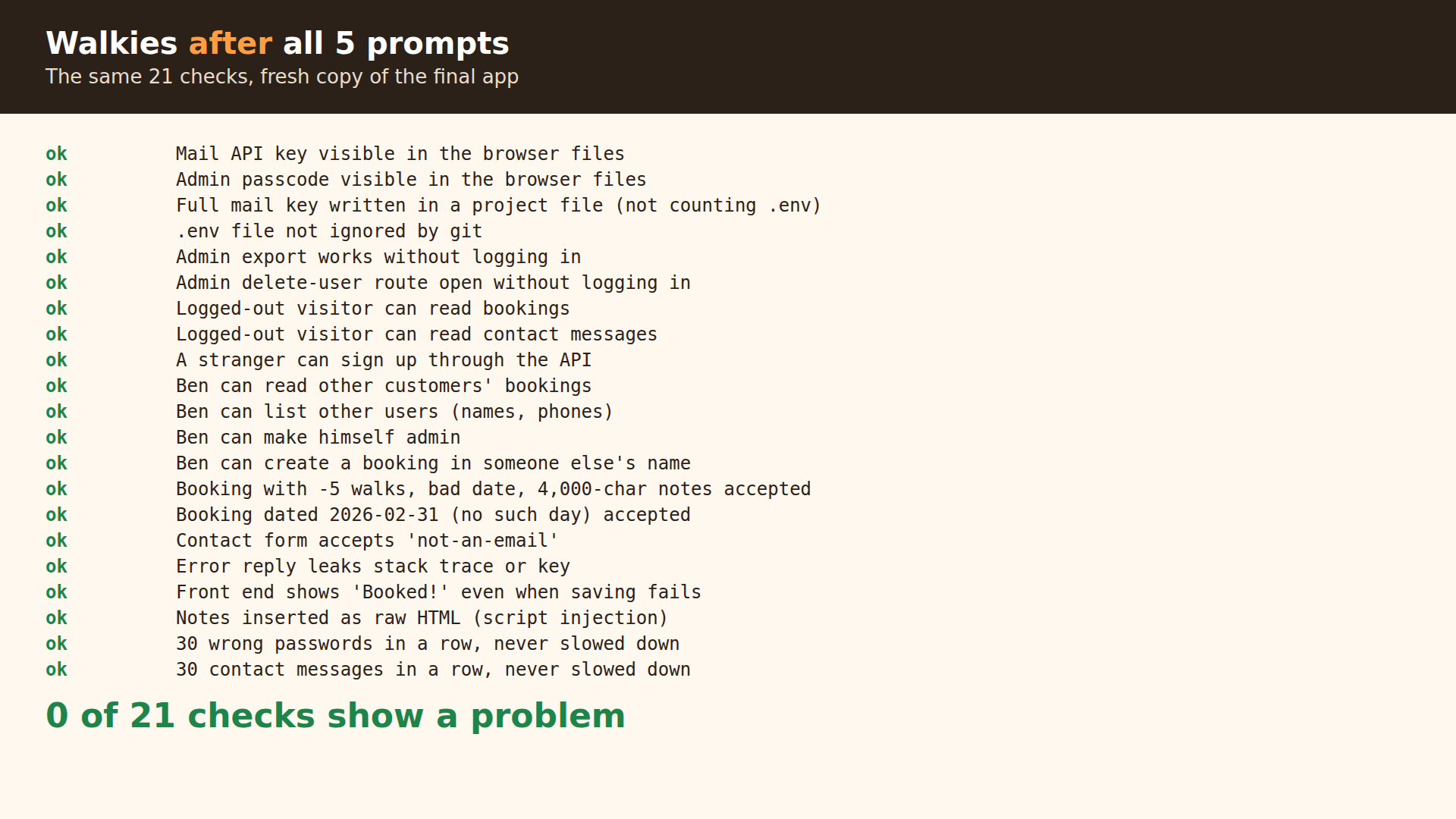
We wrote our own 21-check script to score the app, separate from Claude's tests, and ran it on a fresh copy each time: 21 of 21 checks failed before, 3 still failed after step 3, and all 21 passed after step 6. These checks cover our 11 planted problems and the 3 the second session found; other holes may still exist. A logged-out visitor who asks for the bookings now gets an empty list, and a stranger's attempt to rewrite Ana's notes is refused.
Demo files: demo/.
Evidence you can check yourself, in demo/evidence/: our check script probe.py, its output before, after step 3 and after step 6, Claude's final AUDIT.md, and the app source before and after. The PocketBase program is not included: download it from pocketbase.io and put it in the unpacked app folder, run ./pocketbase serve there, then in a second terminal in the same folder run python3 path/to/probe.py http://127.0.0.1:8090 .
The checklist
Ask Claude to test each of these on the running app, not only to read the code.
| Check | How to test it |
|---|---|
| Keys and passwords | Search every file for keys, including the files the browser downloads and Claude's own test scripts. Is .env in .gitignore? Was it ever committed? |
| Login checks | Call every admin link while logged out. Then call it as a normal customer. |
| Database rules | Logged out, list every table. Logged in as customer A, try to read, edit and delete customer B's rows. Try to set your own role to admin. |
| Sign-up | Can a stranger create an account directly through the server, even if the site has no sign-up form? |
| Rate limits | 30 wrong passwords in a row, 30 contact messages in a row. Something should start saying no. |
| Input checks | Negative and huge numbers, impossible dates, very long text, someone else's ID, HTML in text fields. |
| Error handling | Send broken requests. Errors should say "something went wrong", with no stack traces, file paths or keys. Failed saves must not say "saved". |
| Second opinion | A new session reads AUDIT.md and tries to break the app again. |
| Your jobs | Rotate leaked keys, change leaked passwords, clean git history. |
If something looks off
- The report sounds sure of something it didn't test. This happened at least three times in our run: the deletion claims, the "key is gone from all code" claim and the code-injection finding. Ask "Which of these did you actually run, and which did you get from reading the code?"
- Claude's tests say "blocked" but the app is broken for everyone. Its first owner-only check crashed, and the test counted the crash as blocked. Ask for normal-use checks next to every attack, which our step 3 prompt does by naming Ana, Ben and the owner.
- Rate limits make later tests fail. After step 3, our own check script hit the new limits and got "too many requests" instead of the real answer, and Claude's README for its test script says to wait a minute between runs. Wait a minute or test on a fresh copy.
Credits and licences
- Claude Code by Anthropic: not open source, needs a Claude plan or API billing.
- PocketBase 0.40.6: MIT. PocketBase JS SDK 0.28.1: MIT.
- git: GPL-2.0. Playwright for Python: Apache-2.0. Chromium: BSD-3-Clause.
- The Walkies app, its test data and the demo images are ours. Claude wrote the fixes, AUDIT.md and its test scripts in our run.
- Background reading: the Anthropic article on automated security reviews, the PocketBase API rules docs and CVE-2025-48757 (Lovable apps with open Supabase tables).
Questions people ask
Do I need to know how to code to do this?
No. Every step is a plain-English prompt. You do need to read Claude's report, decide what to fix, and do the jobs that only the account owner can do, like cancelling a leaked key with the provider.
Did Claude find everything on the first try?
No. The first prompt fully found 8 of our 11 planted problems, found 2 more only in part, and missed 1. The first fix round still left 3 holes, and the first session's report said the key was gone from all code when it was still in its own test script. A second, fresh session caught all 3. Run at least one second check in a new session.
Why not just use the /security-review command?
It exists and Anthropic documents it for SQL injection, XSS, login flaws and unsafe data handling. We used plain prompts because we wanted Claude to run the app and attack it as a logged-out stranger and as a second customer. That is how the worst holes in our app showed up. This run did not include /security-review.
How long does it take and what does it cost?
Claude worked for about 34 minutes across our 5 prompts on a small app. We used a paid Claude plan and paid nothing extra. PocketBase, git and Playwright are free and open source.
My app is on Supabase or Firebase, not PocketBase. Does this still apply?
The prompts and checklist are the same. The database part differs: Supabase uses Row Level Security policies on table rows, Firebase uses Security Rules on documents or storage paths, and PocketBase uses API rules on collection records. Ask Claude to test them the same way: logged out, and as a second customer. We only ran the PocketBase version.
Get the 16 prompts, free
The Builder's Prompt Pack: copy-paste prompts to plan, build and launch real things with AI, sent to your inbox.
Get the AI news by email
Once a week, News Desk sends the AI stories that mattered, in plain words, with links to the sources.