Free guide
Build your own version of an app with Claude Code: a habit tracker in 2 prompts
Updated
We built our own habit tracker with Claude Code. It has a daily checklist, streaks, a 6-month calendar for each habit, dark mode and a backup button, and it runs on a laptop with no account. We didn't copy anyone's app. We read one app store listing, wrote down the features we wanted in our own words and gave Claude that list. Claude spent about 6 minutes on 2 prompts. It cost nothing on top of our Claude plan.
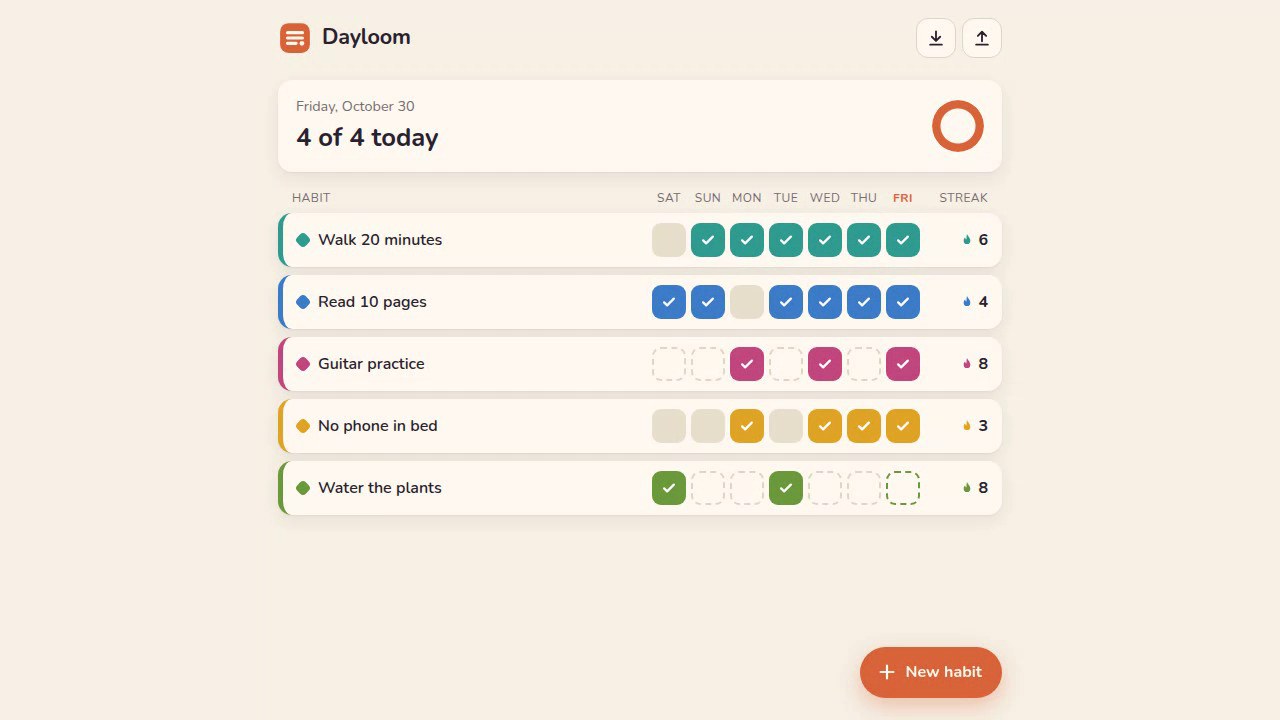
The habits and history in these pictures are made up.
What you need
- Claude Code on a paid Claude plan. We used Claude Opus 5.5.
- Python 3 (PSF License) for a one-line local web server. Check with
python3 --version. On Windows the command is usuallypyorpythoninstead ofpython3. No Python? Skip it and double-clickindex.htmlin step 4. - A web browser.
No framework and no npm install. The app itself needs no account.
Step 1: Pick an app and write your feature list
Pick an app type that lots of companies make, so you are rebuilding an idea rather than one product. Habit trackers, to-do lists, link-in-bio pages, reading logs and expense trackers all work.
Then look at a few store pages or public screenshots and write down what you want, in your own words. We read the App Store listing for one popular paid tracker and wrote this. Save it as features.md in a new folder:
mkdir habit-app && cd habit-app
# My habit tracker: what it should do

- One screen with all my habits. Each row shows the habit name, its colour, the last 7 days as small boxes, and the current streak.
- Tap a box to mark that day done. Tap again to undo.
- At the top: how many of today's habits are done, like "3 of 5 today".
- Add a habit with a name, a colour and the days it repeats (every day, or only some weekdays). Days it does not repeat should not break the streak.
- Edit a habit. Delete a habit, but ask me first.
- Tap a habit name to open its page: a calendar grid of the last 6 months coloured by done days, current streak, best streak, total days done, and the % done in the last 30 days.
- Works on a phone-sized screen and on a laptop.
- Dark mode when my system is in dark mode.
- No account and no server. Everything is saved in this browser. Let me download a backup file and load it again.
We left the other app's screenshots out of the prompt on purpose. Claude's docs show you can paste a screenshot and ask it to match the design, but then you get a copy of someone else's look. A text list leaves the look up to you and Claude.
Step 2: Start Claude Code in the folder
claude
Step 3: Ask for the app
Read features.md. Build my own habit tracker that does all of that, as a small web app I can run on my laptop. Plain HTML, CSS and JavaScript, no frameworks. Give it its own name, colours and icons, don't copy any existing app.
Claude worked for 4 minutes 6 seconds. It made three files: index.html, style.css and app.js. It named the app Dayloom and drew its own logo and icons as small SVGs.
It also tested its own work. It wrote a browser test with 29 checks (adding habits, streak maths for a Mon/Wed/Fri habit, delete, backup and restore) and fixed 4 bugs that came up, such as month labels overlapping on the calendar.
One choice we liked and hadn't asked for: an unticked today doesn't break your streak or drag down your 30-day %. Otherwise every number would drop first thing each morning.
Step 4: Open it
Open a second terminal window, go into the same habit-app folder and run:
python3 -m http.server 8000
Go to http://localhost:8000 in your browser. Leave that terminal open while you use the app; press Ctrl+C there to stop it.
Double-clicking index.html works too, and we tested both. Pick one and stick with it: the browser keeps separate data for the file and for localhost, so if you switch, your habits look like they're gone.
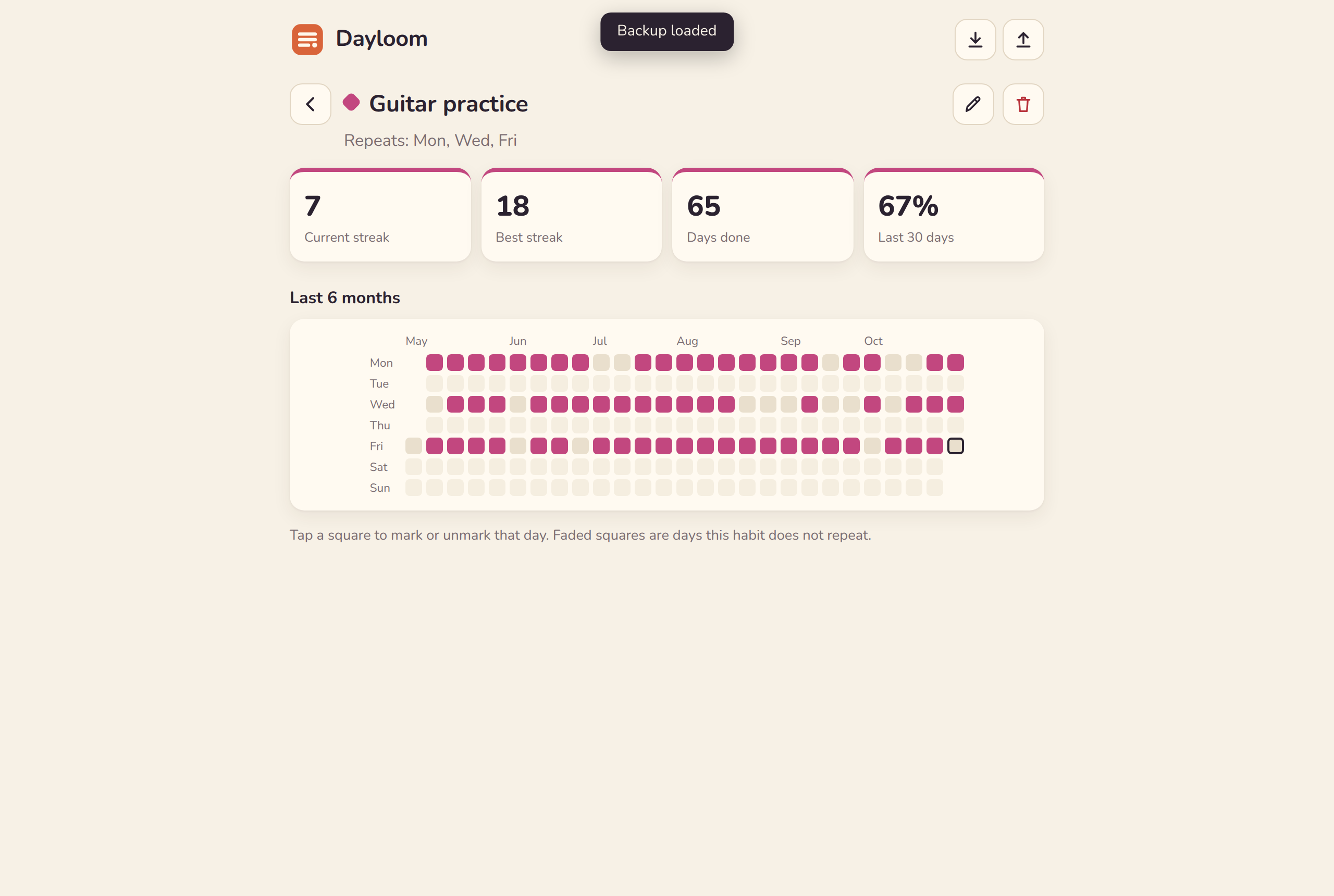
Step 5: Check it at phone size and send what you see
The laptop view was fine. Then we made the browser window phone-sized (390 px wide) and found three problems Claude's own tests had missed:
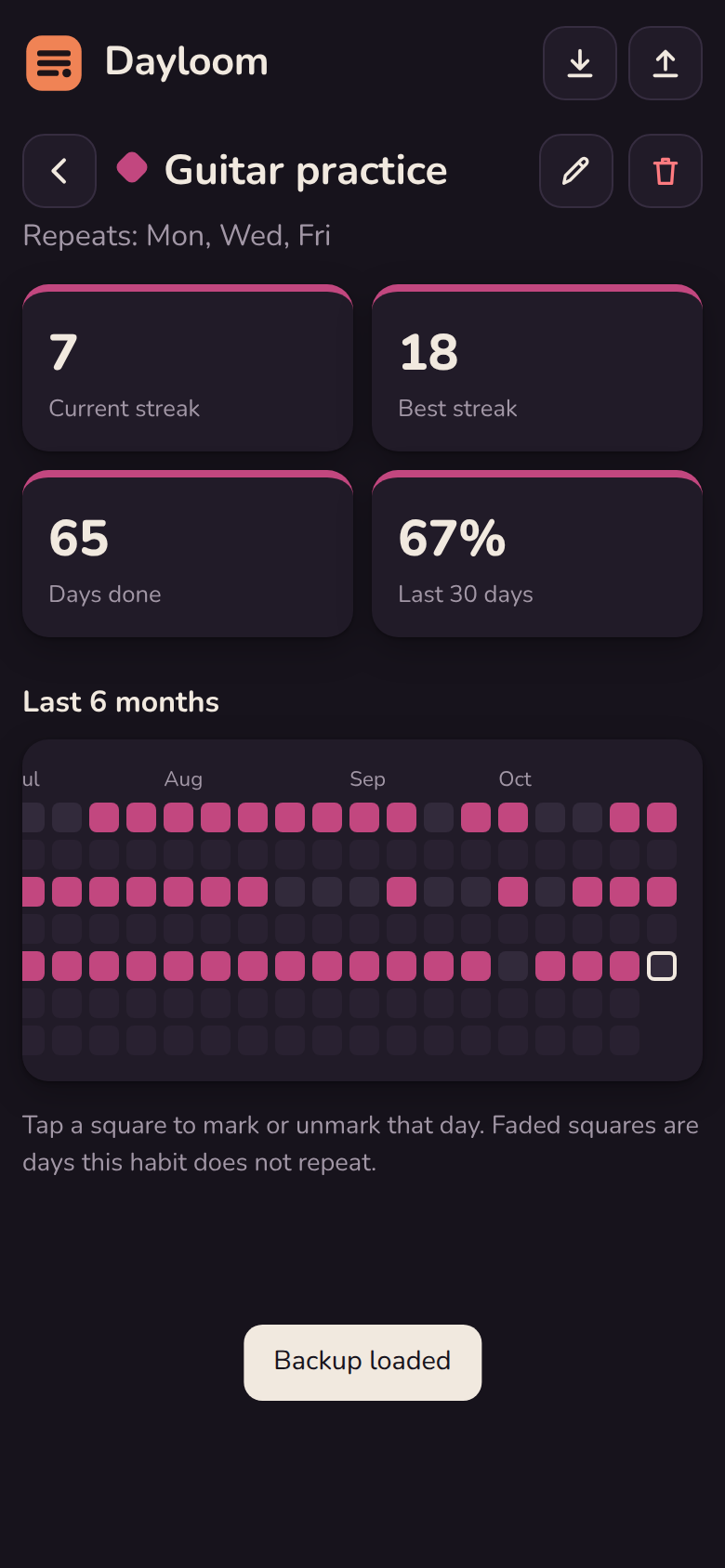
We told Claude what we saw, in plain words:
Looks good! A few things I noticed on my phone:
1. On a habit's page the 6-month calendar is cut off on the left (the first month label shows as "ul") and I can't tell which row is which weekday.
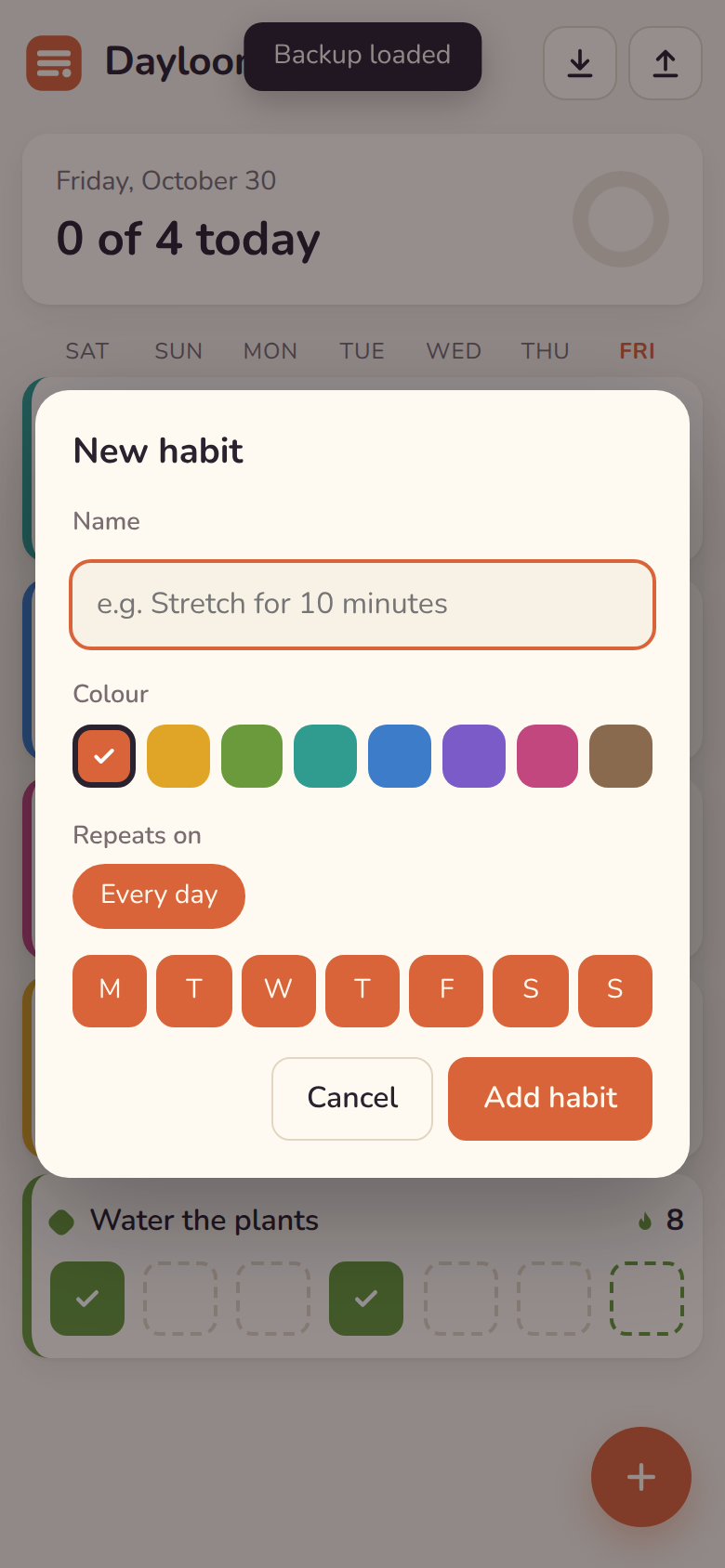
2. In the new habit form the 8th colour wraps onto its own line.
3. The "Backup loaded" message covers the last habit in the list.
Please fix these and check it on a phone-sized screen.
This took 1 minute 41 seconds. The calendar now shrinks to fit the screen with a label on every row, all 8 colours sit on one line, and messages show in the top bar. Claude checked it at 320, 375 and 414 px wide and re-ran its first test, which still passed.
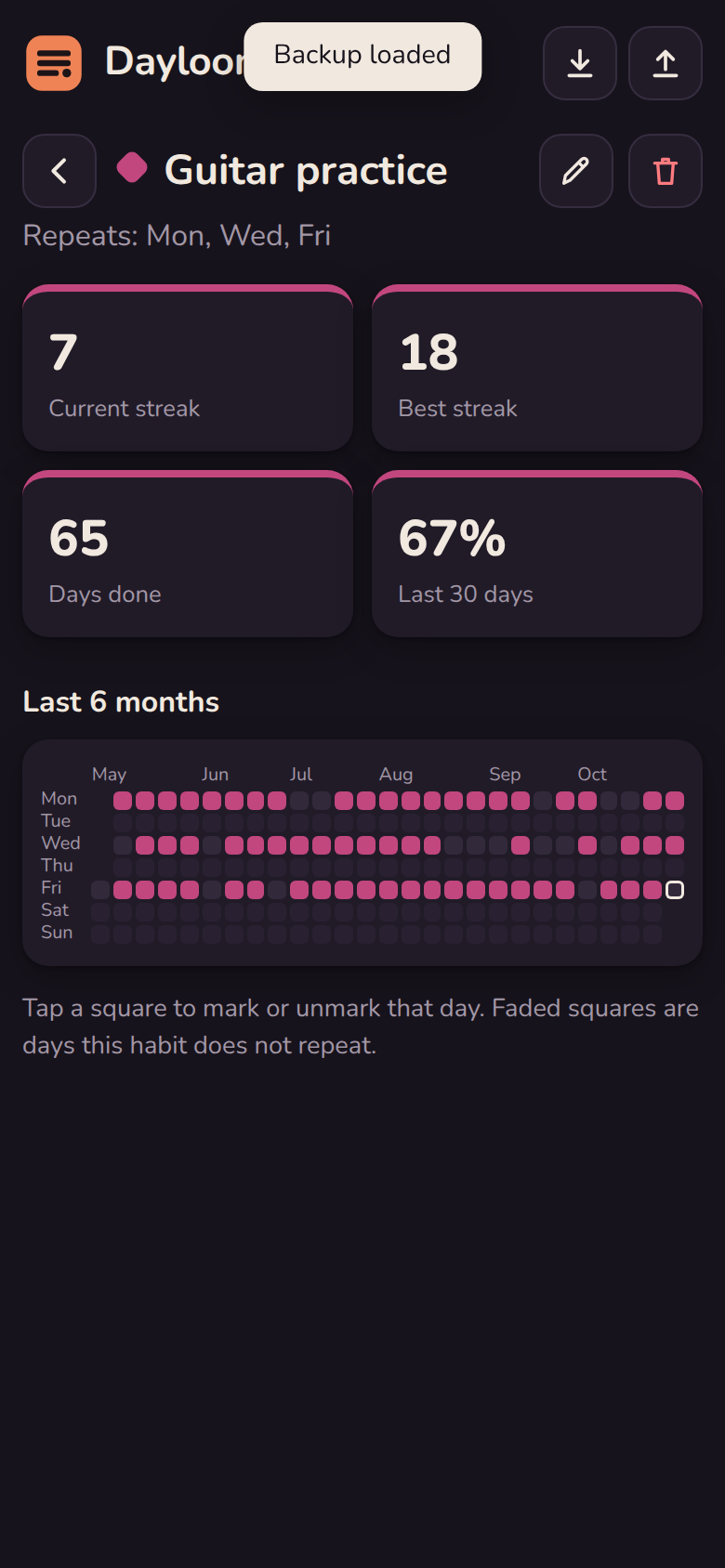
The result
Every item on our list works: ticking days, streaks that skip rest days, the habit page, delete with a warning, backup and restore, and dark mode. It runs offline from three files.
Total Claude time was 5 minutes 47 seconds over 2 prompts. Add a few minutes for writing the feature list and checking the result yourself.
If something looks off
Claude's tests passed, but the phone layout was still broken. Its 29 checks covered what the app does, not how it looks on a small screen. Shrink your browser window, or use your browser's device toolbar, and look at every screen yourself before you call it done.
The fix for the backup message created a smaller problem. On a phone, the "Backup loaded" message now covers part of the app name for about two seconds. We left it. One more short prompt would fix it.
Your data lives in one browser on one computer. Clearing site data deletes it, and your phone won't see it. Use the download button for backups.
If Claude names its app after a real product, or gives you icons that look like a known brand, ask it to change them. Ours didn't, but check before you share it with anyone.
Where the method comes from
Claude's docs cover working from screenshots and mockups. A DEV Community series builds a React habit tracker with Claude Code feature by feature, also saving to the browser.
Credits and licences
Claude Code (Anthropic, used on a paid plan) wrote every line of the app. Python 3 is under the PSF License. Claude ran its own checks with Playwright (Apache-2.0) and Chromium (BSD-3-Clause). You don't need either one to follow this guide. The app uses system fonts and no outside files. The feature list, the made-up demo data and the screenshots are ours.
Questions people ask
Can I copy an app I like?
We rebuilt the features for our own use and kept out the other app's name, logo, icons, wording, screenshots and code. Claude got only a feature list in our own words and made its own name, colours and icons. Selling or publishing a version of someone else's app raises questions this guide doesn't cover.
Do I need to know how to code?
No. We typed two plain-English prompts and Claude wrote all 803 lines. You do need to open a terminal, run one command to start the app, and look at the result with a critical eye. Claude missed the phone layout problems until we pointed them out.
Where is my data stored?
In your browser's local storage on that one computer. There is no account and no server. That also means your phone and laptop do not sync, and clearing your browser data deletes your habits, so use the download backup button now and then.
Can I put it on my phone?
Our build runs on your laptop. We checked it in a phone-sized browser window, not on a real phone. Two common routes are opening the laptop's local server from a phone on the same Wi-Fi, or hosting the three files online. We tried neither in this guide, and with either one the phone keeps its own separate data.
What did it cost?
Nothing extra. We used Claude Code on a paid Claude plan. Python, which runs the local web server, and your browser are free. If you use Claude Code with API billing instead of a plan, you pay for the tokens the two prompts use.
Get the 16 prompts, free
The Builder's Prompt Pack: copy-paste prompts to plan, build and launch real things with AI, sent to your inbox.
Get the AI news by email
Once a week, News Desk sends the AI stories that mattered, in plain words, with links to the sources.