Free guide
8 animation styles for Claude Code, one prompt each
Updated
Type /neon-sign open late in Claude Code and you get a 6-second vertical MP4 of your words as a neon sign. This guide gives you 8 copyable skills like that one, from split-flap boards to pixel art, and each works with 1 to 4 short words. Claude writes the animation in HTML and GSAP and renders it with HyperFrames on your own computer. On our build server, a Linux machine with no graphics card, each style took Claude 2.5 to 6 minutes plus a render of under a minute. It runs on the Claude plan you already pay for.
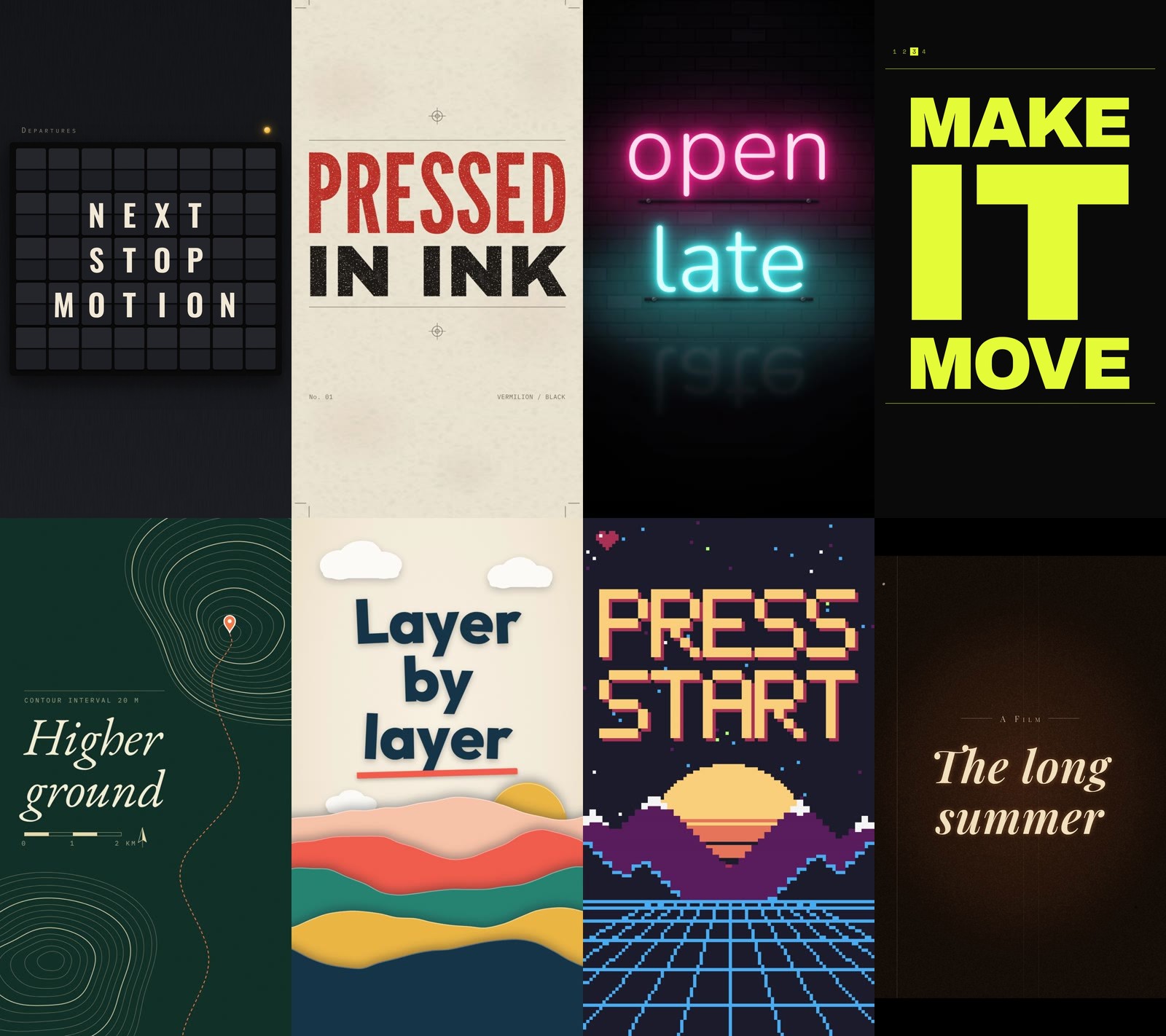
The 8 clips, as rendered (1080x1920, 6 s each, silent):
split-flap letterpress neon-sign kinetic-type topographic paper-cutout pixel-arcade film-title
Split-flap, kinetic-type and film-title were made with the skills below; the other 5 with earlier drafts of theirs.
How it works
A Claude Code skill is a folder with a SKILL.md file in it. The name at the top becomes a slash command, and whatever you type after the command lands where the file says $ARGUMENTS (Claude Code docs). Each of our 8 files has two parts:
- Look and Motion describe the style with hex colours, font names, pixel sizes, seconds and easing names. Loose sizes gave weak clips, so the skills pin sizes down in pixels.
- Build it is the same 6 steps in every file: set up a HyperFrames project, keep your words as typed, keep text away from the edges where phone apps put their buttons, run
hyperframes check, look at snapshots, then render.
HyperFrames (by HeyGen, Apache-2.0) is the renderer. The clip is a web page. HyperFrames plays it in a headless Chrome frame by frame and encodes the frames with FFmpeg, so nothing is screen-recorded.
What you need
- Claude Code on a paid Claude plan. We used Claude Code 2.1.312 with Claude Opus 5.5.
- Node.js 22 or newer. We had v22.23.4. HyperFrames itself runs through
npx, so you do not install it separately. - About 300 MB of disk for the headless Chrome that HyperFrames downloads on its first render.
- FFmpeg. The HyperFrames README lists it as a requirement next to Node 22. We had FFmpeg 6.1.1 installed.
Step 1: Save the 8 skills
Make one folder per style and save each block below as SKILL.md inside it. Use your personal skills folder, ~/.claude/skills/, to have the commands in every project, or .claude/skills/ inside one project folder to keep them there. For example the first one goes in ~/.claude/skills/split-flap/SKILL.md.
In a macOS or Linux terminal (bash or zsh):
mkdir -p ~/.claude/skills/{split-flap,neon-sign,letterpress,topographic,kinetic-type,pixel-arcade,paper-cutout,film-title}
In Windows PowerShell:
foreach ($n in "split-flap","neon-sign","letterpress","topographic","kinetic-type","pixel-arcade","paper-cutout","film-title") { New-Item -ItemType Directory -Force "$HOME\.claude\skills\$n" }
The quickest way to fill them: open Claude Code, paste this guide's 8 blocks and say "save each of these as SKILL.md in the matching folder under ~/.claude/skills". Or paste them into a text editor yourself.
If the skills folder did not exist before you started Claude Code, the new commands will not show up in that session. Quit and start Claude Code again (the docs also mention /reload-skills). We saw this ourselves: a skill added mid-session came back as "Unknown skill". In a fresh session all 8 commands were listed.
/split-flap
---
name: split-flap
description: Animate your words as a split-flap departures board, with every tile flipping through letters before it lands. Vertical 1080x1920 video, HTML + GSAP, rendered with HyperFrames.
argument-hint: [your words]
disable-model-invocation: true
---

# Split-flap board

Make a 6-second vertical animation of these words on a split-flap departures board, the mechanical kind from old train stations: $ARGUMENTS

## Look

- Background: near-black housing `#121315` with a soft vertical gradient to `#1a1b1e` and a faint brushed-metal noise (an SVG `feTurbulence` at 4% opacity).
- The board: a grid of flap tiles that fills the frame width. Columns = the longest row plus 2 (min 6, max 10); break the words at spaces, max 8 characters per row (longer words do not fit), centre each row. Tile width = whatever fits 960 px with 10 px gaps (cap 150 px); tile height = 1.4x the width; corner radius 8 px. Add one blank row above and below the words so it reads as a real board. Each tile is two halves, `#26272b` top and `#1f2023` bottom, split by a 3 px dark line `#060607`, with a 1 px light edge on top `rgba(255,255,255,.08)`, a drop shadow under each tile, and an inner shadow at the split. Empty tiles stay visible but blank. The whole board sits in a dark frame `#0b0b0c` with 24 px padding and a soft outer shadow.
- Letters: Oswald 600, cream `#F2EAD8`, 72% of the tile height, centred on the tile. Each landed letter is one whole element on top of its tile, never inside a half that crops it, so the dark split line runs behind it and every letter reads in full.
- One header row above the board in small caps, IBM Plex Mono 28 px, letter-spacing 0.3em, `#8A8577`: the word DEPARTURES on the left and a small amber lamp `#F5B83D` on the right. No other text.
- The board sits in the vertical middle of the frame.

## Motion

- Frame 0: the board is already there with all tiles blank, the lamp off. Nothing is black.
- 0.2 s to 2.55 s: every tile that holds a letter makes 6 to 12 flips in total (seeded count): each flip shows a seeded random character (A-Z, 0-9), and the last flip lands on the tile's letter. Each flip is a real flap: the top half rotates down on rotateX from 0 to -90 degrees with perspective 600 px, then the next character's bottom half falls from 90 to 0, each half 0.09 s, ease `power2.in` then `power1.out`, and a new flap starts every 0.13 s. The flaps are decoration: they carry the random characters and halves of the final letter, and only they may be marked as intended in step 5.
- Timing that fits: a tile with N flips starts its last flap (N - 1) x 0.13 s after its first and that flap ends 0.18 s later, so 12 flips take 1.61 s. Spread the tiles' start times evenly in reading order, left to right and top to bottom, from 0.2 s (first letter) to 0.9 s (last letter). The latest possible finish is 0.9 + 1.61 = 2.51 s, so every tile has landed by 2.55 s. If you change the flip count or speed, redo this sum before you write the timeline.
- As each tile lands, the whole letter appears in place of the flap and the tile gives a 2 px settle bounce (0.12 s, done by 2.7 s).
- 2.9 s: the amber lamp switches on with a soft glow, and blinks twice slowly.
- 3.0 s to 6.0 s: hold the finished board. The whole board drifts toward camera, scale 1.0 to 1.04, `sine.inOut`.

## Build it

1. Set up. If the current folder has no `hyperframes.json`, run `npx -y hyperframes@0.8.221 init split-flap --example blank --resolution portrait --non-interactive` and work inside `split-flap/`. If a `hyperframes` skill is installed, read its SKILL.md and follow its contract. Canvas 1080x1920, 30 fps, root `data-duration` 6. One composition is fine for a clip this short.
2. Use the user's words exactly as given, same spelling and order. The only changes allowed are the ones this style's Look names, such as capitals or where the lines break. If they gave no words, ask for them and stop. This style is made for 1 to 4 short words; if the words do not fit the line and size limits above, say so and ask which words to keep. Never set the type smaller than this style's sizes to make more words fit. Add no other words except the small labels this style allows. Do not add numbers, names or claims of your own.
3. Keep every letter inside the band from y=250 to y=1500 and x=60 to x=1020. That is the area the buttons and captions of Instagram, TikTok and Shorts usually leave clear. Texture and decoration can run to the edges.
4. Everything moves from the GSAP timeline only. For randomness use a seeded generator (mulberry32 with a fixed seed), never `Math.random()`. No `repeat: -1`.
5. Run `npx hyperframes check --json` and fix every error. Then run `npx hyperframes snapshot` at 0.5 s, the middle and the last second, look at the images, and fix what you see: text touching an edge, uneven spacing, a muddy colour, an empty first frame. Only decoration (texture, grain, glow, light effects, the style's small labels) may be marked as intended with `data-layout-ignore` or `data-layout-allow-occlusion`. Any finding on an element that holds the user's words gets fixed in the layout, never marked.
6. Render: `npx hyperframes render --quality delivery -o renders/split-flap.mp4`. Reply with the file path and one line on what is on screen.
/neon-sign
---
name: neon-sign
description: Animate your words as a glass-tube neon sign that flickers on against a dark brick wall. Vertical 1080x1920 video, HTML + GSAP, rendered with HyperFrames.
argument-hint: [your words]
disable-model-invocation: true
---

# Neon sign

Make a 6-second vertical animation of these words as a neon sign switching on at night: $ARGUMENTS

## Look

- Wall: dark brick, built in CSS, not an image. Base `#120e14`, bricks 120x44 px with 6 px mortar a shade darker, and a few bricks a touch lighter (seeded). Then a strong radial vignette so the corners fall to near black.
- Tubes: the words in Nunito 300 (thin and round, like bent glass), in the same capitals and lower case the user typed, max 2 lines. Set each line as big as it fits a 900 px measure (about 260 to 340 px): this is read on a phone, so the sign fills the frame. Line 1 hot pink `#FF3D8B`, line 2 cyan `#39E6FF` (one word only: all pink). Each letter is its own span.
- A lit tube is a pale core (`#FFE3EF` for pink, `#DFFBFF` for cyan) with stacked `text-shadow` glow in the tube colour: 0 0 6px, 0 0 16px, 0 0 36px, 0 0 80px, 0 0 160px, and a second blurred copy of the line behind it (blur 24 px, 60% opacity) as bloom. An unlit tube is the tube colour at 14% with no glow, so you see the dead glass.
- Under each line, a thin dark mounting rail with 2 small screws, and a light pool on the wall behind the sign: a big blurred ellipse in the tube colour at 30% opacity, wider than the line, that grows when the sign is lit.
- A floor reflection: a mirrored, blurred copy of the sign at 12% opacity, fading out downward, below the lowest line.

## Motion

- Frame 0: the unlit sign is visible on the wall, so the first frame already reads.
- 0.15 s to 1.4 s: line 1 ignites letter by letter. Each letter flickers 2 to 4 times on a seeded pattern (on 0.04 s, off 0.06 s, on 0.03 s, then on for good) before it holds. The light pool on the wall flickers with it.
- 1.3 s to 2.4 s: line 2 does the same, a little faster.
- 2.5 s: both lines surge together, glow radius up 30% for 0.12 s, then settle.
- 2.6 s to 6.0 s: keep it moving: a slow camera push (scale 1.0 to 1.05, `sine.inOut`), one letter that buzzes off for 0.05 s at 4.1 s and comes back, and a very slight brightness breathing on the light pool.

## Build it

1. Set up. If the current folder has no `hyperframes.json`, run `npx -y hyperframes@0.8.221 init neon-sign --example blank --resolution portrait --non-interactive` and work inside `neon-sign/`. If a `hyperframes` skill is installed, read its SKILL.md and follow its contract. Canvas 1080x1920, 30 fps, root `data-duration` 6. One composition is fine for a clip this short.
2. Use the user's words exactly as given, same spelling and order. The only changes allowed are the ones this style's Look names, such as capitals or where the lines break. If they gave no words, ask for them and stop. This style is made for 1 to 4 short words; if the words do not fit the line and size limits above, say so and ask which words to keep. Never set the type smaller than this style's sizes to make more words fit. Add no other words except the small labels this style allows. Do not add numbers, names or claims of your own.
3. Keep every letter inside the band from y=250 to y=1500 and x=60 to x=1020. That is the area the buttons and captions of Instagram, TikTok and Shorts usually leave clear. Texture and decoration can run to the edges.
4. Everything moves from the GSAP timeline only. For randomness use a seeded generator (mulberry32 with a fixed seed), never `Math.random()`. No `repeat: -1`.
5. Run `npx hyperframes check --json` and fix every error. Then run `npx hyperframes snapshot` at 0.5 s, the middle and the last second, look at the images, and fix what you see: text touching an edge, uneven spacing, a muddy colour, an empty first frame. Only decoration (texture, grain, glow, light effects, the style's small labels) may be marked as intended with `data-layout-ignore` or `data-layout-allow-occlusion`. Any finding on an element that holds the user's words gets fixed in the layout, never marked.
6. Render: `npx hyperframes render --quality delivery -o renders/neon-sign.mp4`. Reply with the file path and one line on what is on screen.
/letterpress
---
name: letterpress
description: Animate your words as a two-colour letterpress poster, each block of wood type pressed into thick paper. Vertical 1080x1920 video, HTML + GSAP, rendered with HyperFrames.
argument-hint: [your words]
disable-model-invocation: true
---

# Letterpress

Make a 6-second vertical animation of these words as a letterpress poster being printed, wood type on thick cotton paper: $ARGUMENTS

## Look

- Paper: warm cream `#EFE6D3` with texture: an SVG `feTurbulence` fibre noise at 7% multiply, plus a few larger soft blotches, plus a soft darker edge, 40 px wide, that fades in (no hard brown border). Never flat.
- Ink: vermilion `#D8432B` and soft black `#1F1C1A`, both with `mix-blend-mode: multiply` so where they overlap it goes deep red-brown. Ink is never perfectly solid: mask each letter with a speckle noise so 3 to 6% of the paper shows through, like real wood type.
- Type: set in capitals like wood type, one word per line where possible, set big and tight. Lines alternate between League Gothic (tall, condensed) and Archivo Black (wide). Every line is scaled so it is exactly 900 px wide (measure it and set the font size; cap a single short word at 520 px font size), line-height 0.86, so the type block is a solid poster with no ragged edges. Lines break only at spaces, never inside a word. Short words may share a line (IN INK) when a word alone would hit the size cap before it reaches 900 px. A single word that still cannot reach 900 px at the cap is set at the cap and centred; the furniture fills the rest of the sheet. Alternate the two ink colours line by line.
- The second colour is printed slightly out of register: offset 4 px right and 3 px down from where it should be.
- Printer's furniture, small and quiet, in black at 60%: crop marks in all four corners, a registration target (circle with crosshair) top centre and bottom centre, a hairline rule above and below the type block, and a tiny IBM Plex Mono 22 px label `No. 01` bottom left and the two ink names `VERMILION / BLACK` bottom right. No other text.

## Motion

- Frame 0: the paper, furniture and the first line are already printed.
- Each line is pressed: it starts at scale 1.06, opacity 0, a little blur; in 0.18 s it slams to scale 1.0 with `power4.in`, and the paper under it dips (a quick inner shadow that fades in 0.3 s) like the plate hitting the sheet. A 1 px seeded shake of the whole sheet on impact.
- Lines land on a steady rhythm, one every 0.5 s, starting at 0.0 s.
- After the last line, at about the 3 s mark, the second ink colour layer slides 6 px into its out-of-register spot over 0.4 s, as if a second pass ran.
- Then hold to 6.0 s with a slow camera move across the sheet: scale 1.0 to 1.06 and a 20 px upward drift, `sine.inOut`.

## Build it

1. Set up. If the current folder has no `hyperframes.json`, run `npx -y hyperframes@0.8.221 init letterpress --example blank --resolution portrait --non-interactive` and work inside `letterpress/`. If a `hyperframes` skill is installed, read its SKILL.md and follow its contract. Canvas 1080x1920, 30 fps, root `data-duration` 6. One composition is fine for a clip this short.
2. Use the user's words exactly as given, same spelling and order. The only changes allowed are the ones this style's Look names, such as capitals or where the lines break. If they gave no words, ask for them and stop. This style is made for 1 to 4 short words; if the words do not fit the line and size limits above, say so and ask which words to keep. Never set the type smaller than this style's sizes to make more words fit. Add no other words except the small labels this style allows. Do not add numbers, names or claims of your own.
3. Keep every letter inside the band from y=250 to y=1500 and x=60 to x=1020. That is the area the buttons and captions of Instagram, TikTok and Shorts usually leave clear. Texture and decoration can run to the edges.
4. Everything moves from the GSAP timeline only. For randomness use a seeded generator (mulberry32 with a fixed seed), never `Math.random()`. No `repeat: -1`.
5. Run `npx hyperframes check --json` and fix every error. Then run `npx hyperframes snapshot` at 0.5 s, the middle and the last second, look at the images, and fix what you see: text touching an edge, uneven spacing, a muddy colour, an empty first frame. Only decoration (texture, grain, glow, light effects, the style's small labels) may be marked as intended with `data-layout-ignore` or `data-layout-allow-occlusion`. Any finding on an element that holds the user's words gets fixed in the layout, never marked.
6. Render: `npx hyperframes render --quality delivery -o renders/letterpress.mp4`. Reply with the file path and one line on what is on screen.
/topographic
---
name: topographic
description: Animate your words as the title of a topographic map, with contour lines drawing themselves across the frame. Vertical 1080x1920 video, HTML + GSAP + SVG, rendered with HyperFrames.
argument-hint: [your words]
disable-model-invocation: true
---

# Topographic

Make a 6-second vertical animation of these words as a hand-made contour map: $ARGUMENTS

## Look

- Ground: deep pine `#0F2A26`, with a very faint paper grain.
- Contours: 26 to 34 closed lines around 2 hills, in sand `#E7D7A9`. Build them in an SVG: for each level, walk round the hill in polar steps and push the radius in and out with a seeded smooth noise (sum of 3 sines with random phases), so they look surveyed, not drawn by a compass. Every fifth line is an index contour: thicker (2.4 px) and full opacity; the rest are 1.1 px at 55%.
- One hill sits upper right, partly off the frame. The other sits lower left. The space between them stays calm for the title.
- A dashed route line `#FF7A3D` (orange) winds from the bottom edge up between the hills to the top hill's peak, 3 px, dash 10 / 8.
- A small orange pin with a white ring sits on the top peak.
- Title block in the clear middle-left area: the user's words in EB Garamond italic, 170 to 210 px (it is read on a phone), cream `#F4EBD3`, max 3 lines, left aligned at x=90. Above it a hairline rule and a small label in IBM Plex Mono 24 px, letter-spacing 0.25em, sand at 70%: `CONTOUR INTERVAL 20 M`. Below it a scale bar (0 / 1 / 2 KM, alternating filled and empty blocks) and a small north arrow. No other text.

## Motion

- Frame 0: the 5 index contours are already drawn and the title block is in place but the title is still hidden, so frame 0 is a map.
- 0.0 s to 2.6 s: the other contours draw themselves with stroke-dashoffset, from the peaks outward, staggered 0.05 s per ring, each in 0.9 s, `power2.inOut`.
- 0.6 s to 1.6 s: the title rises in line by line (y 30 px to 0, opacity, `power3.out`, 0.12 s stagger), with a mask that wipes left to right.
- 2.2 s to 4.0 s: the orange route draws from the bottom up to the top peak with `sine.inOut`, a small orange dot riding its tip.
- 4.0 s: the pin drops onto the peak with a little `back.out(3)` bounce and a ring that pulses out once and fades.
- Whole time: the map drifts slowly, scale 1.0 to 1.06 and 30 px to the left, `none` ease, like a camera over a table.

## Build it

1. Set up. If the current folder has no `hyperframes.json`, run `npx -y hyperframes@0.8.221 init topographic --example blank --resolution portrait --non-interactive` and work inside `topographic/`. If a `hyperframes` skill is installed, read its SKILL.md and follow its contract. Canvas 1080x1920, 30 fps, root `data-duration` 6. One composition is fine for a clip this short.
2. Use the user's words exactly as given, same spelling and order. The only changes allowed are the ones this style's Look names, such as capitals or where the lines break. If they gave no words, ask for them and stop. This style is made for 1 to 4 short words; if the words do not fit the line and size limits above, say so and ask which words to keep. Never set the type smaller than this style's sizes to make more words fit. Add no other words except the small labels this style allows. Do not add numbers, names or claims of your own.
3. Keep every letter inside the band from y=250 to y=1500 and x=60 to x=1020. That is the area the buttons and captions of Instagram, TikTok and Shorts usually leave clear. Texture and decoration can run to the edges.
4. Everything moves from the GSAP timeline only. For randomness use a seeded generator (mulberry32 with a fixed seed), never `Math.random()`. No `repeat: -1`.
5. Run `npx hyperframes check --json` and fix every error. Then run `npx hyperframes snapshot` at 0.5 s, the middle and the last second, look at the images, and fix what you see: text touching an edge, uneven spacing, a muddy colour, an empty first frame. Only decoration (texture, grain, glow, light effects, the style's small labels) may be marked as intended with `data-layout-ignore` or `data-layout-allow-occlusion`. Any finding on an element that holds the user's words gets fixed in the layout, never marked.
6. Render: `npx hyperframes render --quality delivery -o renders/topographic.mp4`. Reply with the file path and one line on what is on screen.
/kinetic-type
---
name: kinetic-type
description: Animate your words as loud kinetic typography, giant black words that slam, stretch and slide on a hard beat. Vertical 1080x1920 video, HTML + GSAP, rendered with HyperFrames.
argument-hint: [your words]
disable-model-invocation: true
---

# Kinetic type

Make a 6-second vertical animation of these words as loud kinetic typography on a fast beat (120 BPM, so a beat every 0.5 s and an eighth every 0.25 s): $ARGUMENTS

## Look

- Two colours only: acid yellow `#E4FF3A` and ink `#0B0B0B`. Swap them for the inverted frames.
- Type: Archivo Black, all caps, set very big and tight: letter-spacing -0.04em, line-height 0.82. Each word gets its own line and is scaled to 800 px wide (measure the word and set the font size so it fits), centred, so short words get huge. That leaves 80 px of room on each side for the sideways move, and the final 1.04 push takes a line to 832 px. Height rule: add up the line heights plus 0.35 of the last line (its stretch), then multiply by 1.04 (the final push). The result must stay within 1250 px, the band from y=250 to y=1500, so the unscaled total is at most 1200 px. If it is more, lower the tallest line's font size until it does, so that word is narrower than 800 px. The 800 px width and this height rule together are this style's sizes.
- A thin frame of small details in Space Mono 22 px, ink at 70%: a beat counter top left that ticks 1 2 3 4 with the beat, and a hairline across the top and bottom of the type block. No other words.

## Motion

- Frame 0: the first word is already on screen, full width, so the first frame reads.
- Words arrive one per beat (every 0.5 s). Each one enters with a slam from the baseline: scaleY 0 to 1.15 to 1 (transform-origin bottom), 0.2 s, `expo.out`, while the word above it gets pushed up a line with `power3.out`.
- When all words are on screen, the lines split: odd lines slide 80 px left, even lines slide 80 px right, on one beat, `expo.inOut`, and come back to the centre on the next. An 800 px line then spans x=60 to x=940 or x=140 to x=1020, so every letter stays whole inside the band. Never crop or mask the type.
- One beat later, hard invert: the whole frame flips to ink with yellow type for exactly 0.25 s, back to yellow for 0.25 s, then inverted again for the end.
- Last 1.5 s: the full stack holds inverted, with the last word stretched taller (scaleY 1.0 to 1.35 from the baseline, `power4.inOut`) and a slow scale of the centred stack from 1.0 to 1.04. The lines are back in the centre before this starts.
- Every movement lands on the 0.25 s grid. Cuts, never fades.

## Build it

1. Set up. If the current folder has no `hyperframes.json`, run `npx -y hyperframes@0.8.221 init kinetic-type --example blank --resolution portrait --non-interactive` and work inside `kinetic-type/`. If a `hyperframes` skill is installed, read its SKILL.md and follow its contract. Canvas 1080x1920, 30 fps, root `data-duration` 6. One composition is fine for a clip this short.
2. Use the user's words exactly as given, same spelling and order. The only changes allowed are the ones this style's Look names, such as capitals or where the lines break. If they gave no words, ask for them and stop. This style is made for 1 to 4 short words; if the words do not fit the line and size limits above, say so and ask which words to keep. Never set the type smaller than this style's sizes to make more words fit. Add no other words except the small labels this style allows. Do not add numbers, names or claims of your own.
3. Keep every letter inside the band from y=250 to y=1500 and x=60 to x=1020. That is the area the buttons and captions of Instagram, TikTok and Shorts usually leave clear. Texture and decoration can run to the edges.
4. Everything moves from the GSAP timeline only. For randomness use a seeded generator (mulberry32 with a fixed seed), never `Math.random()`. No `repeat: -1`.
5. Run `npx hyperframes check --json` and fix every error. Then run `npx hyperframes snapshot` at 0.5 s, the middle and the last second, look at the images, and fix what you see: text touching an edge, uneven spacing, a muddy colour, an empty first frame. Only decoration (texture, grain, glow, light effects, the style's small labels) may be marked as intended with `data-layout-ignore` or `data-layout-allow-occlusion`. Any finding on an element that holds the user's words gets fixed in the layout, never marked.
6. Render: `npx hyperframes render --quality delivery -o renders/kinetic-type.mp4`. Reply with the file path and one line on what is on screen.
/pixel-arcade
---
name: pixel-arcade
description: Animate your words as an 8-bit arcade title screen, drawn in chunky pixels with stepped motion and a scrolling starfield. Vertical 1080x1920 video, HTML + GSAP, rendered with HyperFrames.
argument-hint: [your words]
disable-model-invocation: true
---

# Pixel arcade

Make a 6-second vertical animation of these words as an 8-bit arcade title screen: $ARGUMENTS

## Look

- Everything on a hard pixel grid of 12 px. No anti-aliasing: draw on a canvas at 90x160 and scale it up 12x with `image-rendering: pixelated`, or draw every pixel as a 12 px square. No smooth gradients anywhere.
- Palette, only these 8: `#1A1C2C` night, `#5D275D` plum, `#B13E53` red, `#EF7D57` orange, `#FFCD75` sun, `#A7F070` green, `#41A6F6` sky, `#F4F4F4` white.
- Letters: your own 5x7 bitmap font (write the glyph table for A-Z, 0-9 and . , ! ? - ' :). Lower-case letters print as capitals. If the words use any other character (accents, emoji, symbols), say which ones and ask for a replacement before building. Leave a 12 px gap between letters. Each font pixel is 3x3 grid pixels (36 px on screen, so a letter is 180 px wide and 5 letters with gaps take 948 px) when every line has 5 letters or fewer, else 2x2 (24 px, a letter is 120 px wide and 7 letters with gaps take 912 px). Break lines at spaces; a single word longer than 7 letters does not fit. Every letter starts on a whole grid pixel: a font pixel is 3 (or 2) grid pixels, the gap between letters is 1 grid pixel, and each line is centred and rounded down to a whole grid pixel (5 letters at 3x3 are 79 grid pixels wide, so they start at grid pixel 5 of 90). Title in sun `#FFCD75` with a 1-pixel red `#B13E53` drop shadow below and right, centred.
- Scene: night sky with a starfield (3 depths, seeded). Below the title, a big pixel sun (a disc about 50 grid pixels wide, rows stepping from sun yellow at the top through orange to red at the bottom) cut by 4 horizontal night-coloured gaps that get thicker toward the bottom, the classic retro sun. In front of it, two mountain ranges built from stepped columns: a back range in plum with white snow caps on the peaks, and a front range in night `#1A1C2C` with a 1-pixel sky-blue rim light on its top edge. Below the mountains a dark ground with a perspective grid of sky-blue lines (horizontal lines getting closer together toward the horizon). Every colour from the palette shows somewhere.
- Small details: a 1UP-style blinking cursor block next to the last letter, and a pixel heart icon top left. No other words.

## Motion

- All motion is stepped: use `ease: "steps(n)"` or round every position to the 12 px grid, so it moves like real 8-bit hardware.
- Frame 0: stars, sun, mountains and ground grid are already there.
- 0.1 s to 1.6 s: the title draws in letter by letter, each letter's pixels appearing top to bottom in 4 steps of 2 frames each (0.27 s per letter). With L letters in total, start them evenly in reading order, gap = the smaller of 0.12 s and 1.23 / (L - 1) s, so the last letter starts by 1.33 s and is drawn by 1.6 s. Example: PRESS START has 10 letters, so the gap is 0.12 s and the title is done at 1.45 s; 28 letters get a 0.046 s gap.
- 1.7 s: the title drops 2 grid pixels and bounces back up in 3 frames, and a burst of 8 white pixel sparks flies out from it in stepped paths and blinks out.
- The whole time: stars scroll left at 3 speeds (stepped), and the title bobs 1 grid pixel up and down every 0.5 s.
- 2.5 s to 6.0 s: hold with the cursor blinking every 0.5 s and the sun sinking 1 grid pixel every 0.5 s behind the front range, and the ground grid lines scrolling toward the viewer in steps.

## Build it

1. Set up. If the current folder has no `hyperframes.json`, run `npx -y hyperframes@0.8.221 init pixel-arcade --example blank --resolution portrait --non-interactive` and work inside `pixel-arcade/`. If a `hyperframes` skill is installed, read its SKILL.md and follow its contract. Canvas 1080x1920, 30 fps, root `data-duration` 6. One composition is fine for a clip this short.
2. Use the user's words exactly as given, same spelling and order. The only changes allowed are the ones this style's Look names, such as capitals or where the lines break. If they gave no words, ask for them and stop. This style is made for 1 to 4 short words; if the words do not fit the line and size limits above, say so and ask which words to keep. Never set the type smaller than this style's sizes to make more words fit. Add no other words except the small labels this style allows. Do not add numbers, names or claims of your own.
3. Keep every letter inside the band from y=250 to y=1500 and x=60 to x=1020. That is the area the buttons and captions of Instagram, TikTok and Shorts usually leave clear. Texture and decoration can run to the edges.
4. Everything moves from the GSAP timeline only. For randomness use a seeded generator (mulberry32 with a fixed seed), never `Math.random()`. No `repeat: -1`.
5. Run `npx hyperframes check --json` and fix every error. Then run `npx hyperframes snapshot` at 0.5 s, the middle and the last second, look at the images, and fix what you see: text touching an edge, uneven spacing, a muddy colour, an empty first frame. Only decoration (texture, grain, glow, light effects, the style's small labels) may be marked as intended with `data-layout-ignore` or `data-layout-allow-occlusion`. Any finding on an element that holds the user's words gets fixed in the layout, never marked.
6. Render: `npx hyperframes render --quality delivery -o renders/pixel-arcade.mp4`. Reply with the file path and one line on what is on screen.
/paper-cutout
---
name: paper-cutout
description: Animate your words as a layered cut-paper scene, coloured paper hills sliding up with real shadows and the words cut from deep blue card. Vertical 1080x1920 video, HTML + GSAP + SVG, rendered with HyperFrames.
argument-hint: [your words]
disable-model-invocation: true
---

# Paper cutout

Make a 6-second vertical animation of these words as a layered cut-paper diorama: $ARGUMENTS

## Look

- Palette: cream `#F6ECD9` back wall, sun `#F4B63F`, peach `#FFC9A8`, coral `#FF6B4A`, teal `#1F7A74`, deep blue `#12334A`, white card `#FFFDF8`.
- Paper layers: 5 wavy hill layers filling the bottom 45% of the frame, each an SVG path with a soft hand-cut edge (seeded wobble on the curve points), from the back (peach) to the front (deep blue). This must read as real paper, so make the depth obvious:
  - each layer casts its shadow up onto the layer behind it: `filter: drop-shadow(0 -10px 18px rgba(20,22,35,.38))`;
  - each layer has a 3 px lighter edge along its cut top (a paper bevel) and visible paper grain (`feTurbulence`, 10% multiply);
  - neighbouring layers differ clearly in colour, never two similar tones side by side.
- A sun disc of mustard paper behind the hills with the same shadow and grain, plus 2 or 3 white paper clouds (rounded shapes with shadows) in the sky.
- The words: cut from deep blue card `#12334A`, Outfit 800, as big as fits an 880 px measure (about 200 to 260 px), max 3 lines, centred in the upper half. Each letter is its own element with its own paper shadow (`drop-shadow(0 8px 10px rgba(0,0,0,.25))`) and a tiny seeded rotation (-3 to 3 degrees), as if glued on by hand. No boxes or labels behind the words.
- One thin coral paper strip, slightly rotated, under the last line like an underline. No other text.

## Motion

- Frame 0: the back wall, sun, clouds and all 5 hill layers are visible; the front 3 layers start lowered by 140, 220 and 300 px (still on screen, never a flat block of one colour).
- 0.0 s to 1.6 s: the front 3 layers rise into place one after another, 0.18 s apart, `back.out(1.4)`. Their shadows deepen slightly as they settle.
- 0.3 s to 1.4 s: the sun rises 160 px with `power2.out`; the clouds drift sideways the whole time (20 to 40 px).
- 1.0 s to 2.4 s: the letters pop on one by one, 0.05 s apart: from scale 0 and rotation +-20 degrees to their resting tilt, `back.out(2.2)`, like stickers being pressed down. The coral strip slides in under them last.
- 2.4 s to 6.0 s: the layers sway sideways at different speeds (back 6 px, front 24 px, `sine.inOut`, one slow swing), and the camera pushes in from 1.0 to 1.05.

## Build it

1. Set up. If the current folder has no `hyperframes.json`, run `npx -y hyperframes@0.8.221 init paper-cutout --example blank --resolution portrait --non-interactive` and work inside `paper-cutout/`. If a `hyperframes` skill is installed, read its SKILL.md and follow its contract. Canvas 1080x1920, 30 fps, root `data-duration` 6. One composition is fine for a clip this short.
2. Use the user's words exactly as given, same spelling and order. The only changes allowed are the ones this style's Look names, such as capitals or where the lines break. If they gave no words, ask for them and stop. This style is made for 1 to 4 short words; if the words do not fit the line and size limits above, say so and ask which words to keep. Never set the type smaller than this style's sizes to make more words fit. Add no other words except the small labels this style allows. Do not add numbers, names or claims of your own.
3. Keep every letter inside the band from y=250 to y=1500 and x=60 to x=1020. That is the area the buttons and captions of Instagram, TikTok and Shorts usually leave clear. Texture and decoration can run to the edges.
4. Everything moves from the GSAP timeline only. For randomness use a seeded generator (mulberry32 with a fixed seed), never `Math.random()`. No `repeat: -1`.
5. Run `npx hyperframes check --json` and fix every error. Then run `npx hyperframes snapshot` at 0.5 s, the middle and the last second, look at the images, and fix what you see: text touching an edge, uneven spacing, a muddy colour, an empty first frame. Only decoration (texture, grain, glow, light effects, the style's small labels) may be marked as intended with `data-layout-ignore` or `data-layout-allow-occlusion`. Any finding on an element that holds the user's words gets fixed in the layout, never marked.
6. Render: `npx hyperframes render --quality delivery -o renders/paper-cutout.mp4`. Reply with the file path and one line on what is on screen.
/film-title
---
name: film-title
description: Animate your words as the opening title of a 1970s film, with grain, gate weave, a warm light leak and a wide serif title. Vertical 1080x1920 video, HTML + GSAP + canvas, rendered with HyperFrames.
argument-hint: [your words]
disable-model-invocation: true
---

# Film title

Make a 6-second vertical animation of these words as the opening title card of a 1970s feature film: $ARGUMENTS

## Look

- Base: warm black `#140D08` with a deep brown radial glow in the centre `#3A1F10`.
- Film grain: a full-frame canvas of seeded noise, redrawn every frame from the timeline time (seed = frame number), soft-light blend at 22%. Plus 2 or 3 thin vertical scratches and a few dust specks that appear for single frames (seeded).
- Gate weave: the whole picture moves by up to 1.5 px on a seeded path every frame, like film in a projector.
- Light leak: a big soft orange-to-red gradient blob `#FF8A3D` to `#C2271B` in screen blend that drifts across from the left edge. It sits behind the title, so it lights the frame around the letters and never covers them.
- Title: Playfair Display italic 600, cream `#F3E2C0`, 130 to 170 px, centred, max 3 lines, with a faint warm glow (text-shadow 0 0 18px rgba(255,170,90,.35)). Letter-spacing stays fixed at 0.02em. Each letter is its own inline-block span so it can move on its own.
- Layer order, back to front: base and glow, light leak, burn-out flare, title and `A FILM` line, then grain, scratches and dust. Grain, scratches and dust are decoration and the only layers allowed over the words.
- Above the title a small line in Playfair Display 30 px small caps with wide letter-spacing (0.4em), cream at 70%: `A FILM`. Thin hairline rules left and right of it. No other words.
- Letterbox bars top and bottom in pure black, each 140 px tall.

## Motion

- Frame 0: grain, weave, the warm glow and the small `A FILM` line are already showing.
- 0.2 s to 2.2 s: the title fades up from 0 and a soft blur clears from 12 px to 0, `power2.out`, one line after another 0.25 s apart. At the same time the letters close in from wide tracking: letter k of a line with n letters starts at x = (k - (n - 1) / 2) x 0.33 em from its place and slides to x 0, `power2.out`, ending at 2.2 s. Never animate CSS letter-spacing: HyperFrames snaps it to whole pixels and `check` reports it as an error.
- 1.0 s to 4.5 s: the light leak drifts across the frame and fades, peaking around 2.5 s.
- 2.4 s to 5.0 s: hold with a slow push in, scale 1.0 to 1.05, `sine.inOut`, grain and weave never stopping.
- 5.2 s to 6.0 s: a film burn-out: the frame flares warm white-orange from one edge (screen blend, behind the title), up to 85% at 5.9 s. Give the title a soft dark shadow (0 2px 30px rgba(20,8,0,.6)) under its glow so it stays readable on the bright flare.

## Build it

1. Set up. If the current folder has no `hyperframes.json`, run `npx -y hyperframes@0.8.221 init film-title --example blank --resolution portrait --non-interactive` and work inside `film-title/`. If a `hyperframes` skill is installed, read its SKILL.md and follow its contract. Canvas 1080x1920, 30 fps, root `data-duration` 6. One composition is fine for a clip this short.
2. Use the user's words exactly as given, same spelling and order. The only changes allowed are the ones this style's Look names, such as capitals or where the lines break. If they gave no words, ask for them and stop. This style is made for 1 to 4 short words; if the words do not fit the line and size limits above, say so and ask which words to keep. Never set the type smaller than this style's sizes to make more words fit. Add no other words except the small labels this style allows. Do not add numbers, names or claims of your own.
3. Keep every letter inside the band from y=250 to y=1500 and x=60 to x=1020. That is the area the buttons and captions of Instagram, TikTok and Shorts usually leave clear. Texture and decoration can run to the edges.
4. Everything moves from the GSAP timeline only. For randomness use a seeded generator (mulberry32 with a fixed seed), never `Math.random()`. No `repeat: -1`.
5. Run `npx hyperframes check --json` and fix every error. Then run `npx hyperframes snapshot` at 0.5 s, the middle and the last second, look at the images, and fix what you see: text touching an edge, uneven spacing, a muddy colour, an empty first frame. Only decoration (texture, grain, glow, light effects, the style's small labels) may be marked as intended with `data-layout-ignore` or `data-layout-allow-occlusion`. Any finding on an element that holds the user's words gets fixed in the layout, never marked.
6. Render: `npx hyperframes render --quality delivery -o renders/film-title.mp4`. Reply with the file path and one line on what is on screen.
Step 2: Run a style
Make an empty folder, open Claude Code in it, and type the command with your words:
mkdir animations && cd animations
claude
/neon-sign open late
Claude creates the project itself on the first run with this command, which also copies HeyGen's own HyperFrames skills onto your machine:
npx -y hyperframes@0.8.221 init neon-sign --example blank --resolution portrait --non-interactive
Then it writes index.html, runs npx hyperframes check --json and takes snapshots before rendering. In our neon run Claude fixed 3 things it saw in its own snapshots: the floor reflection was missing, the pink rail ran through the "p", and the sign sat too high.
These are the commands and words we used:
/split-flap NEXT STOP MOTION
/letterpress Pressed in ink
/neon-sign open late
/topographic Higher ground
/kinetic-type Make it move
/pixel-arcade Press start
/paper-cutout Layer by layer
/film-title The long summer
We started a new Claude Code session in the animations folder for every command. Each style then made its own project folder next to the others. In a session that has already built one style, Claude may still be inside that project, and the next command would edit it instead of starting fresh.
Step 3: The render
The skill's last step renders the file for you:
npx hyperframes render --quality delivery -o renders/neon-sign.mp4
The MP4 lands in neon-sign/renders/. On the first render HyperFrames downloads a headless Chrome once. After that our 6-second clips rendered in 6.4 s (kinetic-type) to 51.2 s (paper-cutout) with no graphics card. Render times vary with what else the machine is doing. To preview and scrub through it in a browser before rendering, run npm run dev inside the project folder.
HyperFrames sends anonymous usage data by default. We turned it off with an environment variable before every command. On macOS or Linux:
export HYPERFRAMES_NO_TELEMETRY=1
On Windows PowerShell:
$env:HYPERFRAMES_NO_TELEMETRY = "1"
Set it in the same terminal before your first HyperFrames command. We ran ours on Linux and did not test the PowerShell line.
Our results
| Command | Claude's time | Render |
|---|---|---|
| /split-flap NEXT STOP MOTION | 3 min 06 s | 8.4 s |
| /letterpress Pressed in ink | 6 min 06 s | 34.8 s |
| /neon-sign open late | 5 min 56 s | 46.5 s |
| /kinetic-type Make it move | 5 min 17 s | 6.4 s |
| /topographic Higher ground | 2 min 58 s | 22.3 s |
| /paper-cutout Layer by layer | 4 min 17 s | 51.2 s |
| /pixel-arcade Press start | 4 min 08 s | 17.8 s |
| /film-title The long summer | 2 min 31 s | 15.6 s |
Every check ended with 0 errors. Given a 10-word sentence, /neon-sign asked which 1 to 4 words to keep instead of building.
If something looks off
The words look small on a phone
Our first neon sign used 150 to 190 px letters and the first map title 120 to 140 px. In a 1080-wide frame that looks fine on a monitor and small on a phone. The neon skill now sets each line as big as fits a 900 px measure, and the map title went up to 170 to 210 px.
The paper layers look flat
The first paper-cutout had no visible shadows, and its white letters failed the contrast check, so Claude put them on dark labels. We fixed it in the prompt: each layer casts its shadow upward onto the one behind, has a light bevel edge and grain, and the letters are cut from deep blue card.
Claude says two numbers clash
When a skill asked for something impossible, Claude said so in our runs and picked a way round it. An early split-flap draft asked for 12 flips 0.13 s apart and a ripple across the board, all landing by 2.6 s, which did not add up. The skill now spreads the tiles' start times from 0.2 s to 0.9 s and spells out the sum (latest finish 2.51 s). If you change a number in a skill, redo that sum so the next run does not have to guess.
The check flags something
hyperframes check reports text that is cut off, covered or too low in contrast. Only decoration may be marked as intended with data-layout-ignore or data-layout-allow-occlusion: the film grain laid over the whole frame, or the small beat counter in kinetic-type. If a finding is about your words, fix the layout. That is why the film-title light leak and burn-out sit behind the title, and why each split-flap letter is one whole element on top of its tile instead of being cut by the flaps.
Letter-spacing animation fails the check
HyperFrames snaps CSS letter-spacing to whole pixels and reports animating it as an error. The film-title skill keeps the spacing fixed and slides each letter in from a wider position instead, which gives the same closing-in effect.
check --json output does not parse
In HyperFrames 0.8.221 the JSON goes to stdout and the log lines (font downloads and so on) go to stderr. Capturing both with 2>&1 gives a file that will not parse. Use npx hyperframes check --json 2>/dev/null (on Windows PowerShell, 2>$null) to keep only the JSON.
Pixel-arcade prints capitals
Its bitmap font only has A to Z, digits and a few punctuation marks, so "Press start" shows as PRESS START. The skill asks you for a replacement if your words use any other character.
The letterpress sheet looks half empty
With "Pressed in ink", Claude set two lines, PRESSED and IN INK, so both could fill the 900 px width. Two or three short words make the strongest poster.
Make your own style
Copy any of the 8 folders, change name and description, and rewrite the Look and Motion parts. Keep the shared Build it steps, then check that your motion stays inside the text area and adds up to 6 seconds. Pin down colours as hex, sizes in pixels and times in seconds, and pick a font from the HyperFrames bundled list (Inter, Montserrat, Outfit, Nunito, Oswald, League Gothic, Archivo Black, Space Mono, IBM Plex Mono, JetBrains Mono, EB Garamond, Playfair Display, Source Code Pro, Noto Sans JP, Roboto, Open Sans, Lato, Poppins).
Credits and licences
- HyperFrames by HeyGen, Apache-2.0. Version 0.8.221.
- GSAP 3.14.2, loaded by the HyperFrames project. Free for commercial use under GreenSock's "Standard No Charge" licence (not an OSI open-source licence).
- Fonts used by the 8 styles: Oswald, IBM Plex Mono, Nunito, League Gothic, Archivo Black, EB Garamond, Playfair Display, Outfit and Space Mono, all under the SIL Open Font License, fetched by HyperFrames from Google Fonts.
- The pixel-arcade colours are 8 of the 16 in the Sweetie 16 palette by GrafxKid.
- The 8 skills and the clips in this guide are ours. Use them, change them and use the results in your own work.
Questions people ask
Do I need to know HTML or GSAP?
No. You install Node.js and FFmpeg and save the 8 skill files once, then type a slash command and your words. Claude wrote all the HTML, CSS and GSAP for the 8 clips and fixed the problems it found in its own snapshots. If something still looks wrong, describe it in plain words in the same session.
What does it cost?
The skills and local rendering are free. Claude Code uses your paid plan's allowance, so each run counts toward its usage limits. HyperFrames is Apache-2.0 and renders on your own computer, and GSAP is free to use, including for client work.
How long does one animation take?
In our runs Claude worked between 2.5 and 6 minutes per style, and the render itself took 6 to 51 seconds for a 6-second 1080x1920 clip on a server with no graphics card.
Will I get exactly the clip in the demo?
No. Claude writes new code every run, and 5 of the 8 demo clips were made with earlier drafts of their skills, so expect the look each skill describes, not the demo frame for frame. To change something, say what in one sentence in the same session, or run the command again in a new session for a fresh attempt.
Can I make my own style?
Yes. Copy a skill folder, change its name, and rewrite Look and Motion. Keep the shared build steps, then check that your new motion fits the text area and the 6 seconds.
Get the 16 prompts, free
The Builder's Prompt Pack: copy-paste prompts to plan, build and launch real things with AI, sent to your inbox.
Get the AI news by email
Once a week, News Desk sends the AI stories that mattered, in plain words, with links to the sources.