Free guide · from the Reel
Get better designs and tested features from Claude Code.
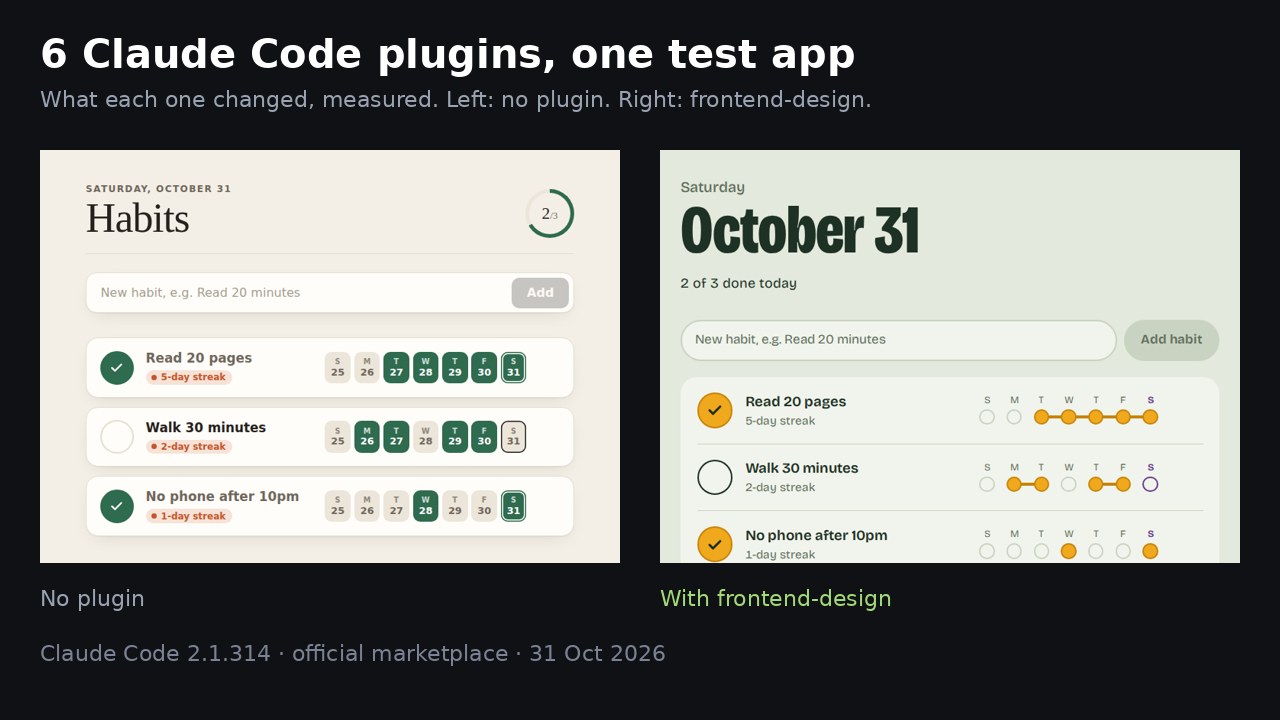
Install three free plugins with one command each. In our tests, Claude Code used them to redesign a page, to ask questions and write tests before finishing a feature, and to check its work in a browser. We tested 6 popular plugins from Anthropic's official marketplace on the same app, and these are the 3 we kept.
- Seconds to install each
- 6 steps
- Free plugins
Published · Updated
Start buildingWhat it does
We had Claude Code build a small habit tracker, then asked it this, once without plugins and once with frontend-design:
The habit tracker looks plain. Give it a proper design.
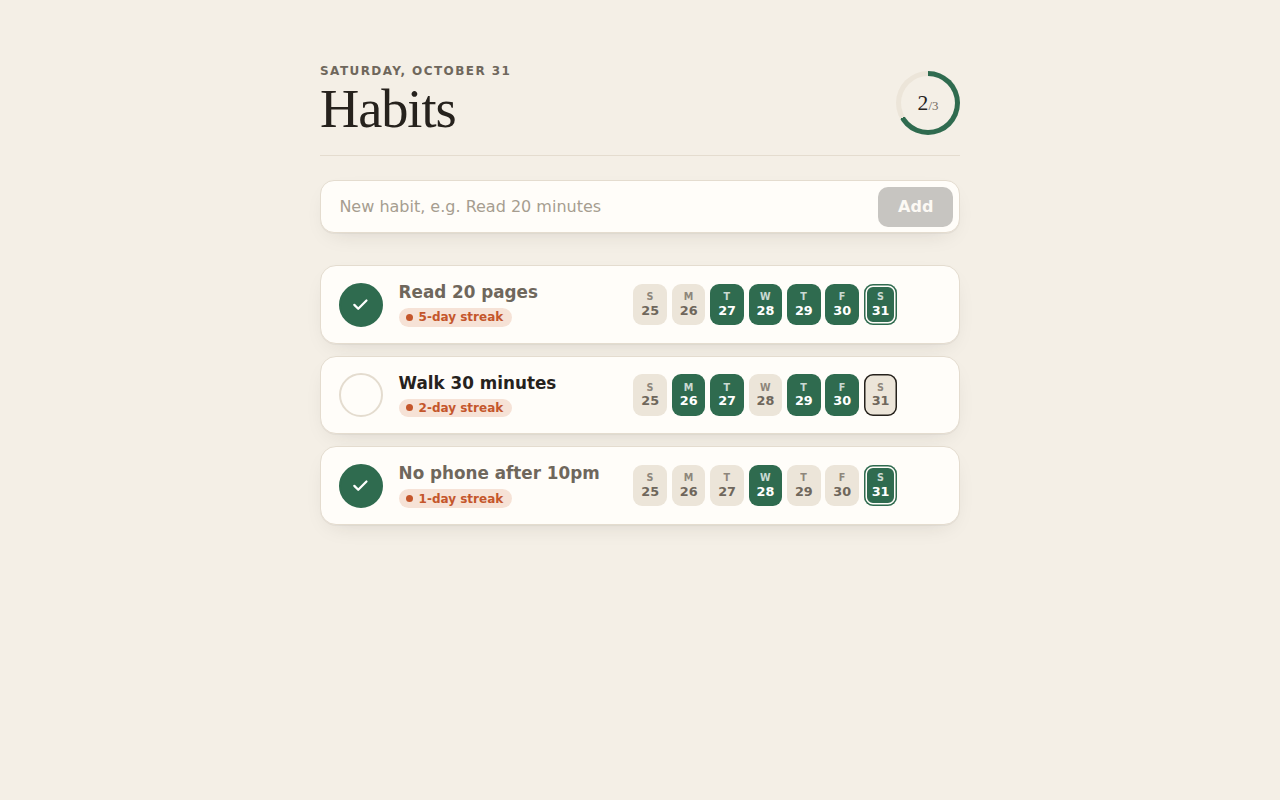
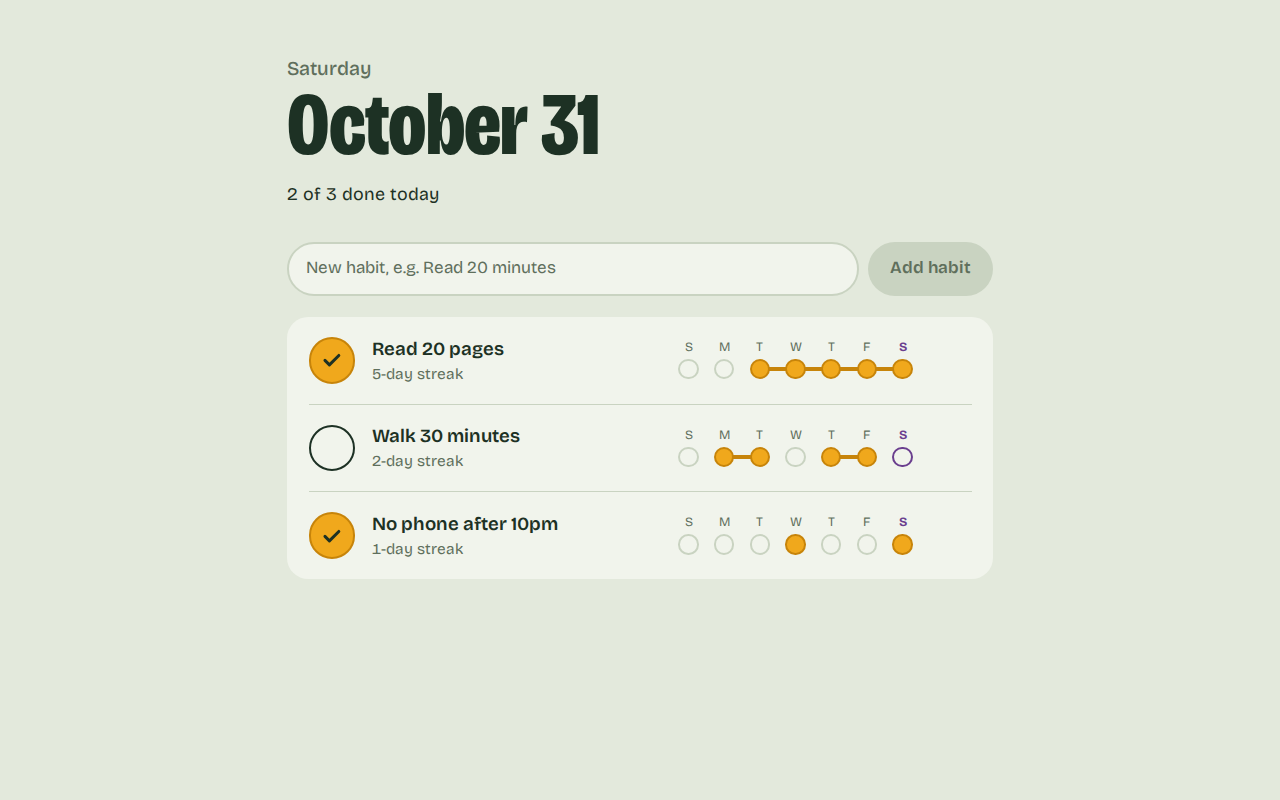
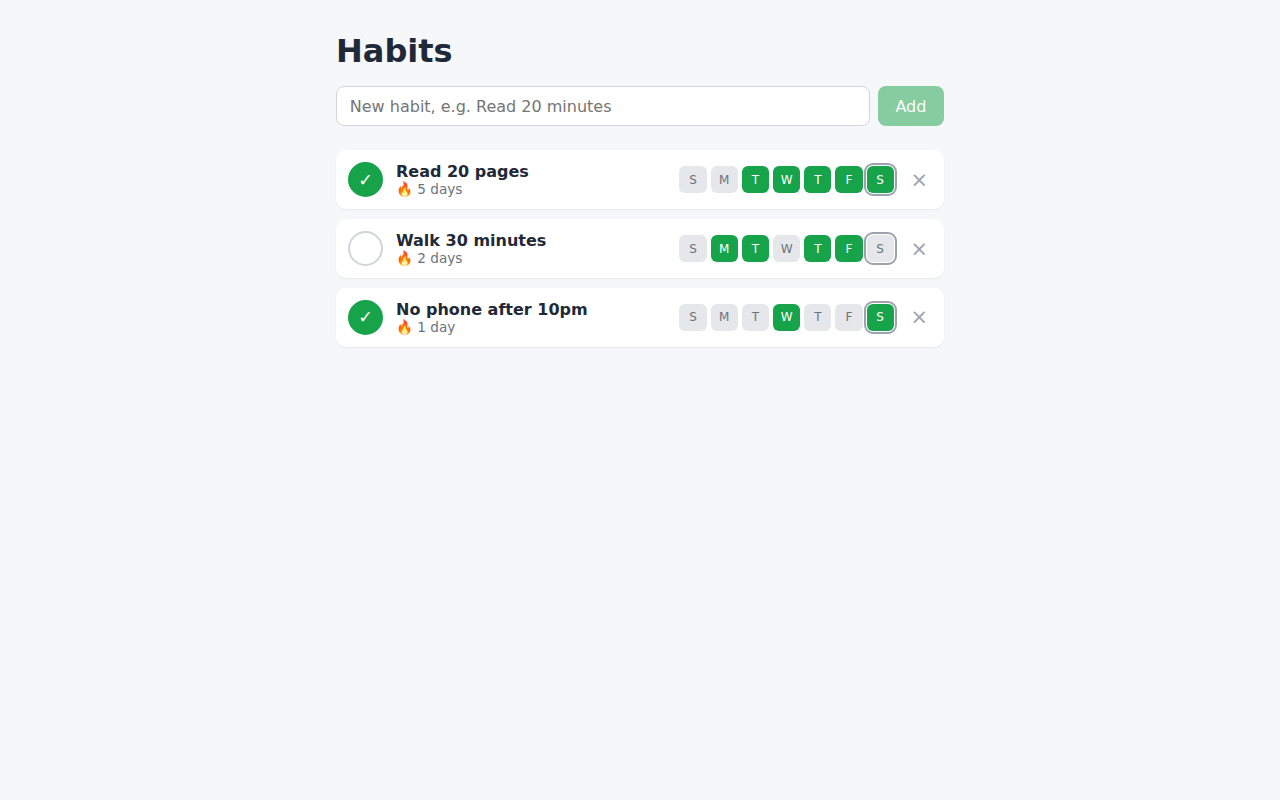
Without the plugin, Claude made a tidy "paper journal" look with system fonts and a progress ring. With it, Claude loaded the plugin's design skill first and built the page around "don't break the chain": each day is a bead, and done days in a row join into one bar. It also pulled in the Bricolage Grotesque font from Google Fonts. It took 8 seconds longer.
What you need
- Claude Code: use it in the terminal, where the install commands below run. It needs a paid Claude plan or API billing. Setup guide.
- Node.js: Playwright needs it. Get it here. We had v22.23.4.
- A project to try them on: any app works. Ours was a habit tracker Claude wrote from one prompt.
The steps
Step 1: Add the official marketplace
Do the steps in order. Steps 1 to 4 are one-time.
A marketplace is the catalogue Claude Code installs plugins from. Anthropic's docs say the official one is added the first time you open Claude Code in a terminal, but our fresh setup didn't have it. Check your list:
claude plugin marketplace list
If claude-plugins-official isn't there, add it:
claude plugin marketplace add anthropics/claude-plugins-official
Step 2: Install frontend-design
frontend-design adds a design skill. In our test, Claude loaded it before styling the page.
claude plugin install frontend-design@claude-plugins-official
Step 3: Install superpowers
In our test, superpowers made Claude ask two questions before building a feature, then write tests for it. It's slower and uses more of your plan, so save it for features you want tests for.
claude plugin install superpowers@claude-plugins-official
Step 4: Install playwright
With playwright, Claude can open your page in a browser and look at it.
claude plugin install playwright@claude-plugins-official
Tip: plugins install for you in every project. Add --scope project to save one in the repository's .claude/settings.json instead. Once you commit that file, each collaborator runs claude plugin install <name>@claude-plugins-official --scope project once on their own machine.
Step 5: Restart and check
Close Claude Code and start it again so the plugins load. To see what a plugin added, run:
claude plugin details superpowers@claude-plugins-official
It lists the plugin's skills, hooks and servers, and the tokens it adds to every session: about 848 for superpowers, 80 for frontend-design and 0 for playwright.
Step 6: Ask for something on your app
Type what you want the way you'd say it. In our runs, Claude used the plugins without being told to. These are the prompts we used:
Add a weekly goal to each habit, like 5 out of 7 days, and show how close I am.
Add a dark mode that follows the system setting. Check it looks right.
Tip: with superpowers on, Claude may stop and ask you questions first. Answer them in plain words.
What the other two changed
superpowers asked first, then wrote tests
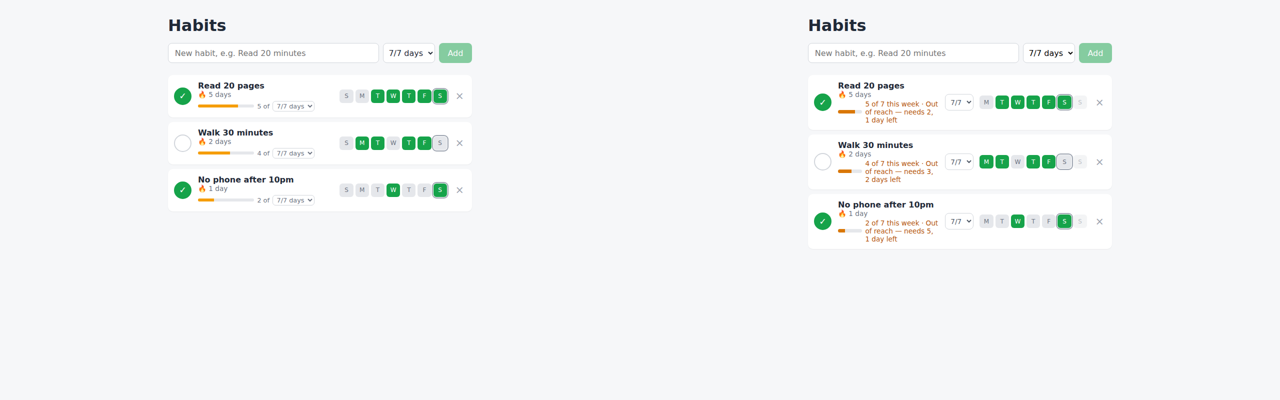
For the weekly goal, Claude without the plugin built it in one go: a dropdown per habit and a bar reading "3 of 5/7 days", counted over the last 7 days. No questions, no tests.
With superpowers, Claude stopped after 7 seconds and asked what "how close I am" should mean partway through a week. We answered:
Both: show 3 of 5 done, and how many more I need in the days left this week.
It asked which day the week starts on. We answered:
Monday. Existing habits start at 7. Looks good, go ahead and build it.
Then it added Vitest and wrote 15 tests, and all of them pass. It opened the app in a headless browser, saw a squashed progress bar and fixed it. Each row now reads like 3 of 5 this week · 2 more in 3 days left, and says so when the goal is out of reach. It took 137 seconds over 3 messages and cost $1.05 at API rates, against $0.31 for the plain run. Part of that gap comes from our two answers, which gave it rules the plain run had to guess.
playwright checked the page in a browser
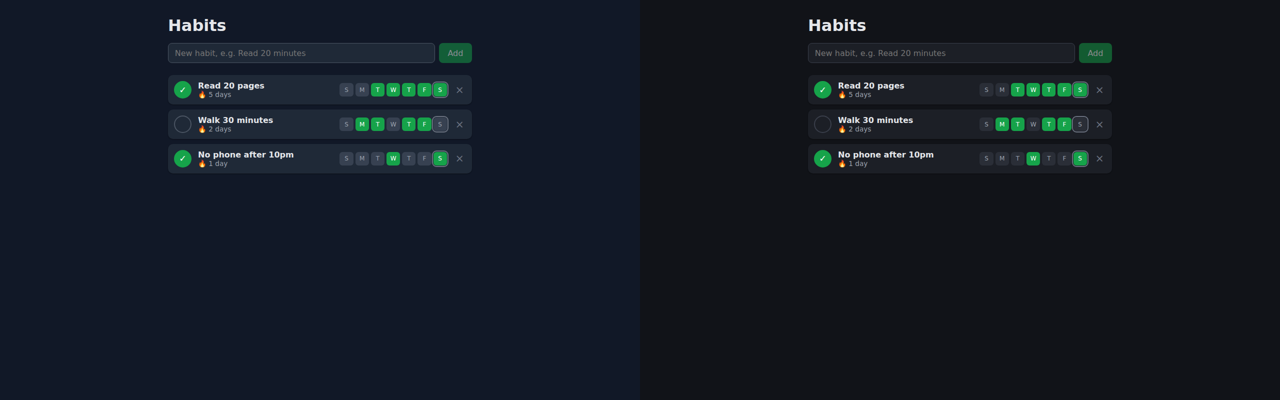
For dark mode, Claude used the plugin to switch the browser to dark mode, took 3 screenshots, and added a tag that stops a white flash when the page loads on a dark system. The dark mode itself came out much the same with and without the plugin, because our server already had Playwright for Python and the plain run used it for its own screenshots. The plugin changed how Claude looked at the page and added that one fix. On our server it needed a fix before it could open a browser (see "If something looks off").
Ask for changes in normal words
You don't need to name the plugins. Ask like this:
The [page or screen] looks plain. Give it a proper design.
Add [feature] to [part of the app], and show me how it works.
Open the page in the browser and check it looks right on a phone-sized screen.
Make the design calmer: fewer colours and more space between items.
The three we didn't keep
security-guidance and typescript-lsp ran but made no visible change on our small app. Context7 couldn't connect, so we couldn't test it.
security-guidance found nothing to fix
We asked for notes with links and bold text, then for the risky version:
Let me add a note to each habit. Notes can have links and bold text.
Show each habit's name with innerHTML so I can use <b> tags in names.
Both times, with and without the plugin, Claude kept typed text from running as code: it only made http, https and mailto links clickable, and escaped everything except <b>. The plugin's review ran when Claude finished and found 0 issues each time. On its first start it also built a 373 MB Python environment in the Claude folder, and its reviews run on your Claude sign-in.
claude plugin install security-guidance@claude-plugins-official
typescript-lsp went unused
Rename the habit's name field to title everywhere. Old saved habits must still load.
Same time, same 5 turns, same result, and Claude never called the language server. When we asked it to ("Use the language server to find every place the Habit type is used, then add a createdAt date to it."), it called it twice, found the 4 uses in one file, said the project wasn't fully indexed and went back to plain text search. On a 5-file app, text search was enough.
The plugin also needs the TypeScript language server. Its README gives npm install -g typescript-language-server typescript. We installed the same two packages into a separate folder with npm install --prefix . typescript-language-server typescript and put its node_modules/.bin on PATH.
claude plugin install typescript-lsp@claude-plugins-official
context7 wouldn't connect
Upgrade this project to the latest Vite and React versions and make sure it still builds.
Context7 feeds Claude current library docs. Its description says it "works anonymously out of the box", with an API key only for higher rate limits. On 31 Oct 2026 its server answered our runs and a plain curl request with 401 Authentication required, and Claude Code listed it as needs-auth. Both runs read the latest versions from npm and upgraded to Vite 8.3.5 and React 19.3.1 in 5 turns. It may work for you on another day.
claude plugin install context7@claude-plugins-official
See what a plugin adds
Plugins can run code on your computer with your user permissions (Anthropic's note), and official ones update themselves. To list a plugin's parts without installing it, point Claude Code at the copy of the marketplace it has already downloaded:
claude --plugin-dir ~/.claude/plugins/marketplaces/claude-plugins-official/plugins/security-guidance plugin details security-guidance
For security-guidance, that showed 4 hooks: SessionStart, UserPromptSubmit, PostToolUse and Stop.
Remove a plugin
Run this with the plugin's name:
claude plugin uninstall context7@claude-plugins-official
If something looks off
It can't find the marketplace
Run claude plugin marketplace add anthropics/claude-plugins-official first, then install again.
Playwright says Chrome is not found
It looks for Google Chrome, and our server had none, so the error was Chromium distribution 'chrome' is not found at /opt/google/chrome/chrome. Install the browser it can use, then start Claude Code with these settings. This worked for us on 31 Oct with @playwright/mcp 0.0.83, the version @latest gave us then (we ran it as claude -p). The install line uses @latest because the plugin always starts @playwright/mcp@latest, and each version wants its own browser build. On 31 Oct the newest was 0.0.84, and it accepted the same install line in a dry run. install-browser doesn't show in --help, and --help lists the browser values chrome, firefox, webkit and msedge, but chromium is the value that worked for us. The download is 119 MB, and PLAYWRIGHT_BROWSERS_PATH keeps it in one folder. Headless mode is there because our server has no screen.
export PLAYWRIGHT_BROWSERS_PATH="$PWD/browsers"
npx @playwright/mcp@latest install-browser chrome-for-testing
export PLAYWRIGHT_MCP_BROWSER=chromium PLAYWRIGHT_MCP_HEADLESS=true
claude
Plugins I never installed show up
claude plugin list shows them under "Synced from claude.ai". They come from your claude.ai account. To switch them off, add "syncClaudeAiPlugins": false to Claude Code's settings.json.
Context7 says needs-auth
Its server refused the connection. Try again later, or add a Context7 API key, which its description lists as optional.
typescript-lsp does nothing
Check that typescript-language-server --version works in your terminal. Ours printed 6.0.2.
The first session after security-guidance is slow
It builds its Python environment once. That took about 10 seconds for us.
Credits
- Claude Code 2.1.314 by Anthropic, model claude-opus-5-5: not open source, needs a Claude plan or API billing.
- frontend-design, security-guidance and typescript-lsp: anthropics/claude-plugins-official, Apache-2.0, a licence file in each plugin's folder.
- playwright: runs @playwright/mcp by Microsoft, Apache-2.0.
- superpowers by Jesse Vincent, MIT.
- context7 by Upstash, MIT.
- typescript-language-server 6.0.2 and TypeScript 7.0.2, both Apache-2.0.
- The test app used React and Vite (both MIT) and, in the frontend-design run, the Bricolage Grotesque font from Google Fonts (SIL Open Font License).
- Why these 6: they sit near the top of the official install counts on claude.com/marketplace (frontend-design 1,134,112; superpowers 1,009,371; context7 417,801; playwright 319,887; security-guidance 241,800; typescript-lsp 212,522), and they come up again and again in r/ClaudeAI threads, such as a list post with 860 points and a question with 138 comments. code-review also ranks high, but it reviews GitHub pull requests, so it needs a GitHub account.
- Demo images: Playwright for Python 1.62.0 (Apache-2.0), FFmpeg 6.1.1 (LGPL/GPL) and DejaVu fonts.
How we tested
We picked 6 plugins with high install counts that come up often on r/ClaudeAI (see Credits). First, Claude Code built the habit tracker in an empty folder from the prompt below: 278 lines across 5 files in 53 seconds, with a passing build. We saved that as the starting point and gave Claude each task twice on a fresh copy, once with only that plugin on and once with every plugin off. Each number is one run, so a few seconds either way is noise, and a turn is one round of Claude thinking and using a tool.
Make a small habit tracker web app in this folder with Vite, React and TypeScript. I can add habits, tick them off for today, and see a 7-day streak for each one. Save everything in localStorage. Make sure npm run build passes.
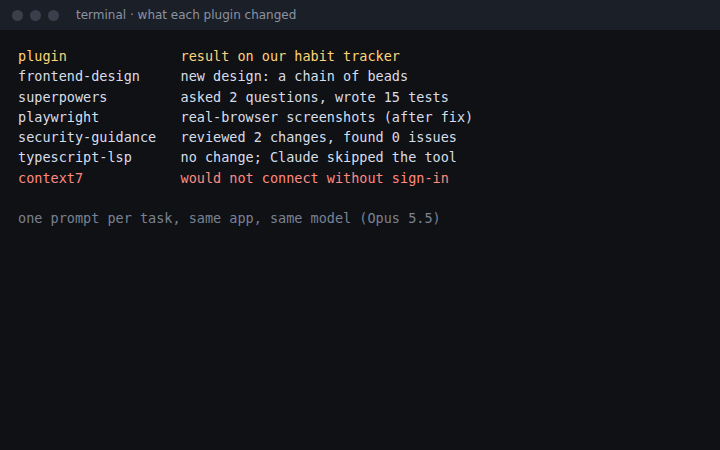
| Plugin | Without it | With it | What we found |
|---|---|---|---|
| frontend-design | 97 s, 13 turns | 105 s, 15 turns | Turned the week into a chain of beads |
| superpowers | 1 message, 67 s | 3 messages, 137 s, 15 tests | Asked first, then wrote tests |
| playwright | 47 s, 9 turns | 49 s, 18 turns, after a fix | Checked the page in a browser |
| security-guidance | 64 s | 73 s, its review found 0 issues | No visible change to the app |
| typescript-lsp | 28 s, 5 turns | 27 s, 5 turns | No visible change |
| context7 | 34 s, 5 turns | 28 s, same result | Server refused our connection |
Questions people ask
How do I install a Claude Code plugin?
In your terminal, run claude plugin install with the plugin name and its marketplace, for example: claude plugin install frontend-design@claude-plugins-official. Each one we tried installed in under 3 seconds and loaded the next time we started Claude Code.
Which plugin made the biggest difference?
frontend-design and superpowers. frontend-design gave our habit tracker a clearly different design from the same one-line prompt. superpowers asked 2 questions before building a feature, then wrote 15 tests for it. That made it slower: 137 seconds and 3 messages, against 67 seconds and 1 message without it.
Will plugins use up my plan faster?
Some do. claude plugin details shows the tokens a plugin adds to every session: about 848 for superpowers, about 80 for frontend-design and about 0 for the other four. Skills add more when Claude loads them. In our runs, Claude Code's usage report priced the superpowers task at $1.05 at API rates, against $0.31 without it, because it asked questions, wrote tests and took 27 turns instead of 13. security-guidance runs an extra review on your Claude sign-in each time Claude finishes.
Do I need an API key or another account?
The 5 that worked for us needed nothing beyond Claude Code, which needs a paid Claude plan or API billing. Context7 is meant to work without an account, but on 31 Oct 2026 its server refused our connection (401, needs-auth), so we couldn't test it.
How do I remove a plugin?
Run claude plugin uninstall with the plugin name and marketplace, plus --scope if you installed it at project or local scope.
Read it on your computer
Keep this guide for later.
We'll send you this page's link and the other free guides.