Free guide · from the Reel
A free Claude skill that turns a messy request into a full prompt
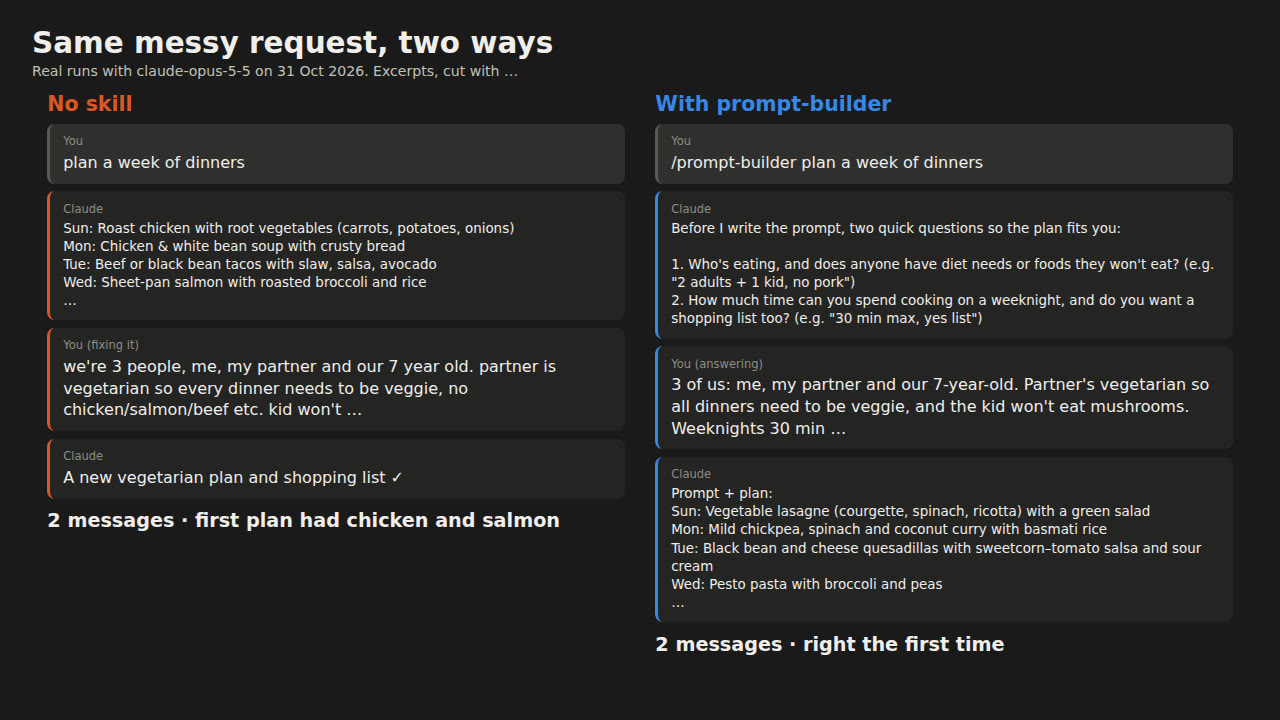
This guide gives you one Claude skill, prompt-builder. You type a rough request like "plan a week of dinners". The skill asks up to 2 questions when something important is missing, writes the full prompt (goal, context, input, format, limits), shows it to you, and runs it. We wrote 4 versions and ran the test chats in about 40 minutes, on a paid Claude plan, with nothing extra to pay.
- 1 free skill
- Tested on 5 tasks
- Messages and tokens counted
Published · Updated
Start buildingWe tested it in Claude Code with claude-opus-5-5 on 5 everyday jobs, 2 runs each, with and without the skill. A second Claude played the person: it knew the details the request left out, answered questions, and decided when an answer met that person's needs. Both ways took 17 messages. Without the skill, 7 of them were corrections, like "my partner is vegetarian". With it, 4 were short answers to Claude's questions and 3 were corrections. The skill used 25% more tokens. So it makes Claude ask before it guesses, but it won't stretch your limit by itself. The section on what uses up your limit covers what does.
What you need
- Claude Code, or the Claude app with Skills turned on. We ran Claude Code 2.1.314.
- The skill file below: one text file, 61 lines.
The steps
Step 1: Save the skill file
Make a folder called prompt-builder and save this inside it as SKILL.md. Keep the folder name and the name: line the same: the Claude app needs them to match, and in Claude Code the folder name is the default name.
---
name: prompt-builder
description: Turns a short, messy request into one complete prompt (goal, context, input, format, limits), then runs it. Use when someone types /prompt-builder or asks to build or fix a prompt.
---

# Prompt builder

The user gives you a rough request, often one line, sometimes with pasted text. Write the prompt they should have sent, then follow it, so the first answer is usable and they don't spend messages on retries.

## Step 1: Check what is missing

Read the request and any pasted text. For each part below, decide if you know it, can safely assume it, or must ask:

- Goal: what should come out, and what "done" looks like.
- Context: who reads or uses the result, where it goes (email, WhatsApp, a form, a spreadsheet), and the facts it depends on.
- Input: the text, data or files to work from.
- Output format: length, layout and file type.
- Limits: what must stay the same, what to avoid, tone.

Ask when a wrong guess would make the answer unusable. These usually are:
- Who it is for and where it will be posted, because length, layout and tone depend on it.
- What the reader should do next (for messages: reply, pay, confirm by a date).
- Facts only the user knows: which job, who eats the meals, which date format.

Ask at most 2 questions, in one short message, numbered, each answerable in a few words. If nothing important is missing, ask nothing and go to step 2.

If the user says "just guess" or skips a question, assume something sensible and list it under Assumptions.

## Step 2: Write the prompt

Write it in the user's language, as plain instructions. Use this shape and drop any heading that would be empty:

```
## Goal
One or two sentences, starting with a verb.

## Context
Who it is for, where it goes, why, and the facts that matter. Give the reason behind rules.

## Input
Point to it: "the email I pasted above". Don't copy it.

## Output format
Exactly what to return: length, layout, what to put first.

## Limits
What to keep, what not to change or invent, tone.

## Assumptions
Only if you guessed something. One line each.
```

Rules:
- Don't copy the user's pasted text into the prompt. It is already in the chat, and copying it repeats the same text in Claude's reply. If the user wants a prompt to reuse later, write "[paste your text here]" instead.
- Ask only for what the user asked for. Don't add extras (recipes, options, explanations); longer answers use more of their limit.
- Ask for the finished thing, with no [placeholders].
- Keep the prompt short: about 150 words is enough for most tasks.

## Step 3: Show it, then run it

Put the prompt in one code block so the user can copy and reuse it. Then, in the same reply, under a line "Result:", do the task exactly as the prompt says. If the user asked only for the prompt, stop after the code block.
The format follows Anthropic's Skills in Claude Code page and the Agent Skills overview. The description stays under the 200 characters the Claude app allows.
Step 2: Add it to Claude Code
Go to the folder where you start Claude Code, the one that holds your prompt-builder folder, and copy the folder under .claude/skills/:
mkdir -p .claude/skills
cp -r prompt-builder .claude/skills/
To use it in every project, Anthropic's docs say to put the folder in ~/.claude/skills/ instead.
Step 3: Add it to the Claude app
Zip the folder so the ZIP holds the prompt-builder folder itself, not just the file:
python3 -c "import zipfile; z=zipfile.ZipFile('prompt-builder.zip','w'); z.write('prompt-builder/SKILL.md'); z.close()"
Then, per Anthropic's help page: turn on code execution under Settings > Capabilities ("Code execution and file creation", or "Create and edit files" in the newer layout). Go to Customize > Skills, click +, then "+ Create skill", then "Upload a skill", and pick the ZIP.
Step 4: Use it
In Claude Code, type /prompt-builder, then your request the way you'd normally say it. Paste any text it should work on below the request. In the Claude app, ask in plain words, for example "use prompt-builder to turn this into a full prompt: plan a week of dinners". Anthropic's overview says Claude uses a skill automatically when your request matches its description.
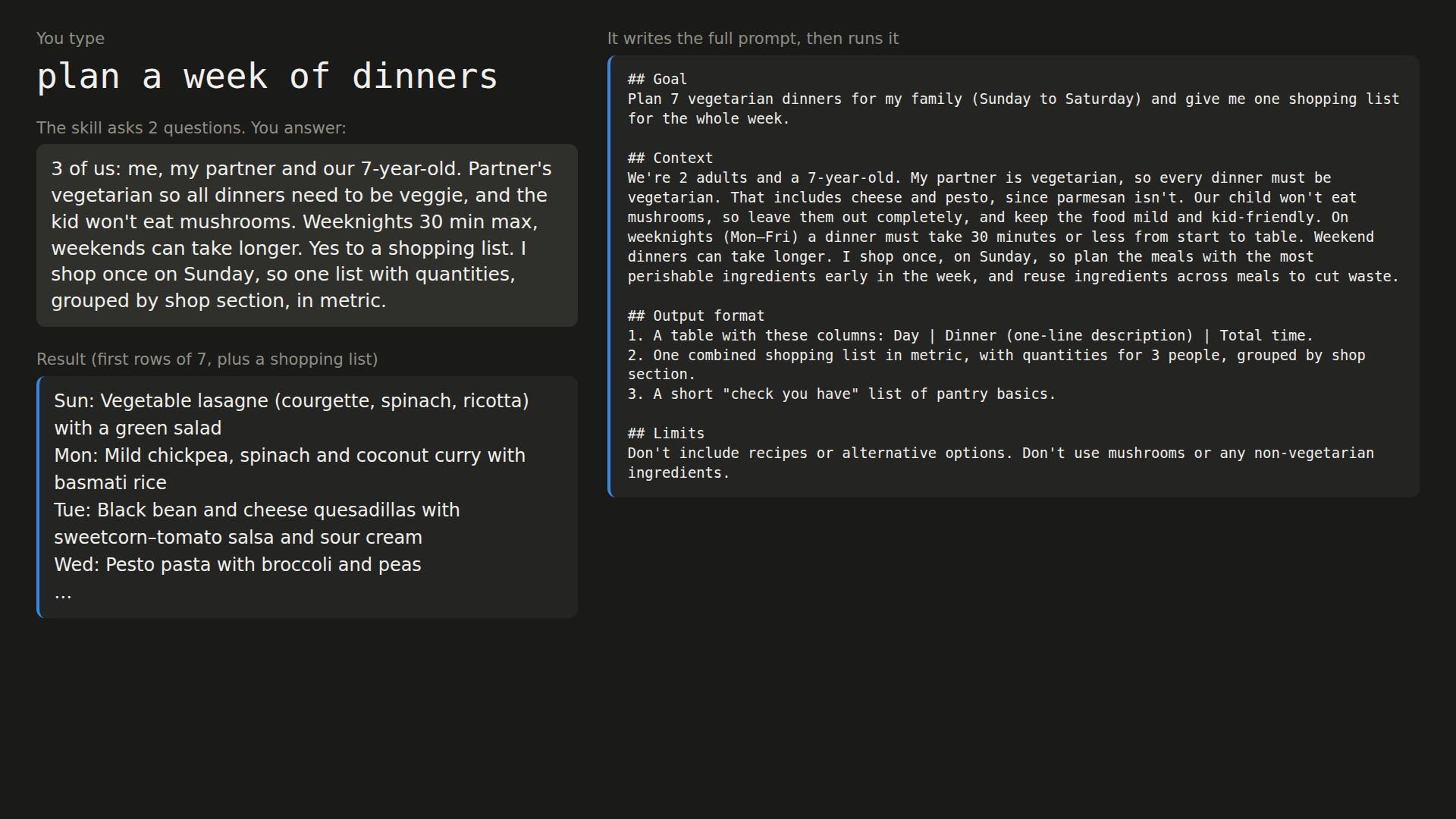
/prompt-builder plan a week of dinners
In our run Claude replied with 2 questions:
1. Who's eating, and does anyone have diet needs or foods they won't eat? (e.g. "2 adults + 1 kid, no pork")
2. How much time can you spend cooking on a weeknight, and do you want a shopping list too? (e.g. "30 min max, yes list")
We answered in one line. Claude then showed this prompt and ran it in the same reply:
## Goal
Plan 7 vegetarian dinners for my family (Sunday to Saturday) and give me one shopping list for the whole week.

## Context
We're 2 adults and a 7-year-old. My partner is vegetarian, so every dinner must be vegetarian. That includes cheese and pesto, since parmesan isn't. Our child won't eat mushrooms, so leave them out completely, and keep the food mild and kid-friendly. On weeknights (Mon–Fri) a dinner must take 30 minutes or less from start to table. Weekend dinners can take longer. I shop once, on Sunday, so plan the meals with the most perishable ingredients early in the week, and reuse ingredients across meals to cut waste.

## Output format
1. A table with these columns: Day | Dinner (one-line description) | Total time.
2. One combined shopping list in metric, with quantities for 3 people, grouped by shop section.
3. A short "check you have" list of pantry basics.

## Limits
Don't include recipes or alternative options. Don't use mushrooms or any non-vegetarian ingredients.
It also caught something we never mentioned: parmesan isn't vegetarian, so the shopping list says "vegetarian hard cheese". Without the skill, the same one-line request got a plan with chicken and fish in both of our no-skill runs. That plan was fine for a family with no rules, but not for ours, so the next message had to explain.
You don't have to type the slash. We also asked "can you turn this into a proper prompt: plan a week of dinners", and Claude picked the skill by itself and asked the same 2 questions.
The test
We chose 5 jobs people often bring to Claude (sources in the credits) and wrote all the inputs ourselves, all fictional:
| Job | What we typed |
|---|---|
| "make this email less rude" + an angry 70-word email to a late supplier | |
| Meeting | "summarise this meeting" + a 420-word community garden call |
| CSV | "fix my csv" + 12 lines with mixed date formats, $ signs, a duplicate and a blank row |
| Dinners | "plan a week of dinners" |
| Cover letter | "write a cover letter from my cv" + a short CV |
Before any run, we wrote down for each job what the person knows but didn't type (the email goes to a supplier they want to keep, the summary goes in a WhatsApp group, the partner is vegetarian, the job ad), plus 5 points the answer had to meet.
Each chat was a claude -p call with connectors off and one tool, Claude Code's skill tool, switched on in both groups. A second claude -p call played the person. It saw only the hidden facts, the 5 points and the chat. It answered Claude's questions, stopped when all 5 points were met, or wrote a follow-up of 1 to 3 sentences. We read every transcript.
Messages until the answer met all 5 points, run 1 and run 2:
| Job | No skill | With the skill | Corrections (no skill → skill) |
|---|---|---|---|
| 1 and 1 | 1 and 1 | 0 → 0 | |
| Meeting | 2 and 3 | 3 and 2 | 3 → 3 |
| CSV | 1 and 1 | 1 and 1 | 0 → 0 |
| Dinners | 2 and 2 | 2 and 2 | 2 → 0 |
| Cover letter | 2 and 2 | 2 and 2 | 2 → 0 |
| Total | 17 | 17 | 7 → 3 |
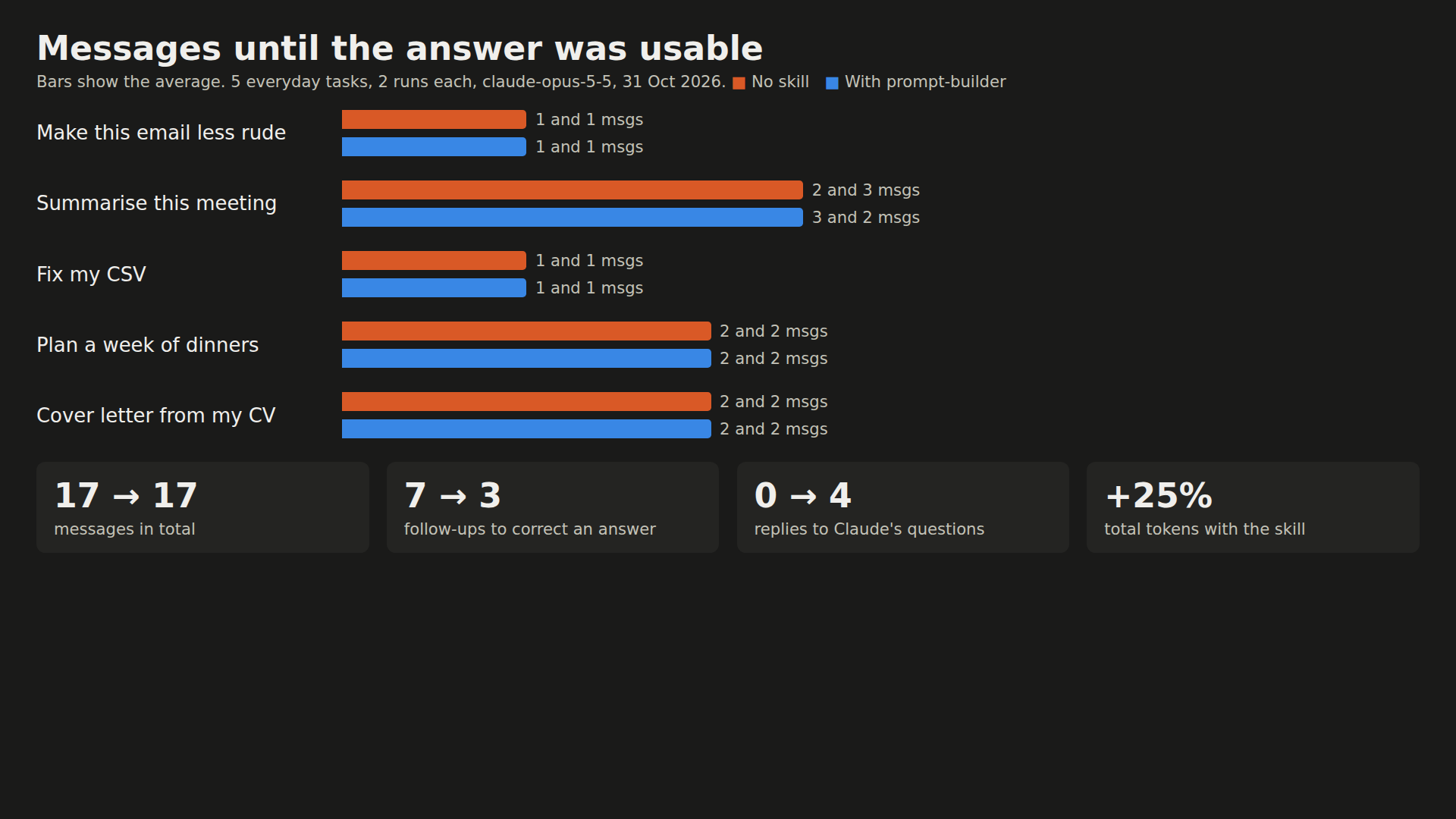
On dinners and the cover letter, the skill traded a correction for a question. Without it, both cover letters came back with [Company Name] and [Job Title] gaps, because the job ad was never pasted. With it, Claude asked which job first. Same number of messages, but the first full answer was the one we could use.
On the email and the CSV, the skill changed nothing: Claude got them right the first time either way. It even read 03/02/2026 as 3 February without being told, because the order numbers ran in sequence. The meeting summary needed corrections both ways, because the short WhatsApp version kept dropping an owner or a date.
Tokens
| No skill | With the skill | |
|---|---|---|
| Output tokens (what Claude wrote) | 23,727 | 24,604 |
| Total tokens, as Claude Code reported them | 106,610 | 133,409 (+25%) |
The skill's instructions, its questions and the prompt it shows all add tokens. In chats this short, they added more than the corrections saved. Anthropic's help pages say message length, chat length, model and tools all affect your limit, but they don't say how tokens map to your plan, so read these as a rough guide.
Four versions
The file above is version 4. Earlier versions taught us what to cut:
| Version | What changed | Messages (10 runs) |
|---|---|---|
| v1 | Built the prompt; you pasted it into a new chat | 27 |
| v2 | Shows the prompt and runs it in the same reply; asks only for what you asked for | 16 |
| v3 | Points to your pasted text instead of copying it; always asks where a summary or message goes | 18 |
| v4 | v3 without the "always ask" line | 17 |
Version 1 needed more messages than no skill on all 5 jobs. Pasting the prompt into a new chat always cost an extra message, and it padded the dinner prompt with full recipes, so that answer ran to about 16,000 output tokens. Versions 2 to 4 are within 2 messages of each other.
What uses up your Claude limit
Anthropic doesn't give a fixed number of messages. Your allowance depends on your plan and on how you use Claude, and the pages we read give no figures for any plan. They do say what makes it run out faster. We checked these pages on 31 Oct 2026, and plans change.
Every message re-reads the chat so far. Claude Code's docs say it "sends your full conversation with every request", so a one-line question late in a long session still draws usage for the whole conversation (Manage costs). The help center lists "current conversation length" as a factor in the Claude app too (Usage limit best practices). So a wrong first answer keeps costing: every later message carries it along.
Big uploads and long messages count. "File attachment size" and "message length" are on the same list. If you use the same files again and again, put them in a Project: project content "is cached and counts less against your limits when reused" (Usage limit best practices).
The model and the effort level count. Both help pages list them (How usage and length limits work). For Claude Code, Anthropic says Sonnet "handles most coding tasks well and costs less than Opus". Keep Opus for hard reasoning, and switch with /model (Manage costs).
Tools, connectors and agents count. Research, web search, artifacts, running code and creating files are all on the list, and "tools and connectors are token-intensive", so turn off connectors you don't use (How usage and length limits work). In Claude Code, each subagent sends its own requests. Agent teams use "approximately 7x more tokens" than a normal session when teammates run in plan mode. A vague request like "improve this codebase" makes Claude scan widely (Manage costs).
One limit covers everything. Claude on the web, Claude Code and the desktop app "count towards the same usage limit". On most plans the session limit resets five hours after your first message, and the weekly limit once a week (How usage and length limits work). Anthropic says verified Ultra accounts don't have the five-hour limit (Usage limit best practices).
Start a new chat when you switch jobs. Anthropic's own advice is to "try starting a new conversation if you're approaching your usage limit in a longer chat" (How usage and length limits work). In Claude Code, use /clear between unrelated tasks. /compact keeps a summary, but it reads the whole chat to make it, so it is a large request itself. /usage shows what is using your plan (Manage costs).
What our test doesn't cover
Two runs per job, with a Claude playing the person, is a first look. We tested in Claude Code only, so the app upload, long chats and other models are untested.
If something looks off
- Skill doesn't show up: in Claude Code, check the path is
.claude/skills/prompt-builder/SKILL.mdin the folder you started Claude in. Then start a new Claude Code session, because a skill added mid-session may not load. In the app, Anthropic's help page lists the usual causes: the ZIP has the file at its root instead of the folder, the folder name doesn't match the skill name, or code execution is off. - App rejects the file name: Anthropic's help page writes
skill.md, while its developer docs and its own skills on GitHub useSKILL.md. We usedSKILL.md. If the upload fails on the name, try renaming it. - It guesses instead of asking: on our meeting job it assumed the summary was for "an email or a group chat" instead of asking, and the first version still needed changes. Say it in your request ("for our WhatsApp group, under 150 words") and it uses that.
- Answer much longer than you wanted: our first version added full recipes to a dinner plan. Check the "Output format" lines in the prompt it shows you, and say "no recipes" or "table only".
- "Not logged in" from
claude -pinside another Claude Code session: this happened in our test setup, because the outer session uses its own settings folder. Running it from a normal terminal works. - Gmail, Slack or Notion show up in a
claude -ptest: those are your claude.ai connectors. For a clean test we added--strict-mcp-configand setENABLE_CLAUDEAI_MCP_SERVERS=false.
Credits and licences
- Claude Code 2.1.314 by Anthropic, model claude-opus-5-5: not open source, needs a Claude plan or API billing.
- Playwright for Python 1.62.0 (Apache-2.0), Chromium 151 (BSD-3-Clause), FFmpeg 6.1.1 (LGPL/GPL) and the DejaVu fonts (free licence) for the demo images.
- The skill, the test inputs and the test script are ours. Use, copy and change them freely.
- Why these 5 jobs: people ask Claude and ChatGPT to make emails "sound nicer / polite" (HN), to summarise meeting transcripts (HN), to plan meals around which kid won't eat what (HN), and to write cover letters, which don't work "from just the resume" (HN). Claude's help page lists processing CSV files (Anthropic). Almost two thirds of ChatGPT writing requests are to edit text the user already has (The Register on NBER paper w34255).
- Why limits: the Hacker News thread on Claude Code weekly rate limits drew 609 points and 705 comments. One comment there describes people using Claude "like a slot machine", sending broad "do better" follow-ups when the first answer misses.
- The prompt shape follows Anthropic's prompting best practices ("If they'd be confused, Claude will be too") and the goal, context, example and format parts from our own how to prompt page.
Questions people ask
Will this skill stop me hitting my Claude limit?
Not on its own. In our test it took the same number of messages as no skill (17 each over 10 runs) and 25% more tokens in total. That total includes the skill's instructions, its questions, the prompt it writes and the answers. What it changed was the order: Claude asked first instead of guessing and being corrected. To use less of your limit, see "What uses up your Claude limit" below.
Does it work in the Claude app or only in Claude Code?
The same SKILL.md follows Anthropic's format for both. In the app you upload it as a ZIP under Customize > Skills, with code execution turned on. Our tests ran in Claude Code.
Do I need a paid Claude plan?
Claude Code needs a paid plan or API billing. For the Claude app, Anthropic's help page lists Skills on Free, Pro, Max, Ultra, Team and Enterprise, while its developer docs list custom skills on Pro and up.
When is the skill worth using?
When the details that matter are in your head and not in the chat: who eats the meals, which job the cover letter is for, where a summary will be posted. When you paste everything Claude needs, as with our CSV, plain Claude got it right on the first try and the skill added nothing.
Read it on your computer
Keep this guide for later.
We'll send you this page's link and the other free guides.