Pro guide · from the Reel
7 Claude skills for YouTube creators, tested on two videos
These are 7 Claude skills for the work after the edit: titles, the description with chapters, a Shorts clip list, a thumbnail brief, a community post and comment replies. You paste your transcript, type something like "chapters for this pls", and get text in your own format that goes straight into YouTube Studio. A skill is a short text file of instructions that Claude reads when your request matches it, so you set your format once instead of retyping it every upload.
- 7 tested skills
- Claude app and Claude Code
- Messages 67 to 34 in our test
Published · Updated
See what you getGet everything free.
The first 150 readers get the whole guide and the kit free with their email. After that it is $12, one payment, no subscription. Price as of October 2026.
- 7 tested skill folders: yt-titles, yt-description, yt-chapters, shorts-clips, thumbnail-brief, community-post, comment-replies
- install.sh: one paste installs all 7 in Claude Code without overwriting your edits
- One ZIP per skill for the Claude app upload, plus make_zips.py to rebuild them after you edit
- Two example transcripts, two comment batches and the 14 requests we tested with
- README with every step, SOURCES.md with the YouTube Help pages behind each rule, and LICENSES.md
Access terms as of October 2026.
Free places are still open. Enter your email and we send your link.
Lost your link?
Enter the email you used for access. Your existing links keep working.
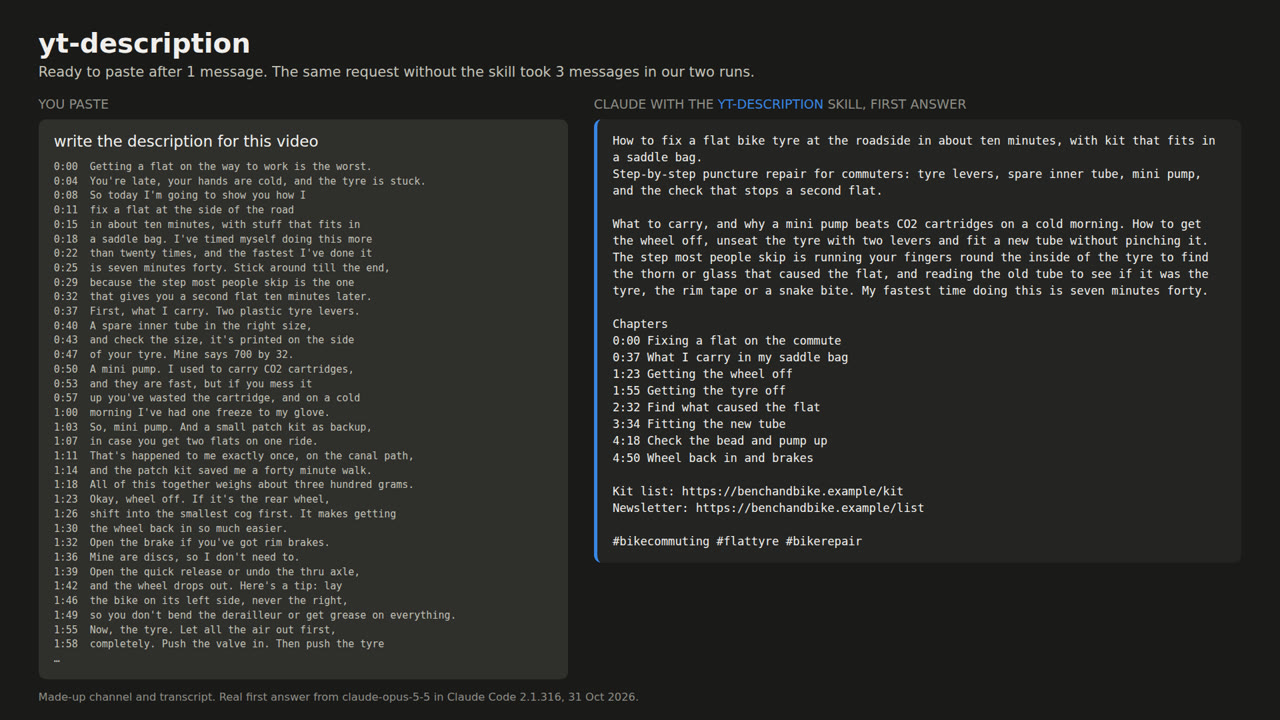
For example, we pasted the transcript of a 6-minute flat-tyre tutorial (a made-up channel, Bench & Bike, run by a made-up creator, Sam, with a script we wrote) and typed "write the description for this video". With the yt-description skill installed, Claude's first answer had the search words up front, eight chapters with times copied from the transcript, the channel's two links and three hashtags. Without the skill, where the request didn't spell out that format, the same request took 3 messages in both of our runs.
It took us about an hour and a half to build and test. The kit is a one-time purchase; running the skills uses your normal Claude plan.
What you get
| Skill | You type | You get |
|---|---|---|
| yt-titles | "give me some title ideas for this one" + transcript | 3 titles under 60 characters, each with its count, and one pick |
| yt-description | "write the description for this video" + transcript | Opening lines with search words, a short summary, chapters, your links, 3 hashtags |
| yt-chapters | "chapters for this pls" + transcript | 0:00 Title lines that meet YouTube's chapter rules |
| shorts-clips | "which bits of this would work as shorts?" + transcript | 3 clips with cut times, length, the opening line and on-screen text |
| thumbnail-brief | "thumbnail ideas for this? title is ..." + transcript | 2 concepts: words on the image, what's in the frame, your face, your colours |
| community-post | "community post to push this one" + transcript | A poll post: short text ending in a question, 3 or 4 answers under 65 characters |
| comment-replies | "help me reply to these comments" + comments | Reply, heart only or skip for each comment |
Each skill is one text file of 29 to 42 lines with a "Your settings" block at the top for your channel, links, hashtags, brand colours, sign-off and spelling. The kit also has an install script for Claude Code, a ZIP of each skill for the Claude app, our two test transcripts and a README.
The demo
All three answers below are Claude's real first reply to a plain request, with no slash command. The channel and both videos are made up: a flat-tyre tutorial and a month of commuting by e-bike.
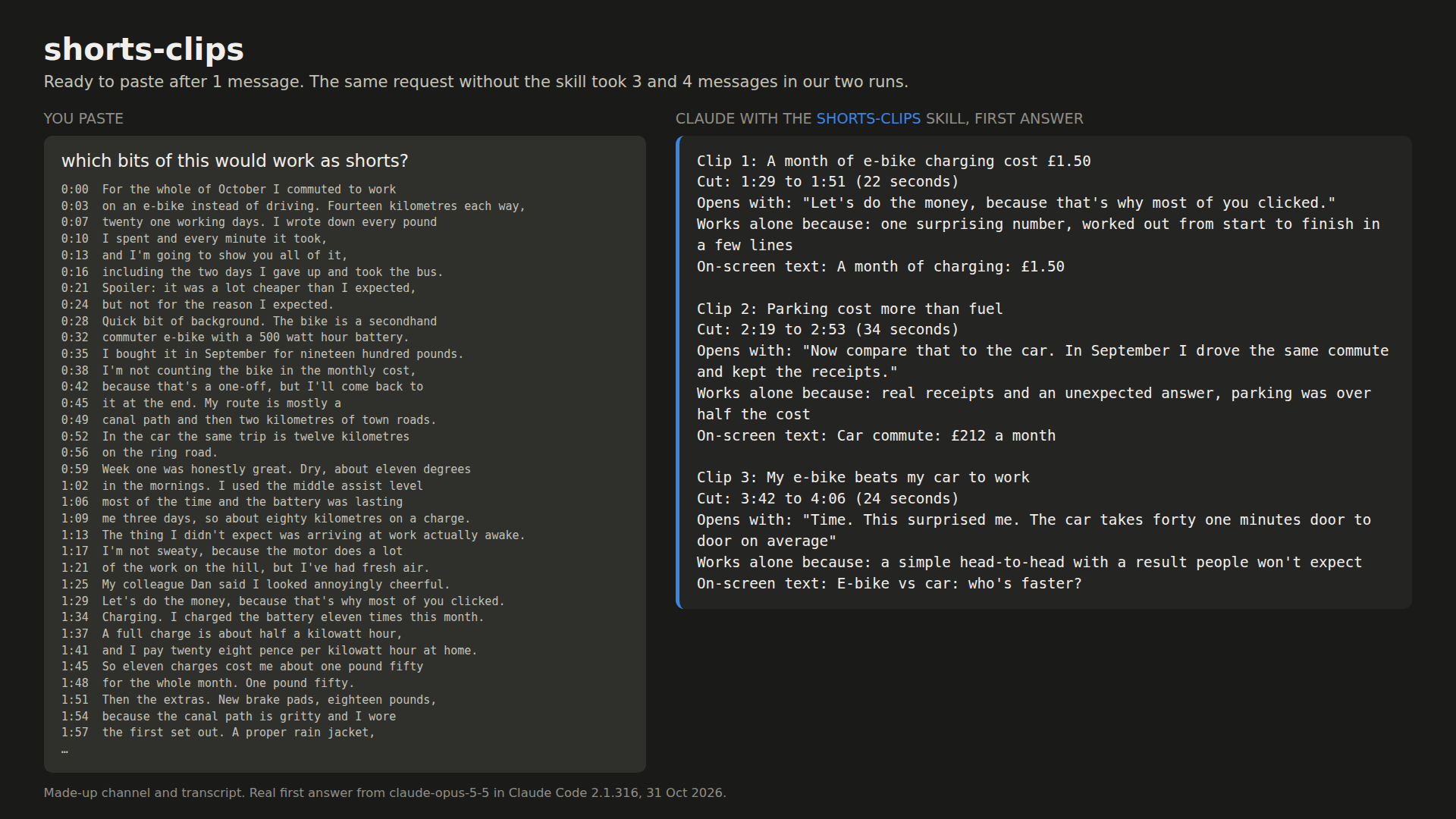
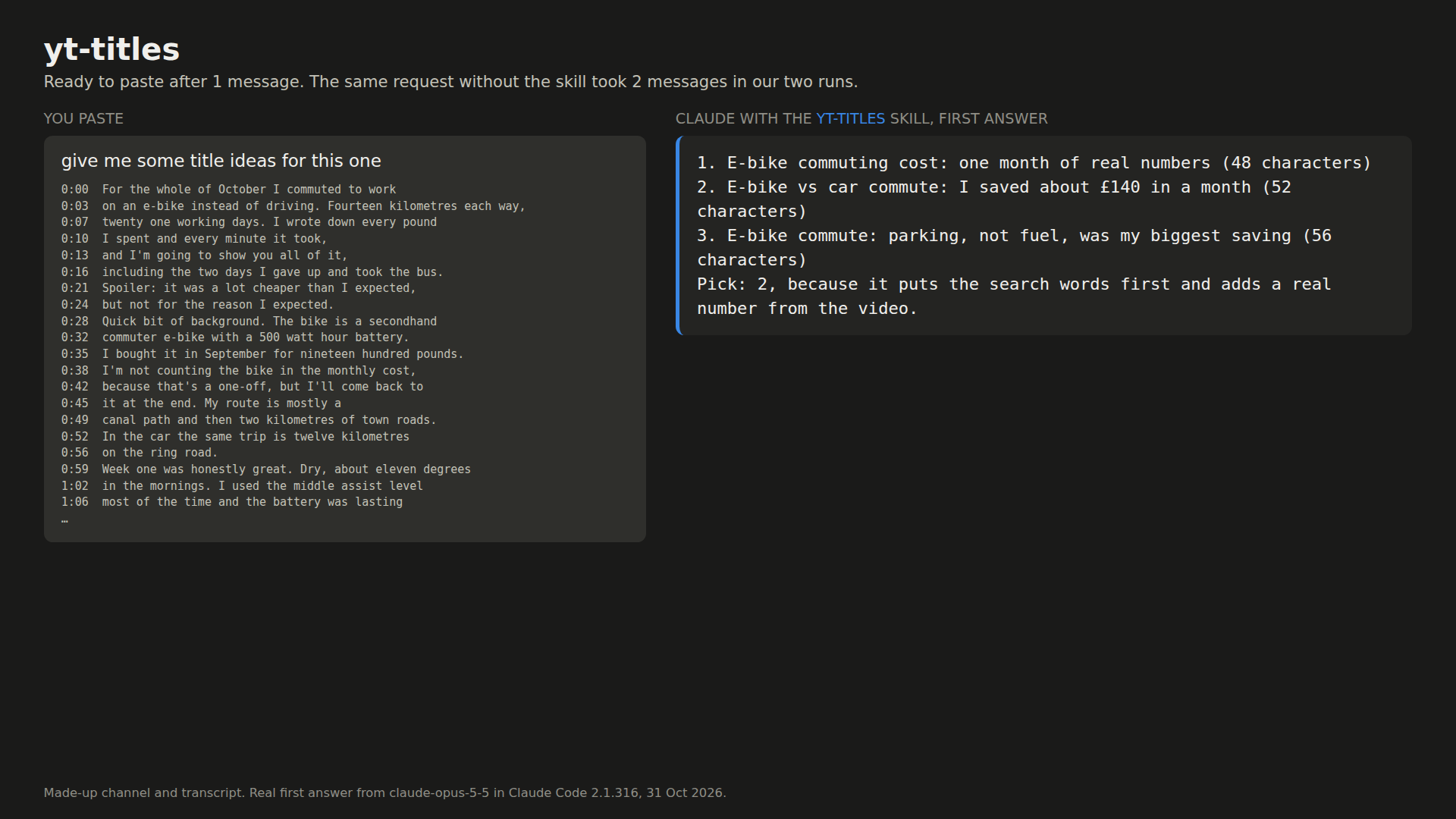
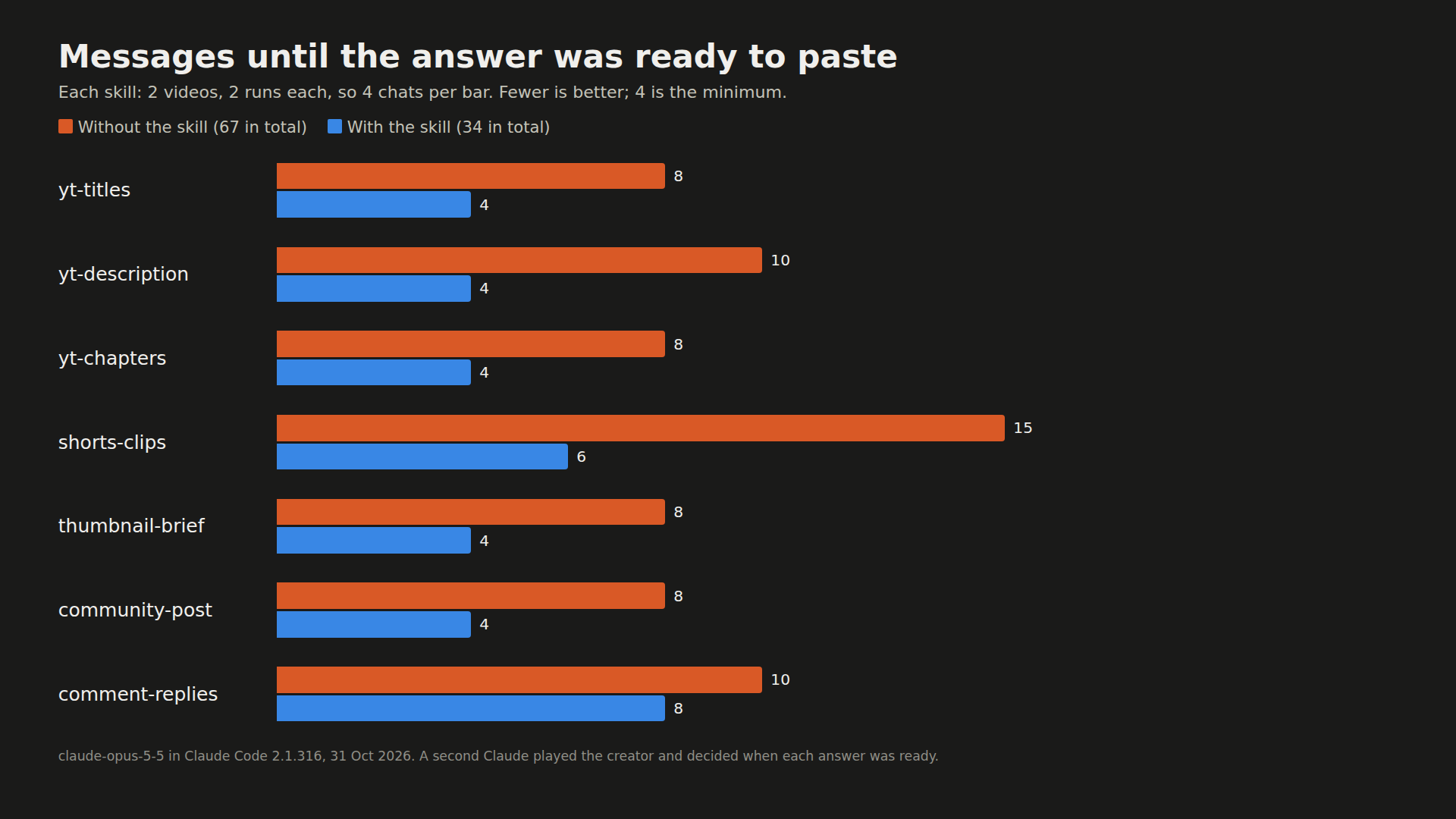
Messages until the answer was ready to paste, per skill. Each bar is 4 chats, so 4 is the best possible score:
What you need
- Claude Code (we ran 2.1.316), or the Claude app with code execution turned on.
- A Claude plan. Claude Code needs a paid plan or API billing; for the app, see the FAQ.
- A transcript of your video with timestamps. YouTube shows the transcript of any video that has captions, automatic ones included (YouTube Help). If yours has none yet, export captions or a transcript from your editing app instead; any layout with a timestamp before each line works.
- The kit, or for step 1, only the file below.
The steps
Step 1: Install the chapters skill and try it
Make a folder called yt-chapters and save this inside it as SKILL.md. The folder name has to match the name: line.
---
name: yt-chapters
description: Turns a timestamped YouTube transcript into chapters that meet YouTube's rules, ready to paste into the description. Use when asked for chapters, timestamps or a table of contents for a video.
---

# YouTube chapters

## Your settings (edit once)
- How many chapters: about one per minute of video, 5 to 10 in total
- Longest chapter title: 35 characters
- Style: sentence case

## YouTube's rules (from YouTube Help, "Video chapters")
- The first chapter starts at 0:00.
- At least 3 chapters, in ascending order.
- Each chapter is at least 10 seconds long.

## What to do
1. Read the whole transcript. Find where the topic really changes: a new step, a new question, a new part of the story.
2. The first chapter is always 0:00, even if the first caption starts a few seconds later. Name what the opening is about. Don't call it just "Intro".
3. For every other chapter, copy the timestamp of the caption line where that part starts, exactly as it is in the transcript. Never make up, round or estimate a timestamp.
4. Keep chapters at least 30 seconds apart, so none is too short to click. The last chapter must start at least 30 seconds before the last caption line.
5. Title each chapter with what happens in it, in words a viewer would scan for. Under the character limit.

If the transcript has no timestamps, say so in one line and ask for the version with timestamps (on YouTube: "...more" under the video, then "Show transcript"). Don't guess times.

## Answer in exactly this shape, nothing before or after
```
0:00 [title]
[m:ss] [title]
...
```
In Claude Code, open a terminal in the folder where you start Claude (the one that holds your new yt-chapters folder) and copy it into place:
mkdir -p .claude/skills
cp -r yt-chapters .claude/skills/
To have it in every project, use ~/.claude/skills/ instead, as Anthropic's skills docs describe. If the .claude/skills folder didn't exist when you started Claude Code, run /reload-skills.
In the Claude app, zip the folder so the ZIP holds yt-chapters/SKILL.md, turn on code execution under Settings > Capabilities, then go to Customize > Skills, click +, choose "Create skill" and upload the ZIP. Those steps come from Anthropic's help center.
Now get your transcript. On YouTube, open your video, click "...more" under it, then "Show transcript", and copy the lines with their timestamps. In a new chat, type this and paste the transcript under it:
chapters for this pls
You should get back only the chapter lines. Paste them into your description. If Claude doesn't pick the skill by itself, type /yt-chapters before the transcript.
Step 2: Fill in your settings
In the pro guide
Step 3: Install all 7 in Claude Code
In the pro guide
Step 4: Add them to the Claude app
In the pro guide
Step 5: Use them after each upload
In the pro guide
Questions people ask
Will Claude make up chapter timestamps?
Not in our test. The chapter, description and Shorts skills tell Claude to copy each time from a caption line in your transcript. A script checked all 12 of those answers and every time matched a caption line. Plain Claude got the chapter times right too; what it got wrong was the format. One Shorts clip did start a caption late, so play each clip before you cut it.
Can I just give Claude a YouTube link?
Paste the transcript instead. On YouTube, click "...more" under the video, then "Show transcript", and copy the lines with their timestamps. When we tried to fetch videos from our server, YouTube asked us to sign in to prove we weren't a bot.
Do they work in the Claude app as well as Claude Code?
The folders follow Anthropic's skill format for both. In Claude Code you copy them into ~/.claude/skills. In the app you upload one ZIP per skill under Customize > Skills, with code execution turned on. We tested in Claude Code only.
Which Claude plan do I need?
Claude Code needs a paid plan or API billing. For the app, Anthropic's help center lists custom skills on Free, Pro, Max, Ultra, Team and Enterprise, with code execution on. On Team and Enterprise an owner can turn custom skills off.
Which skill helped least?
comment-replies: 10 messages without it, 8 with. It sorts spam and keeps replies short, but viewers ask about things only you know, like the brand of your bike. Paste the transcript under the comments and put your common answers in its settings.
Read it on your computer
Keep this guide for later.
We'll send you this page's link and the other free guides.