Free guide
Copy a website's style (not its content) with Claude Code
Updated
We asked Claude Code to look at a public website, measure its style (colours, fonts, sizes, spacing, buttons and cards) and save it as a design-token file. Then it built a new landing page for a made-up tool library in that style, with our own words and shapes. It took 4 short prompts and about 10 minutes of Claude working. Playwright and Chromium are free and open source. We used a paid Claude subscription and paid nothing extra; on API billing you would pay for the tokens.
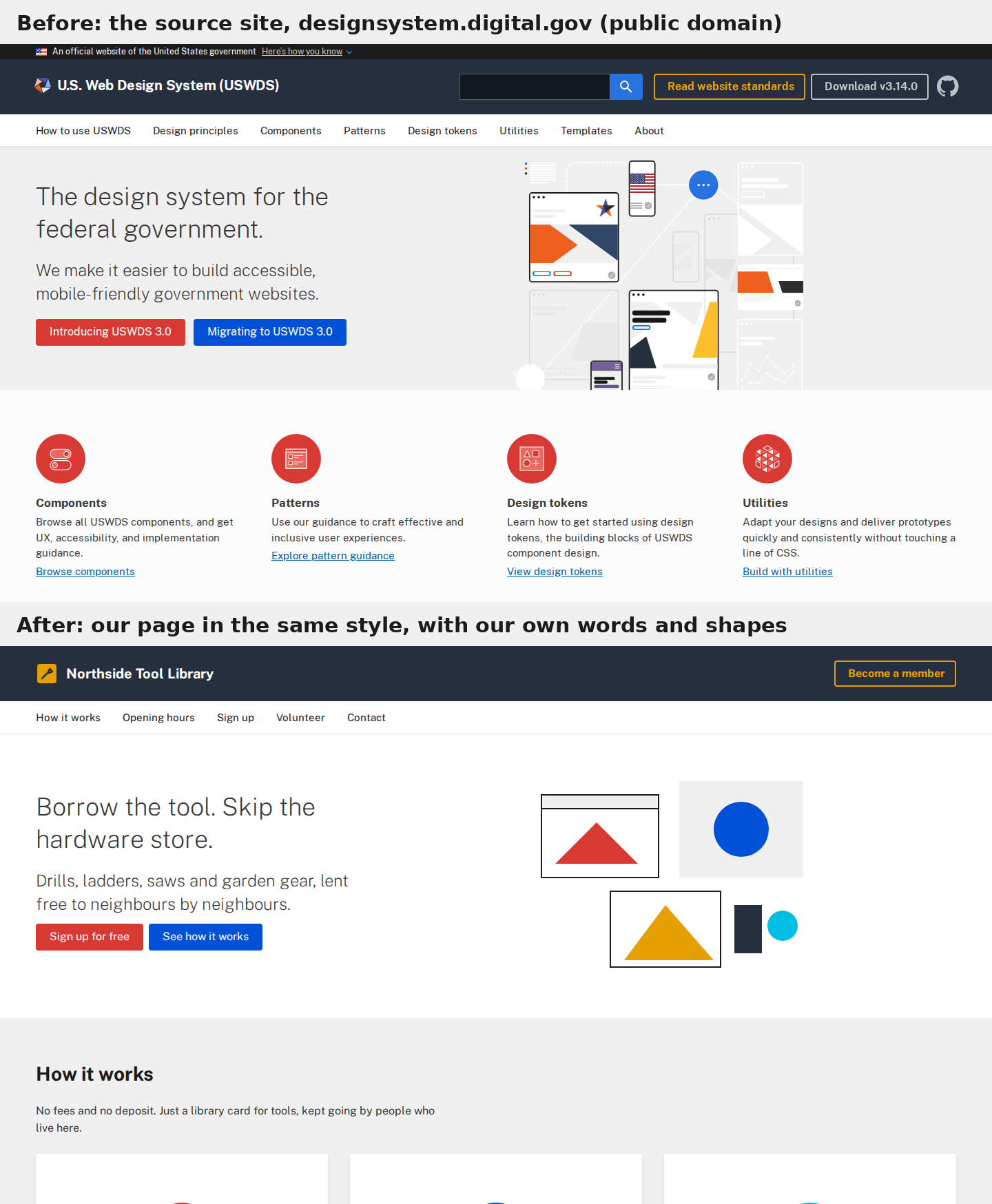
The source is designsystem.digital.gov, the U.S. Web Design System (USWDS). We took the style only. Nothing from the site's text, images, logo or CSS is in our page, and the token names are our own.
Why we picked this site
USWDS was made to be reused: it is a U.S. government work, public domain in the U.S. and CC0 worldwide under its licence. The exceptions are listed there: the fonts (Public Sans, Source Sans Pro, Merriweather) are under the SIL Open Font License, the original Material icon designs are Apache-2.0, and GSA keeps its trademarks. We used one of those fonts, no icons, and no logo or name. We also dropped the "official government website" strip, because it would mislead visitors on a private site.
If you use another site as the source, read its licence and terms first.
What you need
- Claude Code on a paid Claude plan. We used Claude Opus 5.5.
- Node.js 20 or newer. We had v22.23.4. Check with
node --version. - Playwright 1.64.1 (Apache-2.0), installed in step 1. It drives a headless Chromium (BSD-3-Clause), version 156 for us.
No Figma, no browser extension and no paid API.
Step 1: Make a folder and install Playwright
mkdir my-site && cd my-site
npm init -y
npm i -D playwright@1.64.1
npx playwright install chromium
The last command downloads Chromium the first time. We already had it cached, so the whole install took 1.7 seconds. Then start Claude Code in the folder:
claude
Step 2: Ask Claude to measure the style
Open https://designsystem.digital.gov in a headless browser and take a screenshot of the home page. Then pull out its visual style only: colours, fonts, font sizes, spacing, corner radius, buttons and cards. Save it as design-tokens.json and tokens.css. Don't copy any of its text, images, logos or code.
Claude worked for 2 minutes 25 seconds. It wrote a Playwright script that opens the page at 1440 px wide, saves a full-page screenshot and reads the computed style of every visible element: colour, background, font, size, weight, padding, radius and shadow. It counts how often each value appears, so the common values become tokens and one-off values drop out.
Its first pass merged the red and blue buttons (they share a class name) and found no cards (no element had "card" in its class). Claude noticed both gaps in the output and wrote a second script that groups buttons by their colours and padding and finds card tiles by their shadow.
The result was design-tokens.json and a 127-line tokens.css. A slice of it:
--color-primary: #0050d8;
--color-accent: #d83933;
--color-highlight: #e5a000;
--color-surface-header: #252f3e;
--font-sans: "Public Sans", -apple-system, BlinkMacSystemFont, "Segoe UI", Roboto, Helvetica, Arial, sans-serif;
--font-size-3xl: 2.25rem;  /* 36px */
--space-16: 64px;
--radius-sm: 4px;
--shadow-card: 0 1px 4px 0 rgba(0, 0, 0, 0.1);
It also wrote button and card classes (.btn--accent, .btn--outline, .card__title) that use those variables. One value was a guess, and Claude said so: the 64 px icon circles are images on the source, so it read their size off the screenshot.
Step 3: Build your own page with the tokens
Now build index.html for my own site using tokens.css. It's a landing page for Northside Tool Library, a free tool-lending library in a church basement, run by volunteers. I want a header, a hero with a sign-up button, three cards for how it works, the opening hours and a footer. Write my own copy. Then screenshot it next to the original and fix anything that doesn't match the style.
This took 1 minute 55 seconds. Claude wrote a 202-line index.html with its own copy and simple SVG shapes in place of the source's illustrations. Then it wrote a script that screenshots both pages at the same width and prints the styles of the main elements. After comparing, it fixed four things:
- An extra gap under the card images
- Card titles that were not underlined (the source underlines them)
- Card icons that scaled with the card and got too big (now fixed at 96 px)
- The strip above the footer, which used the wrong grey
The font was still wrong, though. See step 4.
Step 4: Get the font right
The headline came out at normal weight instead of the thin 200 weight on the source. Public Sans was not installed on our server. Before the first prompt, we had also told Claude "no paid API or online service other than loading the public website". You do not need that line; it is why Claude did not fetch the font, used a system font and said so. Even if the font is installed on your own computer, visitors won't have it, so the page has to load it. If you ask for the font from Google Fonts in step 3, still compare the screenshot with the source: the headline should be thin. We sent:
The headline should be thin like the original. Use Public Sans from Google Fonts, then take the screenshots again.
Claude added the Google Fonts link for weights 200, 400 and 700 and changed its screenshot script to wait for the fonts to load. The new screenshot showed the thin headline.
Short loop of the source hero fading into ours:
Step 5: Check it on a phone
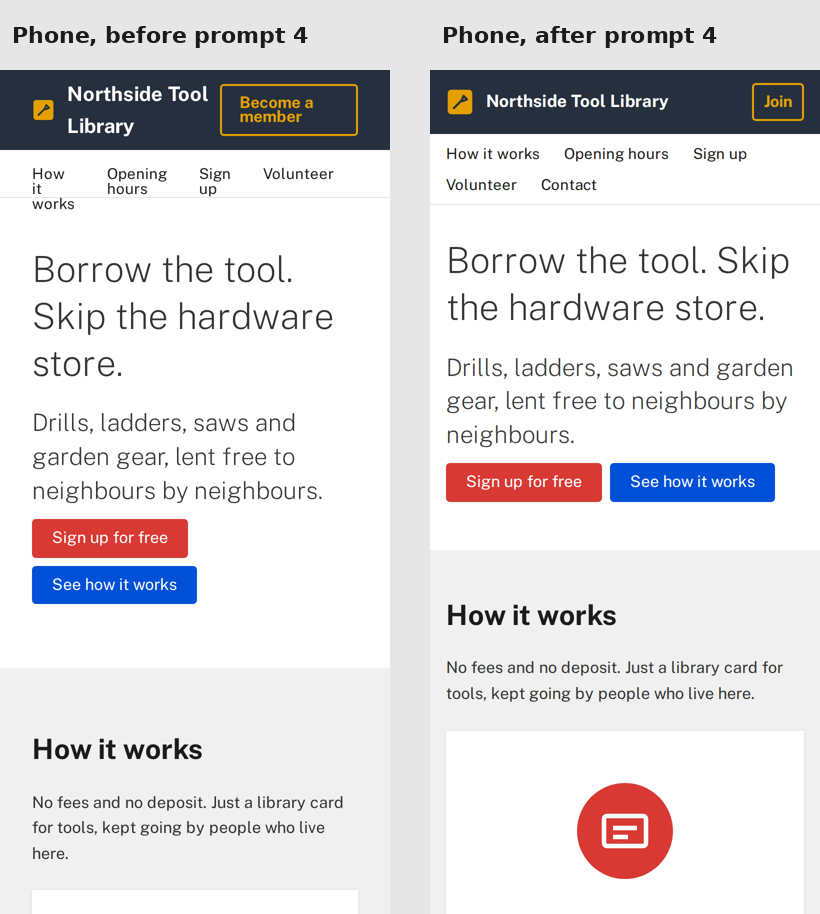
Claude only compared desktop screenshots. When we took a 390 px phone screenshot ourselves, the menu words wrapped onto two or three lines and spilled past the line under the menu, and the "Become a member" button squashed the site name. We sent:
On my phone (390px wide) the menu words wrap onto two or three lines and spill over the line under the menu, and the Become a member button squashes the name. Fix the phone layout and check it with a phone-size screenshot.
This took 3 minutes 46 seconds. Claude took a phone screenshot first to see the problem, then stopped words breaking inside menu links and let the menu wrap whole words onto two rows. On phones the header button now reads "Join", and screen readers still hear "Become a member". It also cut the side margins to 16 px. It re-shot the desktop page to check nothing changed there.
What we ended up with
design-tokens.jsonandtokens.css: the measured style, reusable on any pageindex.html: the Northside Tool Library page, which loadstokens.cssscripts/: Claude's four Playwright scripts (measure, measure details, compare, phone check)capture/: screenshots and the raw measurements (numbers only, no page text)
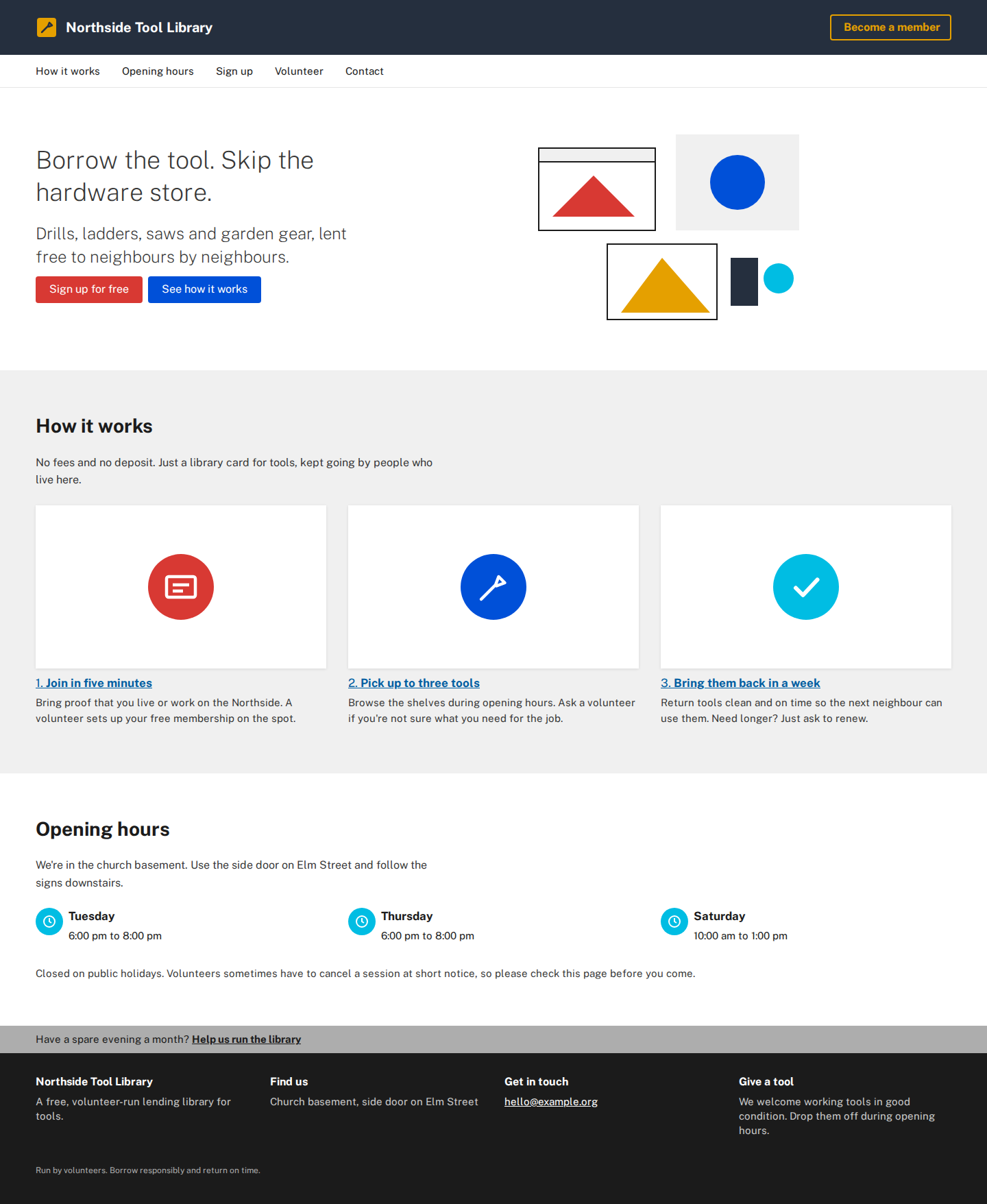
To reuse the style, start Claude Code in the folder and ask for another page "using tokens.css". Claude reuses the saved values, so it does not need to measure the source again. Check the new page against the screenshots anyway.
If something looks off
Two buttons became one token
The first measuring pass grouped elements by class name, so two buttons that share a class but differ in colour merged. Ask Claude to group by actual colour and padding.
Claude found no cards
On our source no element had "card" in its class name, so the first pass missed them. Claude found them by their shadow instead. If yours finds none, tell it which part of the screenshot is a card.
The font looks wrong
The token file names the font, but your page still has to load it. Load it from Google Fonts or a local file. Without it, the browser picks a fallback and the thin or heavy weights go missing.
It looks fine on desktop and broken on a phone
The source was only measured at 1440 px. Ask for a phone-size screenshot every time you build a page.
The page needs the internet
The font loads from Google Fonts. Offline, the headline falls back to a system font. To avoid that, download Public Sans (OFL) and ask Claude to serve it from the project folder.
Credits and licences
- Style source: U.S. Web Design System, public domain in the U.S. and CC0 1.0 worldwide, with the font, icon and trademark exceptions listed in its licence.
- Public Sans, SIL Open Font License 1.1.
- Playwright, Apache-2.0. Chromium, BSD-3-Clause.
- Page copy, SVG shapes and token names: written by Claude Code for this guide. Northside Tool Library is made up, and its email address is a placeholder.
- The source screenshots in our before and after images show the USWDS home page for comparison only.
Questions people ask
Why did you use the U.S. Web Design System as the source?
Its licence lets anyone reuse it. The project is public domain in the U.S. and CC0 worldwide, its fonts are under the SIL Open Font License and its original icon designs are Apache-2.0. GSA keeps its trademarks, so we used no logo or name.
Do I need a plugin or skill to do this?
No. Community skills like /extract-design exist, but in our run Claude Code wrote its own two short Playwright scripts from a plain request and got the tokens in one prompt.
What is a design-token file?
It is a list of named style values: colours, font sizes, spacing steps, corner radius, shadows. Ours came out as design-tokens.json (for tools) and tokens.css (CSS variables like --color-primary: #0050d8) that any page can load.
Will it work on any website?
Not always, and even on our test site the first pass needed fixes: merged buttons, missed cards, a missing font and a broken phone layout. Sites behind a login or bot protection may not load in a headless browser at all, and brand fonts are often paid. Check every result with screenshots.
How long does it take and what does it cost?
Claude worked for about 10 minutes across our 4 prompts. We ran it on a paid Claude subscription with no extra charges. If you use Claude Code with API billing instead, you pay for the tokens these prompts use. Playwright and Chromium are free and open source.
Get the 16 prompts, free
The Builder's Prompt Pack: copy-paste prompts to plan, build and launch real things with AI, sent to your inbox.
Get the AI news by email
Once a week, News Desk sends the AI stories that mattered, in plain words, with links to the sources.