Pro guide · from the Reel
Drop a PDF, a link or a voice memo in one folder. Ask your notes anything.
This is a second brain you don't have to file yourself. You keep notes in Obsidian, drop PDFs, links and voice memos into one Inbox folder, and type file my inbox in Claude Code. Claude writes a short note for each item, links it to the notes you already have and moves the original out of the way. Then you ask questions in plain words, and each answer links back to the notes it came from.
- PDF, link, voice memo in
- Step 1 free below
- No paid add-ons
Step 1 is free on this page. Steps 2 to 7 and the kit are in the pro guide.
Published · Updated
Start buildingFor example, we built a vault from 9 of our own research notes and filed 33 sources into it. One was an 11-second voice memo: "for the Friday review... I want it short. What came in, what's still open, and one thing to ship next week." Then we asked "what should my friday review look like? use my notes, and save the answer". Claude answered in 42 seconds and saved the answer as a note. It drew on that memo, an older memo about posting once a week, and the Wikipedia page on Getting Things Done we had filed in the same batch. Each claim links to the note it came from.
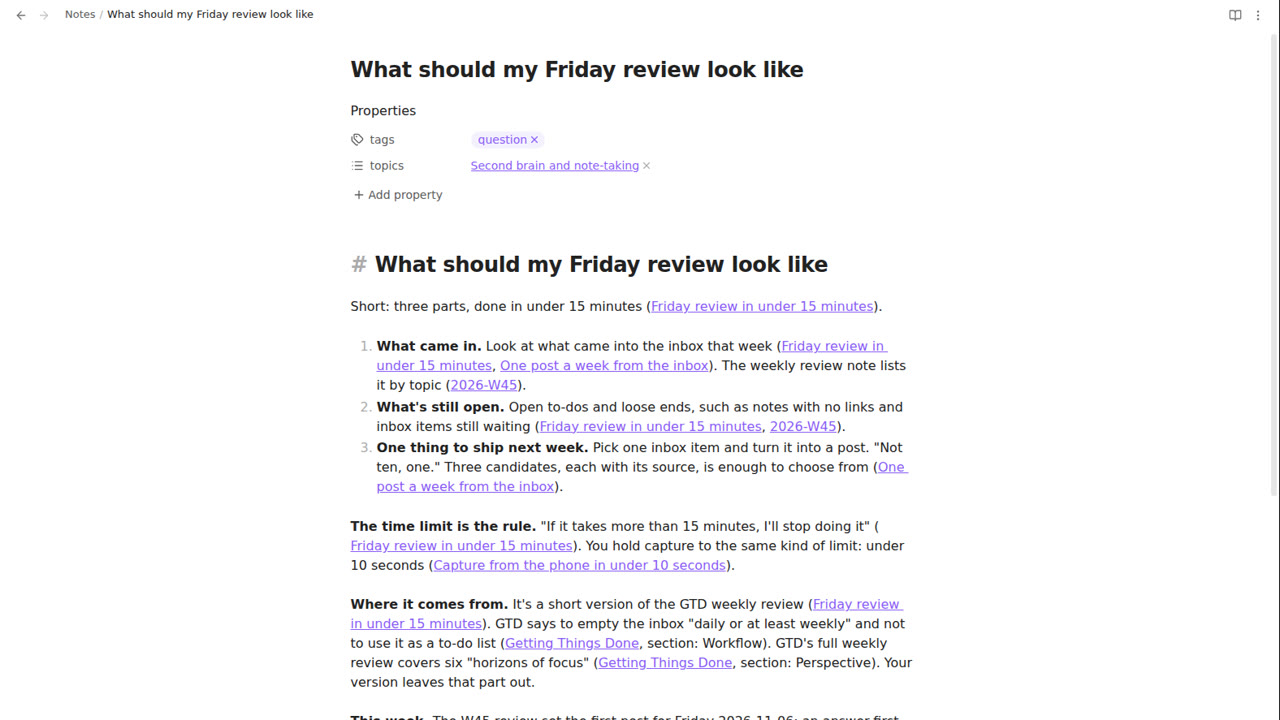
On our server, filing 10 PDFs took 3 min 44 s, 10 links 3 min 2 s and 10 voice memos 4 min 5 s. Questions took 10 to 36 seconds. Obsidian and the voice tool are free; you need a Claude plan with Claude Code.
What is free here, and what does the kit add?
Step 1 is free: open Claude Code in a folder of your notes and ask it a question. That works with no setup, and you get an answer built from your notes. The kit adds the filing: an Inbox that Claude files for you (PDFs, links and voice memos), notes written from templates with page numbers, links in both directions, topic pages, a daily note and a weekly review. Its CLAUDE.md sets the rules: one note per source, only facts from the source, links Obsidian can click, and move files instead of deleting them.
What you get
| Skill | You type | You get |
|---|---|---|
| capture | file my inbox | One note per item in Sources/, the original moved to Attachments/, today's daily note updated |
| summarise-source | (used by capture) | Key points with page numbers or section names, up to 3 exact quotes, the full transcript for memos |
| link-and-tag | link this note (capture also uses it) | 2 to 5 links each way, a topic page, tags from a short list, a broken-link check |
| ask-my-notes | what do my notes say about ...? | An answer built from your notes, a [[link]] after each claim, anything from elsewhere labelled, "Notes used" at the end |
| daily-note | do my daily note | What came in today, notes you changed, open to-dos, one question that joins two notes |
| weekly-review | weekly review | What came in by topic, three things worth acting on, open to-dos, notes with no links |
The kit also has the vault CLAUDE.md, 6 templates, install.sh, two small tools (voice-memo transcription and a link checker), 30 practice sources and a README.
The demo
The vault in these clips is the one from the example above: our research notes plus 33 sources. Everything shown is Obsidian 1.15.0 on our server, screen-recorded.
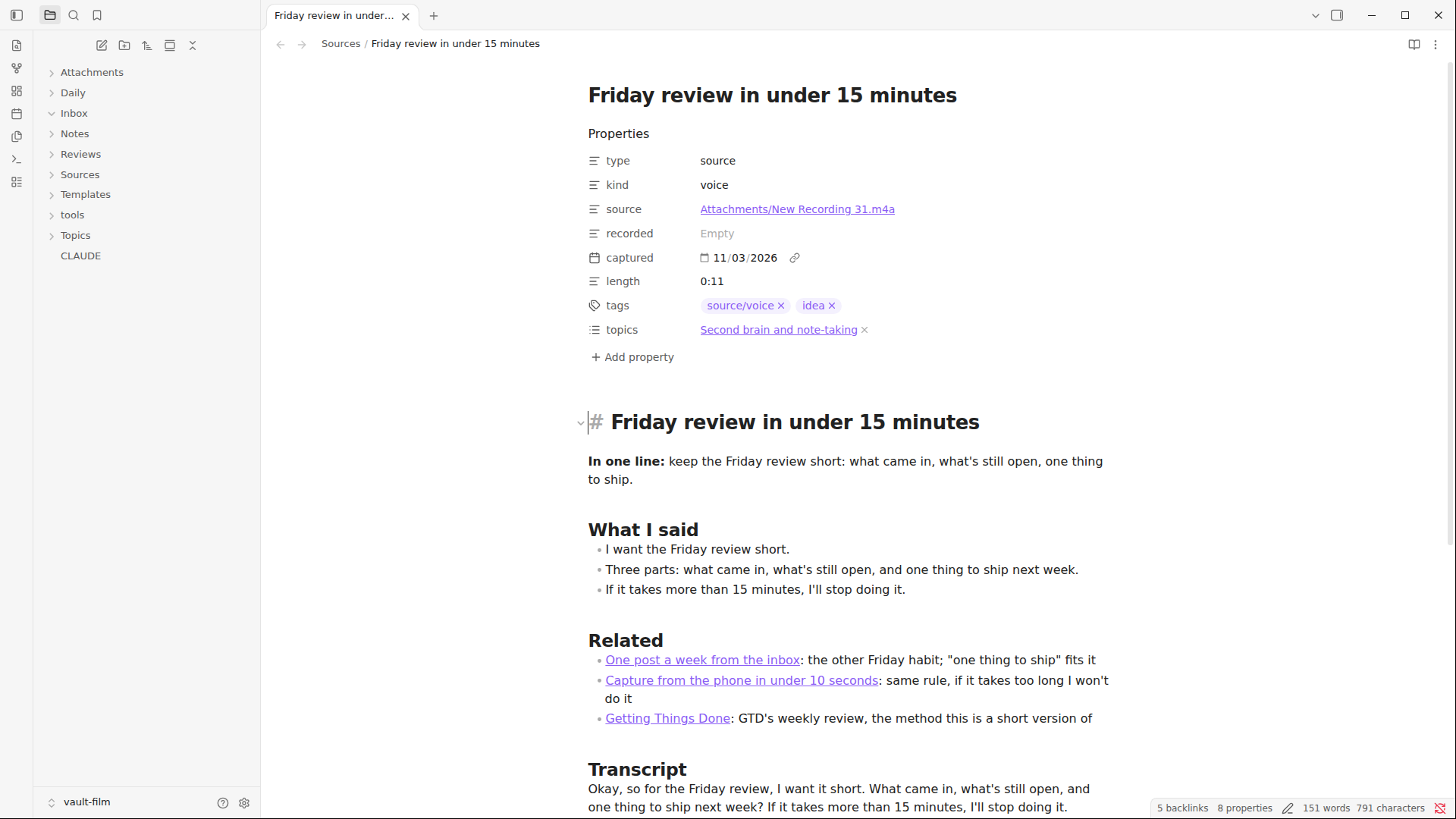
file my inbox they move out, and three notes appear in Sources (sped up 14 times): The voice memo after filing: properties, what was said, links to related notes, and the transcript.
What you need
- Obsidian (we used 1.15.0). Free for personal and work use; no account needed.
- Claude Code (we used 2.1.317) and a Claude plan that includes it.
- Some notes in Markdown. If you have none yet, write three or four in Obsidian first.
- For the kit: Python 3, for voice memos. It is free from python.org.
The steps
Step 1: Ask Claude a question about your notes
An Obsidian vault is just a folder of .md files (Obsidian Help). Claude Code can read that folder as it is, with no plugin. In Obsidian, open your notes folder as a vault (or make a new one). Then open a terminal in that folder and start Claude Code:
cd ~/Documents/Brain
claude
Use your own folder's path in place of ~/Documents/Brain. The first time, Claude Code asks whether you trust the folder. Say yes. Then ask a question your notes can answer, and ask for the notes it used:
what do my notes say about which guide ideas have rising search demand? link the notes you used
We ran this on a folder of 9 of our research notes, with nothing else set up. Claude searched the folder, read two notes and answered in about 30 seconds. It gave a table of the search terms in those notes, named the two notes it used, and said the other seven had no search data. Every number we checked matched the notes.
That's a working question-and-answer over your own notes. Try two or three questions you already know the answers to. In our test, plain Claude Code pointed to notes by file name, which Obsidian doesn't make clickable, and it doesn't file anything unless you tell it how each time.
The pro guide
Get the rest of the steps and the kit.
$12, one payment. No account, no subscription. Launch price as of November 2026; it goes to $29 after the first 300 sales.
What is in the kit
- Vault starter: 7 folders, 6 note templates and a short tag list
- 6 skills: capture, summarise-source, link-and-tag, ask-my-notes, daily-note, weekly-review
- A vault CLAUDE.md with the filing rules, and a settings file that blocks the rm command
- tools/transcribe.py for voice memos on your own computer, and tools/check_links.py
- install.sh that never overwrites your files
- 30 practice sources (10 PDFs, 10 links, 10 voice memos), README and LICENSES.md
After you pay
- Stripe takes the payment. You come straight back to this page with every step open.
- The kit download button appears in this box.
- We email you a private link, so you can open the guide on another device. Anyone with the link can read it, so keep it to yourself.
Not useful? Contact us with your checkout email and ask for a refund. A refunded payment loses access.
Lost your link?
Enter the email you used for access. Your existing links keep working.
In the pro guide
Step 2: Install the kit into your vault
Step 3: Open Claude in the vault and trust it
Step 4: File your inbox
Step 5: Ask your notes
Step 6: Daily note and weekly review
Step 7: Keep the originals out of the graph
Questions people ask
Do I have to use Obsidian?
No. The vault is a plain folder of Markdown files, and Claude Code works on the folder. Obsidian is where you read the notes, click the links and see the graph. It is free for personal and work use.
Do my notes leave my computer?
The files stay on your computer, but the text Claude works on goes to Anthropic, as in any Claude chat. That includes the PDFs, web pages and memo transcripts it files, and the notes it reads to answer a question. The one local-only step is turning voice memos into text: faster-whisper does that on your computer before Claude sees the words.
Will it make things up?
The kit tells Claude to answer from your notes, to label anything from elsewhere, and to say when the notes don't cover a question. We asked 8 questions with known answers: all 8 answers matched the notes, one added a labelled point from outside them, and for a dentist appointment that wasn't in the notes it said "Your notes don't mention a dentist appointment". A script also found all 23 quotes Claude copied from PDFs on the pages it cited.
What does it cost to run?
Obsidian, Python and faster-whisper are free. You need a Claude plan that includes Claude Code. There is no other paid service: no API key and no transcription service.
Does it work on Windows?
We tested on Linux only. install.sh is written for Mac and Linux shells, but we have not run it on a Mac. The skills and templates are plain files and work anywhere Claude Code runs, but install.sh needs a Mac or Linux shell. On Windows, copy the vault folder by hand; the README gives the two commands for voice memos.