Free guide · from the Reel
Make a short animated film in code with Claude Code and the free Lemo-Opuscar skill
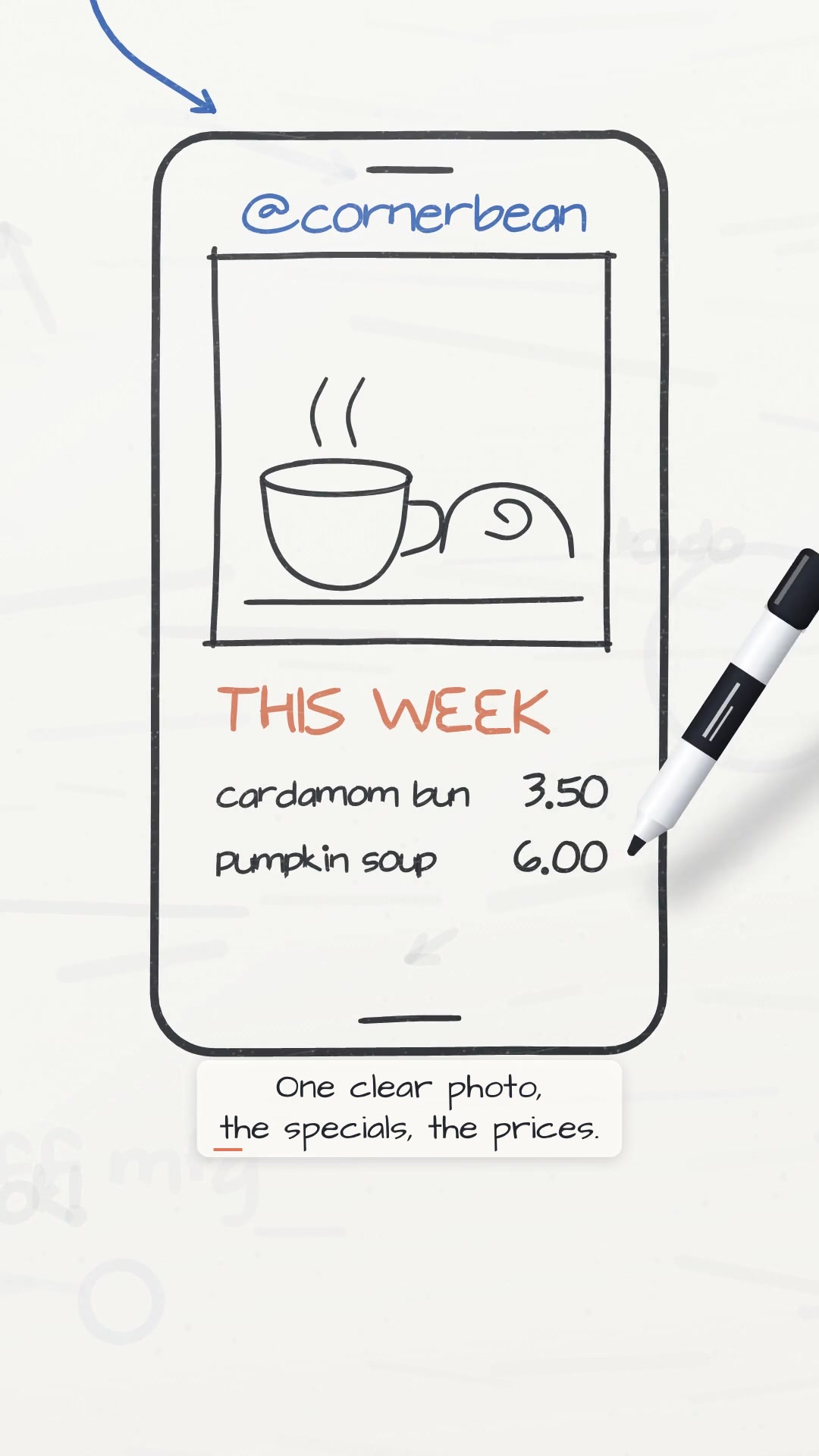
Lemo-Opuscar is a free Claude Code skill with 66 film styles, from whiteboard and watercolour to Swiss poster type. You name a style and a topic in one sentence, answer one round of questions, and Claude writes the film as code: the drawings, the timing, an original music score, sound effects and burned-in captions. We made a 25-second vertical film for Instagram about why a cafe should post its menu every week. It took 3 messages and 49 minutes of Claude work. We also gave it our brand colours and fonts and got a saved style of our own in 15 minutes.
- About 50 minutes
- 1 sentence to start
- No video model
Published · Updated
Start buildingIf you only need a 6-second animated clip, our Claude Code animation styles guide is quicker. For a narrated explainer from one prompt without a style library, see animated explainer from one prompt.
What you need
- Claude Code on a paid Claude plan (Pro or Max) or an API key. The styles are tuned for Claude Opus 5.5, and the project warns that other models may not reproduce them.
- ffmpeg 7 or newer. Ubuntu 24.04 ships 6.1, which is too old; step 1 shows the fix.
- About 2.3 GB of free disk space for the library, its tools, the browser and the music samples, plus room for Whisper speech models if the film has a voice (one medium model is 1.5 GB). Our numbers are in "Before you install".
- Optional: an ElevenLabs account for the narration. The skill's own voice is Kokoro, which is free and runs offline. We used ElevenLabs because we wanted a more natural read. The free plan is fine for tests, but you need a paid plan for a commercial licence. Our two takes used 730 credits.
Before you install
The plugin itself is three small files: a manifest, a SKILL.md and a setup script. We read them all before running anything. On the first film, the script does this on your computer:
- clones the style library from GitHub into
~/lemo-opuscar(guides, tools and every style prompt, without the demo films); - runs
npm installthere (playwright-core and three.js) and downloads Playwright's headless Chromium (261 MB in~/.cache/ms-playwrightfor us); - makes a Python environment in
~/lemo-opuscar/.venv(numpy, scipy, Pillow and a few more); - when the film has a voice, adds Kokoro, edge-tts and faster-whisper, plus a 354 MB voice model from the project's GitHub releases. The speech check then pulls Whisper models into
~/.cache/huggingface; - downloads only the free sample libraries the score needs (for our film: VCSL, Karoryfer and FreePats, 743 MB together).
After both of our films, ~/lemo-opuscar was 2.0 GB. Your film's project goes in the folder you start Claude Code from. Your own styles go in ~/lemo-my-styles.
To remove the plugin and its library:
claude plugin uninstall lemo-opuscar@lemolab
rm -rf ~/lemo-opuscar
Delete ~/lemo-my-styles too if you don't want your saved styles. Two caches stay behind: Playwright's browser in ~/.cache/ms-playwright and the Whisper models in ~/.cache/huggingface. Other tools on your computer may use the same caches, so only clear them if you know nothing else needs them. One open issue on the project (#24) reports that some agents refuse to run the setup script because it downloads and runs code. Our runs had permission prompts turned off, so we can't say whether a normal session stops here.
Licences: the code and guides are MIT. The demo films and their stills are CC BY 4.0: you can reuse them, including commercially, if you credit LemoLab with a link to the repository and say what you changed. Three demo voice tracks are excluded from that licence (Game Show Flat, Paper-cut Lightbox, Broadcast News Package), so don't reuse those. Films you make with the library are yours, with no credit needed.
The steps
Step 1: Get ffmpeg 7 on Ubuntu (skip if `ffmpeg -version` says 7 or higher)
The project points Ubuntu users to a static build. No sudo needed: unpack it in your home folder and put it first on your PATH.
mkdir -p ~/tools && cd ~/tools
curl -LO https://johnvansickle.com/ffmpeg/releases/ffmpeg-release-amd64-static.tar.xz
curl -LO https://johnvansickle.com/ffmpeg/releases/ffmpeg-release-amd64-static.tar.xz.md5
md5sum -c ffmpeg-release-amd64-static.tar.xz.md5
tar xf ffmpeg-release-amd64-static.tar.xz
FFDIR=$(ls -d ~/tools/ffmpeg-*-amd64-static | tail -1)
echo "export PATH=\"$FFDIR:\$PATH\"" >> ~/.bashrc
export PATH="$FFDIR:$PATH"
ffmpeg -version | head -1
The last line should print version 7 or higher (we got 7.0.2). The echo line adds the folder to ~/.bashrc, so new terminals find it too. Don't skip this on Ubuntu. The project's TECHNIQUE.md says ffmpeg 6 under-reports the audio length in the last step, and the skill then rejects the finished film as cut off.
Step 2: Install the skill
claude plugin marketplace add lemomo-ai/lemo-opuscar
claude plugin install lemo-opuscar@lemolab
Both finish in seconds. Start a new Claude Code session after this so it loads the skill.
Step 3: Pick a style
The full list with a demo film for each is in the gallery. If you type /lemo-opuscar:lemo-opuscar with nothing after it, the skill asks your language and what you want to do, then shows the list.
For a short business explainer we picked Whiteboard Explainer. Its style prompt says it "suits explainers"; every word is written in marker at the moment the narrator says it, captions are burned in for people watching with the sound off, and it is flat 2D, so it renders without a graphics card. Isometric Infographic was our second choice, but its demo film is already about coffee, and we wanted to see the skill build something new.
Step 4: Make the voice in ElevenLabs (optional)
Skip this step to use the skill's free Kokoro voice. To bring your own, make a folder for the film with a voice folder inside, then write the script:
mkdir -p menu-film/voice && cd menu-film
Ours is 61 words, which reads in about 21 seconds:
Your regulars know your coffee. But do they know what's new this week? Here's one easy habit. Every Monday, post this week's menu on Instagram. One clear photo, the specials, the prices. Followers can save it, send it to a friend, and plan their visit. One post a week gives people a reason to drop by. Post the menu. Every Monday.
Save it as voice/script.txt. Then make two takes. We used the voice "Eve - Conversational" from the ElevenLabs Voice Library and model eleven_v4, with a direction tag at the start of the text. Add a Voice Library voice to "My Voices" first (open it in the library and click Add), or the API cannot find it. To use another voice, swap its ID into the address in the loop. Copy your API key from your ElevenLabs profile. The first line asks for it without showing it or saving it in your shell history; paste it and press Enter:
read -rsp "ElevenLabs API key: " ELEVENLABS_API_KEY && export ELEVENLABS_API_KEY
cd voice
for take in 1 2; do
python3 -c 'import json; print(json.dumps({"text": "[bright, friendly, upbeat, clear] " + open("script.txt").read().strip(), "model_id": "eleven_v4", "voice_settings": {"stability": 0.5, "similarity_boost": 0.75}}))' > body.json
curl -sS -o take$take.mp3 -X POST "https://api.elevenlabs.io/v1/text-to-speech/BZgkqPqms7Kj9ulSkVzn?output_format=mp3_44100_128" \
  -H "xi-api-key: $ELEVENLABS_API_KEY" -H "Content-Type: application/json" --data @body.json
done
cd ..
Each take cost 365 credits (the tag counts). Two takes give the skill a backup if one has a slip. Don't speed the audio up to fit a length; change the script instead.
Step 5: Ask for the film
Open Claude Code in the film's folder (the one that holds voice/) and type one sentence with the style, the topic, the length and the shape:
Make a 25-second vertical film (1080x1920) in the Whiteboard Explainer style: why a coffee shop's Instagram needs a weekly menu post. Friendly, for small cafe owners.
Within a minute it downloaded the library and read the style, then asked one round of questions, each with a default: should a real cafe name appear, which claims or numbers to use, whether we had our own voice, music, logo or fonts, the language, and whether we wanted to approve a storyboard first. Answer them all in one message. Ours:
1. Make up a cafe, that's fine. 2. No numbers or stats, keep it to plain reasons. 3. I have my own voice: two ElevenLabs takes of the same script are in voice/ (take1.mp3, take2.mp3), the script is voice/script.txt. Check both against the script and use the one that matches word for word. Don't speed up or stretch the voice. Make your own music. No logo. 4. English. 5. No storyboard, go straight to the film.
Then leave it running. Ours worked alone for 38 minutes. It transcribed both takes, found that both matched the script and used the shorter one as recorded. It planned the film as one tall whiteboard the camera reads top to bottom, like a phone feed, then drew it: a cup, three regulars, a question mark whose dot drops and pins Monday, a phone with the menu post, the cafe's door. It wrote a cafe-jazz score from free samples, gave every pen stroke a sound, and checked its own frames and captions before handing over the film, a subtitle file, a poster and a build.sh that rebuilds it.
Speech recognition can miss a small slip, so listen to the finished film yourself.
Step 6: Check it on a phone screen, then send notes
Watch the film once with sound and once with the Reels interface in mind. Our first version put the captions at the very bottom of the frame, where Instagram covers the screen with the post caption and buttons. One note fixed it:
Looks great. One change: on Instagram Reels the bottom of the screen is covered by the caption and buttons, so move the subtitles up so they sit above the bottom 380 px. Keep everything else.
That took 10 minutes. It moved the captions, framed every captioned shot a little wider and higher so the drawings stayed clear of both the captions and the buttons, rebuilt the film and ran its checks again. It also told us about one half-second where an empty box passes under a caption.
You can save that note for later: ask for the bottom 380 px to stay clear in your first message.
Step 7: Make a style your own
To make films that look like your brand, change a library style. We started from Swiss Motion Graphics (a grid, bold type, one signal colour) because our brand is type-led with one orange. Put your font files in a folder (ours: brand/fonts), open Claude Code next to it and say what you want:
I want to change the Swiss Motion Graphics style into my own version for my brand, Leverage AI. Colours: accent #D45E2B, ink #1B1714, backgrounds #FCE6D6 and #FFF6EE. Fonts: Inter Tight 800 for headlines, Instrument Serif italic for accents; the font files are in brand/fonts. Vertical 1080x1920 for Instagram Reels.
It worked out the frame, palette and fonts from that message, then asked its questions one at a time, recommended answer first. The first: what job does the second font do? Its option 1, "the serif is the human voice", keeps Inter Tight for headlines and numbers and sets one or two key words per screen in the serif italic. We chose it and said what the films are for:
1, the serif as the human voice. Mostly short AI tips and how-to explainers for small business owners, 20-40 seconds.
The next question was about tempo and sound. Every question ends with a "free conversation" option, and you can hand the rest over at any point:
1. You decide the rest.
It filled in every other choice and showed one table: each part of the style before, after and what the change costs. Fewer grid columns make each element bigger but force wide comparisons to stack; the warm background lowers contrast, so small text stays in full ink. Nothing is written until you approve:
Yes, approved. No logo file, end on the name. Show me the style frame first.
Three minutes later it showed the same frame drawn twice, the original style on the left and ours on the right.
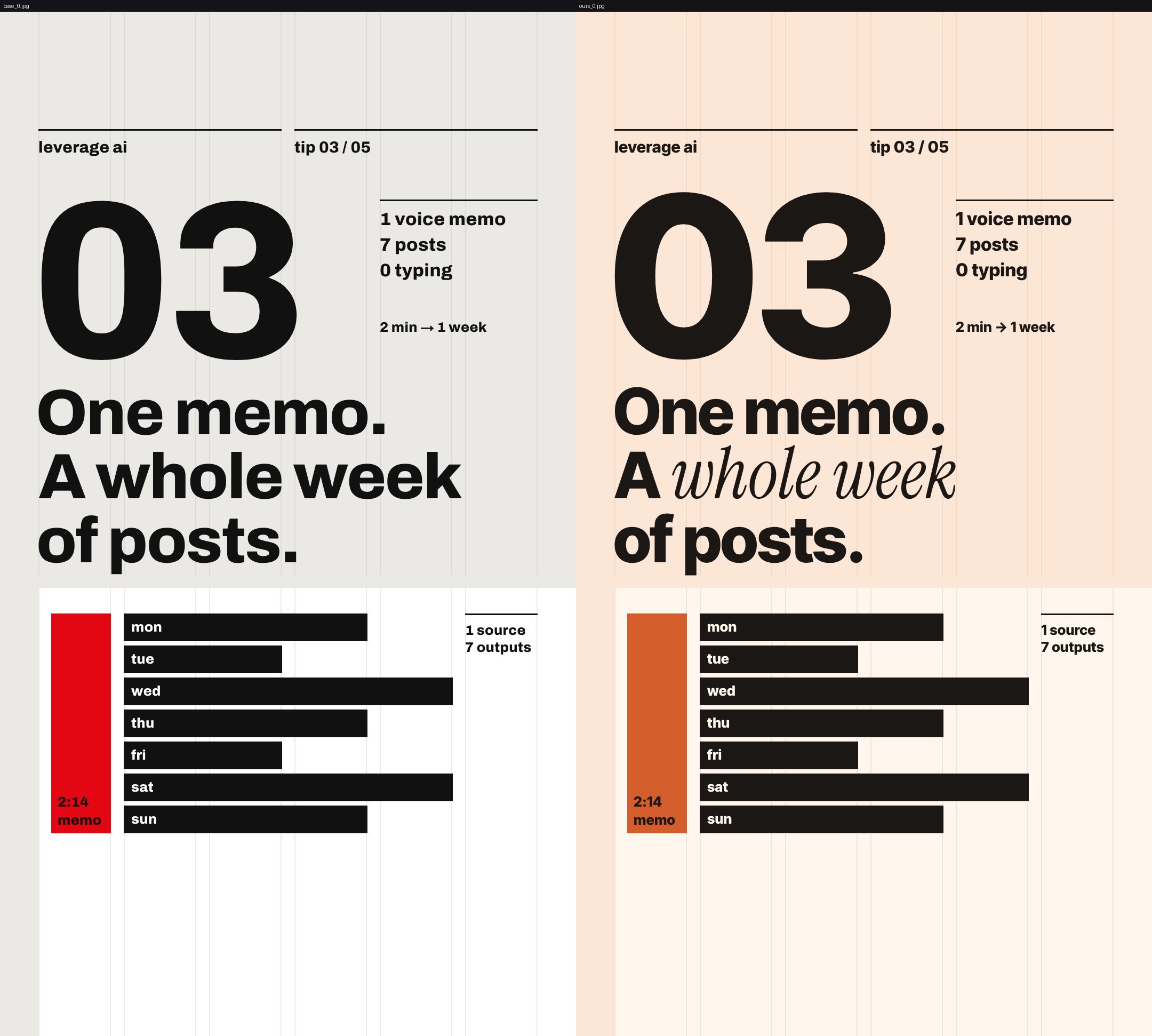
If anything looks wrong, say so now, before it makes the demo film. It warned us that with only the 800 weight of Inter Tight, even the small notes are bold, and offered to use a lighter weight if we added the file. We were happy with the frame and asked for the demo film:
The frame looks right. Make the demo Reel, about 25 seconds, no voiceover. Topic: write an Instagram caption with Claude in three steps: paste your menu, say who it's for, ask for three options. No numbers or claims beyond that.
1, keep it as my style.
The style is now in ~/lemo-my-styles/leverage-swiss/: the style prompt, a list of what changed and why, the frames, the demo film and its source. To use it, name it in a request, for example "Make a Reel in my Leverage Swiss style about...". That is how the skill told us to use it; we haven't made a second film with it yet.
The result
| Whiteboard film | Our own style | |
|---|---|---|
| Messages from us | 3 | 6 |
| Claude working time | 48 min 54 s | 14 min 59 s |
| Output | 25 s film, 1080×1920, 24 fps, voice, score, captions, .srt | style prompt, side-by-side frame, 26 s demo film, saved style |
| Loudness | −14.1 LUFS | −13.8 LUFS |
| Claude Code's cost readout (API prices) | $6.41 | $4.31 |
| ElevenLabs credits | 730 (two takes) | none (no voice) |
The first film includes several minutes of one-off installs and downloads, so later films should be a little faster. The cost readout is what the same work would cost through the API, which is what you pay if you run Claude Code with an API key. On a Pro or Max plan the work counts toward your plan's usage limits instead, and you only pay more if you've turned on extra usage. Film work uses a lot of it: the whiteboard session alone wrote over 100,000 tokens of output.
If something looks off
- The skill's setup check reports
ffmpeg7+(found 6.x)(the wording in its setup script). Do step 1 and start Claude Code from a terminal whereffmpeg -versionshows 7. - Captions or words sit under the Instagram buttons. Ask for the bottom 380 px to stay clear, as in step 6. Put it in your first message next time.
- You're not sure which voice take it used. It names the take in its final message and in the treatment. In our run it transcribed both takes, found that both matched the script and picked the shorter one to leave more time for the end card. A transcript check can miss a small slip, so listen to the film, and if you prefer the other take, tell it to swap.
- Small text in your own style looks too heavy. Add a lighter weight of your font (a 500 or 600 file) to the fonts folder and ask it to use that under 40 px.
- The film's music sounds off. The skill mixes by measurement. Watch with sound and describe what you hear ("the bass is too loud under the voice"); it rebuilds with
build.sh. Our one rebuild, which also reframed the shots, took 10 minutes. - The agent refuses to run the setup script. This is the open issue #24. Our runs had permission prompts off, so we didn't test this. Read the script yourself (it's in the plugin's
skills/lemo-opuscar/scripts/folder) and tell Claude you've checked it.
How we tested
Ubuntu 24.04 server, 1 November 2026: Claude Code 2.1.316, Claude Opus 5.5, Node 22.23, Python 3.12, ffmpeg 7.0.2, Lemo-Opuscar commit bebbbe1. Each row is one message we sent; the time is how long Claude worked on it. We ran Claude Code from a script (claude -p with permission prompts turned off, resuming the session for each message), so the skill asked its questions as plain text; the project's README says a normal session shows them as options to click. The whiteboard film's final audio matched the script word for word in our own Whisper check.
| Message | Film or style | Claude time | What happened |
|---|---|---|---|
| Request | Whiteboard | 38 s | library download, five questions |
| Answers and voice | Whiteboard | 37 min 57 s | full film |
| Captions note | Whiteboard | 10 min 19 s | captions moved, film rebuilt |
| Request | Own style | 27 s | first question |
| Answers (2 messages) | Own style | 32 s | plan table |
| Approve | Own style | 3 min 18 s | side-by-side frame |
| Demo film | Own style | 10 min 27 s | 26 s demo |
| Keep | Own style | 15 s | saved to ~/lemo-my-styles |
Credits and licences
- Lemo-Opuscar by LemoLab (github.com/lemomo-ai/lemo-opuscar): code MIT, demo films CC BY 4.0.
- Our whiteboard film uses the EMS Tech and Architects Daughter fonts (SIL Open Font License), music samples from the Versilian Community Sample Library, Karoryfer Samples and FreePats (CC0 per the film's credits file), and an ElevenLabs voice. Inter Tight and Instrument Serif (SIL Open Font License) in our own style.
- Tools: Claude Code (Anthropic), Playwright (Apache-2.0), three.js (MIT), faster-whisper (MIT), ffmpeg static build by John Van Sickle (GPLv3).
- Thanks to Nick Saraev, whose Reel pointed us to the project.
Questions people ask
Is Lemo-Opuscar free?
The skill and its library are free and MIT-licensed, and the music samples it downloads are free libraries. You pay for Claude Code itself (a Pro or Max plan, or API use) and, if you want our kind of narration, ElevenLabs. Our 25-second film took 49 minutes of Claude work, and Claude Code put the session at $6.41 at API prices. On a plan it counts against your usage limits instead.
Does it use a video model?
No. Claude writes a web page that draws each frame, a headless browser renders it frame by frame, and ffmpeg joins the frames with the voice, music and sound effects. Nothing is sent to a video or image generator.
Can I use my own voice instead of the free one?
Yes. When the skill asks whether you have your own voice, point it at your audio files and the script. We gave it two ElevenLabs takes; it checked both against the script with Whisper and used one as recorded.
Can I make it match my brand?
Yes, with its 'make a style your own' flow. We turned Swiss Motion Graphics into a style with our colours and two fonts in 6 short messages and 15 minutes, including a 26-second demo film. It saves the style in ~/lemo-my-styles so later films can use it by name.
Does it run on Windows or a Mac?
We tested on Ubuntu Linux only. The project's TECHNIQUE.md says it was developed on macOS and asks Windows users to use WSL, and an open issue ([#23](https://github.com/lemomo-ai/lemo-opuscar/issues/23)) reports that its setup script reinstalls the Python environment on every run on Windows.
Read it on your computer
Keep this guide for later.
We'll send you this page's link and the other free guides.